


If you work in social media, you probably feel like you're always on the go: there's no time, there are emergencies, management wants results, and you can't always prove the real impact of your actions.
At the same time, you know that social media marketing is one of the main points of contact with the public, whether on Instagram, TikTok, X (formerly Twitter), LinkedIn or Facebook.
This content is designed precisely for this reality: to show, in a practical and human way, how to use the HubSpot platform for Social Media Marketing, connecting social media management, marketing campaigns, CRM and the sales funnel.
The idea here is not just to "explain the tool", but to help you see Social Media as a strategic part of business growth, within a broader content planning and digital marketing strategy.
HubSpot for Social Media Marketing in practice
This content shows how to use HubSpot to turn Social Media Marketing into a strategic operation, connected to campaigns, CRM and the sales funnel.
Instead of posting on the fly, you learn how to centralize publications, organize calendars, associate posts with concrete offers and track metrics that go beyond likes and followers.
The aim is to help social media professionals and marketing teams gain predictability, demonstrate business results and integrate social networks into the growth machine.
-
- Connect Instagram, TikTok, X, LinkedIn and Facebook to the HubSpot platform;
- Centralize Social Media publications and calendar in a single dashboard;
- Associate posts with campaigns, landing pages and specific offers;
- Track metrics by funnel stage, not just "likes";
- Integrate Social Media, CRM and the sales team to generate opportunities.
What you'll see in today's content
Happy reading!
Why is Social Media Marketing so important to your digital strategy?
When we talk about Social Media Marketing, we are referring to the strategic use of social networks to attract, engage and convert people.
It's not just posting for the sake of posting, but connecting content, relationships and real business opportunities.
In a direct sense, Social Media Marketing is important because today more than 5 billion people, around 60% of the world's population, are active on social networks.
In other words, Social Media follows people's real behavior online:
- Your potential customers spend a huge part of their day on the networks;
- Many people discover brands first through Instagram or TikTok, and only then through Google;
- Comments, DMs and shares act as "social proof" of the brand's value;
- Social media marketing campaigns can drive direct traffic to landing pages, WhatsApp or product pages.
Before listing the benefits, it's worth reinforcing one point: if you ignore Social Media, you're not "just losing engagement", you're giving up relationships, behavioral data and business opportunities that could appear in CRM.
Now, let's organize the main benefits of a consistent Social Media Marketing strategy:
- Generating visibility and brand recognition
People see your brand often, understand what you do and start to remember your name when they think of the pain you solve.
- Direct support for the sales funnel
Posts and campaigns drive traffic to content, forms and pages that generate leads and opportunities.
- Building trust and authority
Real cases, behind-the-scenes, educational content and human interaction create the feeling of closeness and the trust needed for someone to choose your brand.
Research into digital consumer behavior and social proof shows that reviews, recommendations and content from other people significantly increase trust and purchase intent.
For example, recent studies indicate that more than 90% of consumers read reviews before deciding and that the majority trust these reviews almost as much as personal recommendations.
This is even more true in highly social environments such as Instagram, TikTok, X, LinkedIn and Facebook.
- Gathering insights into pain and interest
Comments, messages and interactions show which topics most generate doubts, objections and a desire to know more.
After these points, you can see that Social Media is not a "parallel channel", but a space where you can test narratives, understand what touches the public and feed your entire content strategy with real data.
 Image 01: A centralized Social Media dashboard in HubSpot helps connect posts, campaigns and metrics to the funnel.
What is HubSpot and how does it help with social media marketing?
HubSpot is a CRM and marketing automation software platform that integrates several channels in one place: website, blog, email, ads, sales and, of course, social media management.
Instead of treating networks as something isolated, the platform connects social interactions to the history of each contact.
Before going into the specific features for Social Media, it's important to understand the logic of the platform: everything revolves around the contact's record in the CRM.
So when someone interacts with a post, clicks on a link or converts on a landing page, this information can be associated with the person's journey.
Within this context, HubSpot helps Social Media Marketing in several ways:
- Centralizing publication on multiple networks
You schedule and manage Instagram, Facebook, X and LinkedIn posts from a single dashboard, avoiding the chaos of multiple open applications.
- Connecting social media with marketing campaigns
Each post can be associated with a specific campaign, which makes it easier to understand the role of the networks within strategic actions.
- Taking metrics beyond the "like"
Instead of just looking at likes and followers, you can see sessions, leads, business influenced and other indicators closer to revenue.
- Recording interactions in the CRM
Clicks, conversions and engagement can become rich data within the contact sheet, helping marketing and sales to act with context.
After using the HubSpot platform with this integrated vision, you stop seeing social media as "just a post" and start treating it as an important part of the growth machine.
IT'S WORTH A READ:
- ChatGPT vs. Google vs. Social Search: organic traffic and SEO
- How to Apply Native Ads in Practice: a Complete Guide
- Native Advertising: what it is, how it works and how to measure it
Social media management: what does a well-structured operation on the HubSpot platform do in practice?
Many people search for "what does social media management do" precisely because, in practice, the function has become a mix of strategy, operations and service.
When you bring the HubSpot tool to the center, this management becomes clearer and more predictable.
In practice, a well-structured social media management operation in HubSpot involves:
- Planning social media marketing campaigns connected to business objectives;
- Organizing the publication calendar by themes, personas and stages of the buying journey;
- Integrating posts with landing pages, forms and automation flows;
- Monitoring results and adjusting content strategy based on data.
This more complete vision helps to answer questions that, on a daily basis, generate anxiety: "am I posting what the public really needs?", "does it make a difference in the funnel?" or "how do I prove that Social Media is not just vanity?".
How to set up HubSpot to start managing social media
Before thinking about complex campaigns, the first step is to get the basics right. Setting up HubSpot for Social Media Marketing isn't complicated, but it will make a big difference to your routine if you do it calmly and intentionally.
Below, we'll go through it step by step. The idea is not to turn you into a technical expert overnight, but to give you the confidence to get started without fear of "breaking everything".
- Connect your social media accounts to the HubSpot platform
In the marketing menu, you'll find the social media area and you can connect your Instagram, Facebook, X and LinkedIn accounts. This connection allows you to schedule posts and collect data directly from the platform.
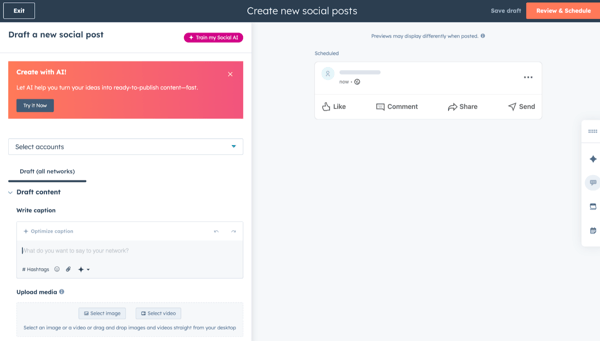 Image 02: Example of HubSpot’s interface to draft, review, and schedule social posts from a single dashboard.
- Define which networks will be a priority
It's not always worth trying to do everything at once. Choose which networks your audience is really on and where the content effort makes the most sense within your digital marketing strategy.
- Adjust team permissions and access
Organize who can publish, approve or just view reports. This avoids noise and the accumulation of responsibility in one person.
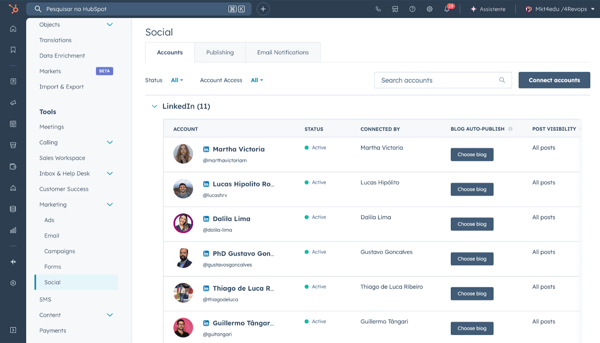
Image 03: In HubSpot’s Accounts tab, you connect and manage profiles (like LinkedIn) to centralize publishing and reporting.
- Create a basic publishing calendar
Start with a frequency that you can actually maintain. More important than posting every day is posting consistently.
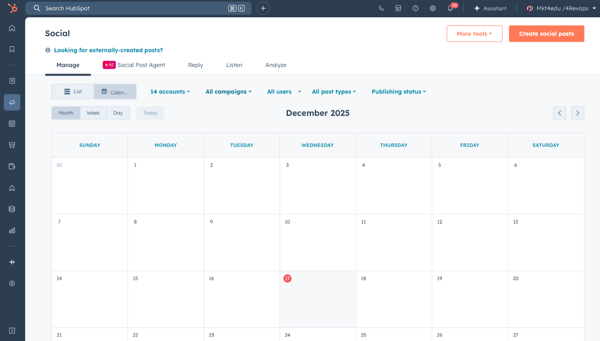
Image 04: HubSpot calendar view to plan and schedule posts, with filters by accounts, campaigns, and publishing status.
After following these steps, social media management begins to move away from improvisation and into a minimally organized flow, relieving some of the mental burden and opening up space to think about strategy, not just putting out fires.
To make the impact of this organization even clearer, see the comparison below between a manual operation and one using HubSpot in a structured way.
Comparison between manual Social Media management and management with HubSpot
It's worth emphasizing that nobody starts out perfect. Many teams still work "on the spreadsheet + metrics printout". The aim here is not to judge, but to show how centralizing HubSpot can simplify your day-to-day work.
|
Aspects |
Manual social media management |
Social media management using HubSpot |
|
Content planning |
Loose spreadsheets, difficult to keep track of |
Centralized calendar, organized by campaign and theme |
|
Publishing posts |
Each network in a different application |
Scheduling on multiple networks from a single dashboard |
|
Results view |
Prints and isolated exports |
Integrated reports, with filters by date and campaign |
|
CRM connection |
Almost none or done by hand |
Interactions associated with the contact's journey automatically |
|
Decision-making |
Based on feeling and memory |
Based on engagement data, clicks and conversions |
The table shows, side by side, how a manual Social Media operation differs from a structured management with HubSpot in planning, publishing, metrics, CRM and decisions.
Once you've seen this comparison, it's easier to understand why so many marketing teams adopt CRM software with a social media module: you gain time, you gain context and you gain arguments to defend your work.
How to create Social Media Marketing campaigns within the HubSpot platform
Creating social media marketing campaigns using HubSpot doesn't just mean scheduling posts. The idea is to use the platform to tie content, offers and business objectives into a single structure.
Before looking at the step-by-step, it's worth asking a sincere question: today, when you create a sequence of posts, is it clear what the objective of that "mini-story" is? Or do you feel like you're just filling up the calendar?
With HubSpot, you can organize your campaigns like this:
- Define the objective of the Social Media campaign
It could be to generate leads, promote a new product, bring registrants to an event, strengthen the brand in a specific segment, among others.
- Link the campaign to a concrete offer
This offer is usually a landing page, a form, a rich material, a product page or a list sign-up.
- Create a sequence of content by journey stage
Combine more educational posts (to arouse interest) with direct invitation posts (to generate action).
- Link the posts to the campaign within HubSpot
This makes it easy to see which posts contributed most to the final result of that action.
With this kind of organization, social media is no longer an endless stream of random posts, but part of a thought-out roadmap that respects the audience's journey and the business's goals.
How to monitor and analyze social media results on the HubSpot platform
One of the biggest pains for anyone working with Social Media is hearing: "But does it work?". Without CRM software and integrated reports, you're left scrambling for prints, spreadsheets and trying to "tell a story" with scattered data.
HubSpot makes this analysis much easier, offering detailed reports on social networks and connecting them:
- Engagement data on the networks;
- Website clicks and sessions;
- Leads generated from marketing campaigns;
- Opportunities and deals in the sales funnel.
Before looking at the table, it's important to understand that there is no single magic metric.
Each stage of the journey requires a different type of indicator and, together, they show how far your strategy is progressing, exactly as reinforced by specialized guides, such as Semrush's social media analytics guide and the article on social media metrics.
Social media metrics by funnel stage using HubSpot
Here's how you can organize your data reading:
|
Funnel stage |
What to look out for on social media |
How HubSpot helps you see the value in it |
|
Attraction (top) |
Reach, impressions, link clicks |
Session reports from social networks |
|
Consideration (middle) |
Clicks on CTAs, visits to landing pages |
Form conversions, new leads and lists |
|
Decision (bottom) |
Interactions of hot leads with content |
Qualified leads, opportunities created, business deals |
|
Post-sale (relationship) |
Customer engagement with support content |
Impact on retention, reactivation and referrals |
The table summarizes the main social media metrics at each stage of the funnel and how HubSpot connects this data to lead generation, opportunities, business and relationships.
Once you've structured your reports, it's easier to answer leadership questions such as: which network brings in the most qualified visitors, which campaigns actually generate leads and which topics connect best with purchasing decisions.
SEE ALSO:
- Nano Banana Pro: what it is, how to use it and examples in marketing
- New sales funnel for SEO with LLMs
Social media best practices for Instagram, TikTok, X, LinkedIn and Facebook using HubSpot
Even with a good tool, if the content strategy doesn't speak to the reality of your audience, the results won't come. That's why, in addition to the technical side, it's worth looking at good practices specific to each network.
Before that, however, there's an important point: you don't have to win on all the networks at the same time. The HubSpot tool helps you operate several, but prioritization needs to come from your digital marketing strategy and the profile of your ideal client.
Here are some guidelines for each channel, with a view to how HubSpot can support you:
Focus on visual content that explains pains and solutions quickly (carousels, short Reels). Use trackable links to landing pages and follow which posts generate the most sessions and conversions within the HubSpot platform.
- TikTok
Work on short videos answering real questions, with direct and authentic language. Use TikTok as an ideas laboratory, and what performs well can be reused on other networks, always monitoring clicks and impact on the funnel.
- X (Formerly Twitter)
Explore threads and comments on trending topics in your market. With HubSpot, you can schedule posts and analyze which topics generate the most traffic to your content and offers.
Ideal for B2B communication, executive education, postgraduate courses or higher-value services. Combine educational posts with cases and testimonials. Use HubSpot to compare the performance of authority-focused posts with more conversion-oriented posts.
Still relevant for certain audiences and age groups. Invest in communities, events and content that reinforces long-term relationships. By integrating with HubSpot, you can see the impact both organically and, if it makes sense, in paid campaigns.
As well as thinking by network, a more advanced point, but one that makes all the difference, is how you structure titles and content.
When you create posts in a question and answer format, using people's real questions, this helps not only the network algorithm, but also the way your content is understood by search engines and artificial intelligence tools that summarize information, in line with Google Search Central's guidelines for useful content.
You don't need to master technical terms to take advantage of this: you just need a content strategy guided by real questions, consistent between Social Media and other channels.
After looking at these good practices, you can choose one or two priority networks to start structuring in more depth in the HubSpot tool, rather than trying to embrace them all in a shallow way.
How to integrate Social Media, CRM and sales funnel using HubSpot
So far, we've talked about posts, campaigns and metrics. But what really changes the game is being able to connect Social Media with CRM software and the stages of the sales funnel. This is what turns engagement into tangible results.
Before listing the possibilities, think about how many times you've seen someone super engaged on social media, who disappeared because nobody knew they existed as a lead within the system. When Social Media doesn't talk to CRM, this kind of opportunity slips through the cracks.
On the HubSpot platform, this integration can happen in various ways:
- Automatic session registration and conversion
When someone comes to the site from social networks and fills in a form, HubSpot identifies the source and creates or updates the contact.
- Use of specific lists and segmentation
You can create lists based on interactions (for example, people who came from a specific social media campaign) and nurture these leads with personalized emails and content.
- Supporting the sales team with context
When the sales team opens a contact's file, they can see that they have interacted with a particular post, clicked on a marketing campaign and downloaded material. This makes it easier to approach them and can increase the conversion rate.
- Analysis of revenue influenced by Social Media campaigns
By linking your social media actions to campaigns on the HubSpot platform, you can see not only leads, but also business and value generated or influenced by these initiatives.
After integrating Social Media, CRM and the sales funnel, Social Media Marketing is no longer seen as something "purely institutional" and becomes a clear part of the growth strategy, aligned with other channels such as email, content and ads.
KEEP LEARNING:
- SWOT analysis: why apply it before any marketing campaign
- Branding strategy: a practical guide to building strong brands
- Content marketing: how to perform on Google and LLMs
First steps to professionalizing Social Media with HubSpot
If you feel like you're putting a lot of effort into Social Media, but you're still not seeing a clear return, using HubSpot as a base can be a game changer.
The platform helps you organize your calendar, connect campaigns, record data in the CRM and demonstrate the real impact of your work.
To recap, the first practical steps are:
- Connect the main social networks to the HubSpot platform;
- Define clear objectives for your social media marketing campaigns;
- Create a social media calendar that you can stick to consistently;
- Link posts to campaigns, landing pages and concrete offers;
- Track metrics by funnel stage, not just by "likes";
- Use CRM to turn engagement into relationships and business opportunities.
More than "using a tool", the proposal is to change the way you see Social Media Marketing: to get out of survival mode and build an operation that respects your time, your strategy and the results you need to deliver.
With HubSpot as an ally, Social Media is no longer just a space for pressure, but a structured channel, connected to what really matters: people, relationships and sustainable growth.
If, in addition to organizing Social Media within the HubSpot platform, you want your brand's Instagram to actually be found by those who search for you on Google, the next step is to understand how profile, content and SEO work together.
That's why it's worth complementing this reading with Mkt4Edu's content on "how to make my Instagram appear on Google", where you delve into precisely this connection between the social network and search results.

What is Social Media Marketing and why is it important in digital strategy?
Social Media Marketing is the strategic use of social networks to attract, engage and convert people along the buying journey. It is important because more than 5 billion people are active on social networks, which makes these channels one of the main points of contact between brands and the public. On social media, your potential customers discover companies, evaluate their reputation, interact with content and go on to landing pages, WhatsApp or product pages. Ignoring social media doesn't just mean losing engagement, it means giving up relationships, behavioral data and opportunities that could be recorded in the CRM.
What is HubSpot and how does it help with social media marketing?
HubSpot is a CRM and marketing automationplatform that integrates several channels in one place, including website, blog, email, ads, sales and social media management. In the context of social media, it connects social media interactions to the history of each contact in the CRM. So when someone interacts with a post, clicks on a link or converts on a landing page, this data becomes part of the contact's recorded journey. This allows you to centralize publishing on multiple networks, associate posts with specific campaigns, track metrics closer to revenue and turn engagement into real business opportunities.
How does the HubSpot platform support day-to-day social media management?
The HubSpot platform supports social media management by offering a centralized dashboard for planning, publishing and analyzing posts on different networks. Instead of switching between apps, you schedule content for Instagram, Facebook, X and LinkedIn in one place and connect each post to campaigns, landing pages and automation flows. The platform records clicks, sessions and conversions, associating these interactions with the contact's record in the CRM. As a result, the social media routine is no longer just operational and becomes clearer about objectives, results and impact on the sales funnel, facilitating data-based adjustments.
What are the first steps to setting up HubSpot for Social Media?
The first steps in setting up HubSpot for Social Media start with connecting your social media accounts to the social media area within the platform. Next, it's important to define which networks will be a priority, concentrating efforts where your audience really is. Next, adjust team permissions and access, defining who can publish, approve or just view reports. Finally, create a basic publishing schedule, with a frequency that you can maintain consistently. With these steps completed, social media management moves away from improvisation and into a minimally organized flow.
What's the difference between manual social media management and using HubSpot?
In manual social media management, planning usually takes place in loose spreadsheets, publishing is done network by network in different applications and the collection of results depends on prints and isolated exports. The connection to the CRM is almost non-existent or done by hand, which makes decision-making based on memory and sensation. With HubSpot, the content calendar is centralized and organized by campaigns and themes, publishing is scheduled from a single dashboard and reports are integrated, allowing data to be filtered by date and campaign. Interactions are automatically associated with the contact's journey, which makes decisions more based on engagement, clicks, conversions and business data.
How do I create Social Media Marketing campaigns within the HubSpot platform?
Creating Social Media Marketing campaigns on the HubSpot platform starts by clearly defining the objective, such as generating leads, promoting a product, attracting registrants to an event or strengthening the brand in a segment. Next, you link the campaign to a concrete offer, usually a landing page, form, rich material, product page or list sign-up. Then you organize a sequence of content by stage of the journey, combining educational posts and direct calls to action. Finally, it associates each post with the campaign within the platform, allowing you to see which posts contributed most to the result of that action.
How do I track and analyze Social Media results using HubSpot?
To track social media results with HubSpot, you combine social media reports with website, lead and sales funnel data. The platform allows you to analyze reach, impressions and clicks, but also shows sessions coming from networks, conversions on forms, leads generated and businesses created or influenced. This way, you can go beyond vanity metrics and connect each stage of the funnel to specific indicators. By organizing reports by campaign, network or period, it's easier to answer leadership questions, such as which networks bring in the most qualified visitors and which actions relate to purchasing decisions.
Which Social Media metrics should you observe at each stage of the funnel using HubSpot?
At the top of the funnel, the focus is on attraction metrics, such as reach, impressions and link clicks, which the HubSpot tool relates to sessions coming from social networks. In the middle of the funnel, you look at clicks on CTAs, visits to landing pages and conversions on forms, tracking the generation of new leads and entry into segmented lists. At the bottom of the funnel, the interest lies in interactions between hot leads and content, qualified leads, opportunities created and business generated. In post-sales, customer engagement with support content can be associated with retention, reactivation and referral indicators.
How does HubSpot help integrate social media, CRM and the sales funnel?
HubSpot integrates social media, CRM and the sales funnel by automatically recording sessions and conversions originating from social networks. When someone comes to the site via a post and fills in a form, the platform identifies the source and creates or updates the contact. From there, you can create specific lists and segmentations based on social media interactions and nurture these leads with personalized emails and content. The sales team, in turn, sees in the contact's file which posts were clicked on, which campaigns were accessed and which materials were consumed, which gives context for more assertive approaches and increases the connection between engagement and revenue.
What content best practices to apply on Instagram, TikTok, X, LinkedIn and Facebook with the support of the HubSpot platform?
The best practices vary per network, but the HubSpot platform helps to operationalize all of them. On Instagram, it's useful to focus on visual content, carousels and short Reels that explain pains and solutions, accompanied by trackable links to landing pages. On TikTok, short videos answering real questions act as a laboratory for ideas that can be reused on other channels. On X, threads and comments on trending topics bring the brand closer to relevant conversations. On LinkedIn, educational posts, cases and testimonials are ideal for B2B contexts. On Facebook, communities and events strengthen long-term relationships. In all cases, the platform allows you to schedule posts and monitor their impact on the funnel.
How do I start professionalizing Social Media using HubSpot?
To professionalize social media with HubSpot, the first step is to connect the main social networks to the platform and define clear objectives for your campaigns. Next, create a realistic publication schedule, linking posts to campaigns, landing pages and concrete offers. Start tracking metrics by funnel stage, not just likes, and use CRM to turn engagement into relationships and business opportunities. Over time, you'll come to see Social Media as a structured part of the growth machine, and not just as a channel for pressure and urgencies, gaining more clarity about the real impact of your work.


























 Portugal