






You could have the best campaign in the world and still see your pipeline stall for one very simple reason: the page doesn't turn intent into action.
At the bottom of the funnel, this has a different kind of impact. It’s not just about “losing traffic.” It’s about missing the timing, losing context, and making the sales team chase after leads that weren’t ready—or worse, letting the ones who were ready slip away.
And there’s one detail that almost always goes unnoticed: the campaign might be great. The ad might be great. The problem is the bridge—and the page is that bridge.
This guide is a practical roadmap for creating effective landing pages within HubSpot, connecting conversions to the HubSpot CRM.
The focus here is on what typically makes the difference when the operation is already mature: on-page optimization, content that’s useful to people, preparation for discovery in AI-powered search results, a structure for search FAQs, and editorial trust signals (E-E-A-T).
What will you find in this post?
You’ll walk away with a practical roadmap for creating, publishing, and optimizing landing pages in HubSpot, with a focus on decision-making and conversion in BOFU. The kind where you can open HubSpot and just get started, without having to “wing it” along the way.
Throughout the text, references appear only to support technical points and definitions, without distracting the reader.
What are landing pages, and why do they make such a difference in BOFU?
Landing pages are designed with a focus on a single conversion action, such as requesting a diagnosis, asking for a proposal, scheduling a call, or requesting a demo.
In BOFU, they work because they reduce distractions, address objections, and make the next step obvious.
In practice, they become “the place where the truth is revealed.” If the offer is clear and the form is well-designed, you know it right away. If it’s confusing, you know that too.
At HubSpot, landing pages make sense when you need:
- Attribute conversions by campaign and by offer;
- Capture data directly in the CRM with standardized properties;
- Trigger automations and SLAs with traceability;
- Test variations without relying on development, such as in A/B testing on pages.
How should you structure the first fold of the landing page to increase conversion?
The first fold needs to make it clear, within a few seconds, what you offer, who it’s for, and what the next step is. If this isn’t clear right away, the user will go back to the search results, and the conversion rate drops.
You know when you open a landing page and think, “Okay, but… what exactly do you do?” Exactly. That thought costs you conversions.
A simple, BOFU, and straightforward template:
- Who it’s for: segment, profile, or context (no generalities);
- What pain point it solves: a specific, recognizable pain point;
- What practical benefit it delivers: a realistic benefit, without making absolute promises;
- What happens next: clear expectations after submission.
Example of copy that usually works:
- Headline: “HubSpot landing pages to boost conversion without losing CRM traceability”;
- Subheadline: “We create and optimize landing pages with forms and automations integrated with HubSpot CRM to generate better leads and speed up the decision-making process”;
- Quick preview: “Step-by-step process, checklist, and trackable delivery”;
- CTA: “Request a diagnostic.”
After the first fold, everything should reinforce the same decision. If each section tries to “sell a different product,” the page turns into a catalog and conversion drops.
How to create a landing page in HubSpot step by step, without being limited by a template?
You create it under Content → Landing Pages and can publish it without relying on a developer, as long as you follow a clear process for structure, forms, and post-conversion.
The settings described in this step-by-step guide follow the recommended standards in the guidelines for creating and customizing pages.
A helpful tip: before opening the editor, define the page’s “elevator pitch”—that short phrase you’d say to someone on Slack: “It’s the page to request X, for those who have Y, and the next step is Z.”
If you can’t say that, the page will end up being long and confusing.
A reliable step-by-step guide:
- Choose a template that already has a conversion hierarchy
Start with a structure that includes a hero section, benefits, proof, how it works, a form, and objections. - Define a single primary conversion
One page, one goal. In BOFU, mixing demos, materials, and quotes tends to confuse visitors. - Write the value proposition using decision-oriented language
Replace “learn more” with “what do I get, how long does it take, what comes next.” - Insert the HubSpot form and map fields
Ensure that the fields map to useful properties in HubSpot CRM. - Set up post-conversion
Set up a thank-you page, confirmation email, and next steps. - Apply basic on-page SEO and indexing settings
Adjust the title, URL, H1, image, canonical, and noindex tags as needed. - Publish, test, and validate data collection in the CRM
Send a test and confirm that the source, campaign, and properties are being captured correctly.
The hierarchy suggested here follows established best practices for landing page creation, especially when there is a risk of the page becoming a “catalog” with multiple competing objectives.
 Caption: Visual example of an optimized landing page structure focused on conversion and fast loading in HubSpot.
What elements are essential for a landing page that converts leads in BOFU?
A BOFU landing page needs to reduce risk and address friction points before the form. When these elements are clear, conversion increases without having to “push” the visitor. That’s why, in addition to the offer, you need trust signals.
The most important elements:
- Headline and subheadline with decision-making context;
- Benefits presented in impactful language (3 to 5, focusing on “what changes”);
- Proof (process, certifications, screenshots, methodology, real testimonials when available);
- “How it works” section (3 steps, to eliminate uncertainty);
- Offer with scope (what is included and what is not);
- Streamlined form with microcopy (what happens next);
- Objections addressed (timeline, requirements, who handles it, format);
- Single CTA repeated consistently throughout the page.
Before adding more text, keep the “people-first” principle in mind: if a block exists solely to “pad keywords,” it rarely improves decision-making.
Google reinforces the idea of useful content, and a “people-first” approach as the foundation for quality and relevance. And this applies to landing pages as well.
How can you use HubSpot modules and sections to scale landing page creation?
You scale landing pages when you stop creating them from scratch and start reusing conversion blocks that already work. In HubSpot, this is feasible because the modular editor makes it easy to standardize sections and test variations.
A module kit that helps maintain consistency:
- Hero with headline, subheadline, and CTA;
- List of benefits;
- Testimonials and trust signals;
- “How it works” in 3 steps;
- Form and microcopy;
- Short FAQ addressing BOFU objections.
When you standardize modules, it becomes easier:
- Quickly create pages for new offers;
- Maintain visual identity and hierarchy;
- Run A/B tests without breaking the database.
How do you choose form fields in HubSpot without hurting your conversion rate?
The best BOFU form is one that asks for the minimum necessary to prioritize customer service, without creating unnecessary friction.
The more “just-for-fun” fields you include, the higher the chance of abandonment. The rest comes through lead nurturing, questions during the meeting, or progressive automation.
Here’s a very human sign that you’ve gone too far: when someone on your team says, “Ask for this field too—it might come in handy someday.” Usually, that “someday” never comes, and conversion pays the bill.
For BOFU, a balanced set usually consists of:
- Name;
- Work email;
- Company;
- Job title or department;
- Size of operation (range);
- Main objective (list).
What defines quality here isn’t “more fields.” It’s what you can use to prioritize your pipeline.
The choice of properties and fields needs to align with sales operations and the CRM structure. This reasoning holds true when you consider the role of the HubSpot CRM and the form design at on how to create forms in HubSpot.
How do you connect a landing page to HubSpot CRM to prioritize leads and maintain context?
When the form is from HubSpot, the contact is automatically created within HubSpot CRM with history and origin. The key is to standardize properties and automations so that the lead enters the right workflow with the right context.
A simple and efficient approach:
- Standardized properties (industry, job title, objective, company size) for segmentation;
- Consistentlifecycle stage and lead status;
- Workflows that trigger the right next step.
Standardizing funnel stages is more reliable when it follows the definition of lifecycle stages used by HubSpot itself.
How do you set up traceability and reporting to track lead conversion all the way to revenue?
If you can’t track conversion all the way to the CRM, the discussion becomes mere opinion. In BOFU, the minimum requirement is to capture the source, offer, and funnel stage to connect marketing, sales, and results.
Minimum requirements:
- UTMs in campaigns (source, medium, campaign, content, term);
- Properties for source and conversion asset;
- Funnel report with clear stages (conversion, MQL, opportunity, win).
When these elements are well aligned, it becomes easier to justify investment and prioritize channels.
When it comes to metrics and bottlenecks, the concept of the customer journey and friction points becomes clearer when you work with a lead conversion framework , rather than relying on isolated impressions.
How should you set up the thank-you page to increase lead conversion in the next step?
The thank you page needs to set expectations and suggest the next step without raising new questions. In BOFU, this reduces drop-off and increases the conversion rate after the form is submitted.
And yes: many people forget this part. The landing page looks great, the form works, and the person lands on a soulless “thank you” page. Then the lead cools off, not because they weren’t interested, but because they were left hanging.
A high-performing BOFU structure:
- Clear confirmation: “We’ve received your request”;
- Expectation: “We’ll get back to you within X business hours”;
- Option to speed up the process: scheduling button (if applicable);
- Decision support: a short piece of content to help those who are still comparing options.
In terms of the process, think of the thank-you page as part of the conversion “product.”
What changes in the on-page SEO of a landing page created in HubSpot?
On a landing page, on-page SEO is mainly about intent and structure: title, headings, URL, indexing, and mobile experience. If these elements are consistent, you avoid invisibility and improve the consistency of both organic and paid performance.
On-page checklist for landing pages:
- Title with BOFU intent and the keyword “landing pages” when it makes sense;
- Asingle H1 tag aligned with the title;
- Short and descriptive URL;
- H2 tags in question format that address objections (this also helps with PAA);
- Images with descriptive alt text and small file sizes;
- Mobile and speed;
- Correctcanonical tags and indexing.
The fundamentals used in this checklist are outlined in Google’s guidelines at Search Essentials and in the SEO starter guide.
When is it appropriate to use noindex on landing pages?
It’s worth doing when the page is temporary, very specific, or when there are nearly identical variations (tests and campaigns), as this reduces the risk of duplication and prevents “diluting” the main page.
At HubSpot, the guidance on“ ” explains how to prevent content from appearing in search results, when to use “noindex,” and how to apply it to content hosted on a connected domain.
How do you handle cloned pages and duplicate content in HubSpot?
If you clone pages for testing, it’s easy to create duplicates. Use canonical tags to consolidate the primary version.
HubSpot shows you how to set up canonical URLs to organize this without sacrificing performance.
How can you prepare your landing page for PAA (People Also Ask) without turning it into a giant FAQ?
You increase your chances of appearing in PAA when you use real questions and short answers right at the beginning of each section. You don’t need a massive FAQ; you need well-answered BOFU objections.
How to choose questions that work:
- Use decision-making questions, not initial questions;
- Write questions that a person would actually type;
- Answer in 1 to 2 sentences right at the beginning of the section.
Examples of BOFU questions that often appear in PAA:
- “How long does it take to set up a landing page in HubSpot?”
- “How many fields should the form have?”
- “Do I need to index the landing page on Google?”
- “How do I know if the lead came from an ad or organic traffic?”
In the text, you’re already using H2 headings as questions. The adjustment is to make the first two sentences of each section even more “precise,” with definitions and criteria.
How can I get featured snippets with landing page content and a BOFU guide?
You increase your chances of winning a featured snippet when you answer a question with a short definition and clear structure before delving deeper. Even though it’s BOFU content, you can still capture snippets for questions related to the process.
Formats that help the most:
- Short definition paragraph (40 to 60 words);
- Numbered lists for step-by-step instructions;
- Bullet points with criteria and checklists.
Two best practices:
- Use an H2 heading with the exact question;
- Start the answer with a direct sentence before going into detail.
Your content already includes step-by-step guides and checklists. The goal here is to organize the initial answers so they “fit” into a snippet without losing context.
What is AI SEO and how does it apply to the landing page?
SEO for AI means making your content easy to understand and reuse in AI-generated responses, without losing control over indexing and displayed snippets. In real-world terms: clarity, structure, and governance.
A quick example: if your page explains what happens after the form is submitted, this results in a response that’s easy to “capture” in summary. If you hide that detail, both the AI and the user are left in the dark.
This involves two worlds:
- Google and AI experiences in search (such as AI Overviews and AI Mode);
- Crawlers and AI discovery systems that access your site to retrieve content.
Google describes the controls for previews and snippets in AI search experiences at AI features and your website.
How can you control what appears in snippets and Google AI experiences?
If you have content you don’t want to appear as a snippet, or want to limit the snippet size, there are controls such as nosnippet and max-snippet. The key is to use these judiciously, so as not to hurt your CTR.
The options for controlling previews and snippets are covered by Google both in AI features and on its website, as well as in robots meta tags.
How can you make your content more “quotable” by AIs without resorting to generic text?
This is where practices that align with people-first and E-E-A-T:
- Answer questions clearly and without embellishment;
- Include criteria, limits, and prerequisites;
- Use realistic examples, without promising results;
- Name tools, screens, and decisions that demonstrate practical experience.
That is the difference between “content that looks good” and “content that helps.”
Does it make sense to implement llms.txt?
llms.txt is a proposal to facilitate access to essential information by AI models and systems, organizing what they should prioritize. The proposal and examples are described at llms.txt.
For a company using HubSpot, this makes the most sense in areas such as documentation, guides, and corporate pages. For campaign landing pages, the benefit is generally smaller. A practical guideline:
- If you have a set of “pillar” pages and want to guide discovery, llms.txt can help;
- If your landing pages are temporary and specific, focus first on structure and internal links.
What are OpenAI crawlers, and why does this matter?
If your strategy includes discovery in AI experiences, it’s worth understanding that there are specific crawlers and user agents. The user agents and guidelines related to crawlers are described in the OpenAI crawler and in the FAQ for publishers and developers.
In practice, this falls under governance: allowing, limiting, or organizing access via robots.txt and internal policies, especially for sensitive areas.
How can you apply people-first content to BOFU content without it sounding “generic”?
People-first means helping a real person make a real decision, without writing for the algorithm. In BOFU, this translates to scope, boundaries, criteria, and explicit next steps.
In your case, people-first consists of simple editorial decisions:
- State who the audience is and who it isn’t;
- Include requirements and limitations;
- Show what you would do first, and what only makes sense later;
- Minimize jargon, and when you use it, explain it in one sentence.
On landing pages and BOFU content, this increases conversion because it reduces uncertainty.
How can you organize topic clusters for landing pages and HubSpot without cannibalizing keywords?
Topic clusters work when you have a strong pillar piece and satellite content with different intent, connected by internal links. This reduces cannibalization and improves discoverability because each page has a clear role in the journey.
Mini cluster map with target blog URLs
For this topic, a lean map (with existing URLs and some suggestions for new pages) might look like this:
- Pillar (this post): /blog/landing-pages-hubspot-tips;
- Satellite 1 (general best practices): /blog/how-to-create-a-landing-page-the-7-best-practices;
- Satellite 2 (HubSpot forms): /blog/how-to-create-hubspot-forms-capture-leads;
- Satellite 3 (HubSpot CRM): /blog/what-is-hubspot-crm-a-guide-to-its-features;
- Satellite 4 (lead nurturing and follow-up): /blog/how-to-nurture-leads-with-hubspot;
- Satellite 5 (automation and workflows): /blog/how-to-use-hubspot-for-digital-marketing;
- Satellite 6 (conversion and funnel): /blog/lead-conversions-with-funnelytics;
- Additional context (overview): /blog/hubspot-software-lead-generation-and-business-opportunities.
Suggestions for new pages (if you want to make the cluster even more “snippetable” and BOFU):
- Suggested URL (create): /blog/noindex-hubspot-when-to-use;
- Suggested URL (create): /blog/canonical-hubspot-cloned-landing-pages;
- Suggested URL (create): /blog/ab-testing-hubspot-landing-pages;
- Suggested URL (create): /blog/utm-hubspot-attribution-conversion;
With this structure, this post becomes a BOFU “bridge”: it links to the execution pages and receives backlinks from the clusters, consolidating the pillar.
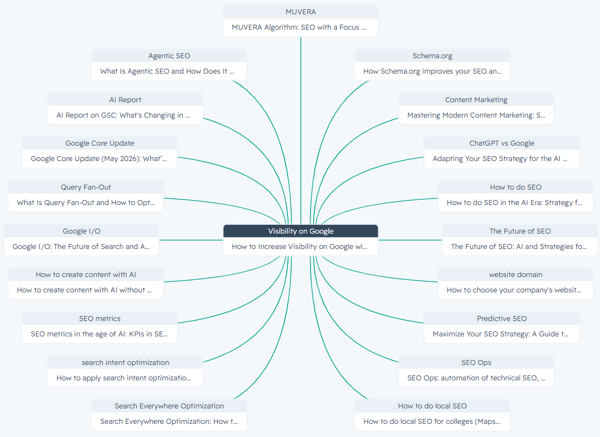
Image: Practical example of Topic Cluster architecture: the central node represents the pillar content focused on Google visibility, surrounded by interconnected satellite content that supports the topic.
How do you design an internal and external link architecture that helps with SEO and conversion?
Links aren’t just for show. They guide the reader, distribute relevance, and help the visitor make a decision.
An effective pattern:
- At the beginning of the text, an internal link for those who need the basics;
- In the middle, internal links for action (forms, CRM, conversion);
- Near technical decisions, external links to official documentation.
The most important internal links already appear throughout the text at decision points (structure, CRM, forms, conversion).
If you want to validate the logic of “HubSpot as a lead generation engine,” the content on HubSpot software and lead generation reinforces the context without competing with this page’s BOFU focus.
Now, to strengthen authority, external links should prioritize primary sources: HubSpot and Google. You’re already using this in key areas such as canonical tags, noindex, and AI features.
What editorial E-E-A-T signals make this content more trustworthy (and more “citable”)?
Editorial E-E-A-T comes into play when the text makes it clear who is speaking, based on what experience, and within what limits. This reduces uncertainty, improves trust, and helps both SEO and discovery in AI-generated answers. In BOFU, this also reduces friction.
Practical adjustments you can apply to this post and the pages it guides:
- Author byline and mini-bio with real-world context (e.g., “HubSpot implementation, CRO, RevOps”);
- Update date and revision policy (e.g., “revised every 90 days”);
- Real screenshots (HubSpot editor, SEO settings, workflow) when possible;
- Scope statement: which accounts and plans the tutorial applies to;
- Limitations and prerequisites: what needs to be set up beforehand.
This aligns with Google’s guidance on quality and a people-first approach to creating helpful content.
What are the most common mistakes when creating landing pages in HubSpot?
The mistakes below occur frequently because they seem minor, but they have a direct impact on the conversion rate:
- More than one primary conversion on the same page;
- Generic text that could apply to any company;
- A form asking for data that won’t be used;
- Failure to set up a thank-you page and contact expectations;
- Failure to set up basic automation in the CRM (tasks, notifications, segmentation);
- Ignoring mobile and page speed;
- Mismatch between traffic and offer;
- Cloning pages without canonical tags or noindex tags when necessary.
How do you know if your landing page is ready for increased investment?
A page ready for scaling is one that has a process and traceability, not the prettiest one.
Final checklist before investing more:
- Clear value proposition in 5 seconds;
- One primary conversion;
- A form with the minimum required to qualify;
- Submissions are sent to HubSpot CRM with useful properties;
- Confirmation and follow-up automation set up;
- Thank-you page defines next step;
- UTMs and reports connected.
- Title, H1, and URL consistent with the intent;
If the submission rate is good but funnel progression is low, adjust segmentation, offer, and qualification criteria.
And if the submission rate is low, reduce friction and improve clarity above the fold.
Which images work best on a landing page, and how can you write better alt text?
Good images speed up understanding and reduce uncertainty. In BOFU, prioritize images that explain the process.
Suggestions (1 to 3):
- Screenshot of HubSpot’s landing page editor showing a modular structure.
Alt: "HubSpot landing page editor with sections and conversion modules"; - Conversion flow (visitor → landing page → form → CRM → sales task);
Alt: "Lead generation and conversion flow connected to HubSpot CRM"; - Wireframe of the above-the-fold section (headline, proof, CTA) to illustrate hierarchy.
Alt: "Above-the-fold template for landing pages with headline, social proof, and CTA."
FAQ: Common questions about landing pages in HubSpot
Are landing pages and sales pages the same thing?
No. A landing page typically has a single conversion goal and fewer distractions, while a sales page usually provides more detailed information about offers, plans, comparisons, and in-depth insights.
How many fields should I include in the BOFU form?
In BOFU, it’s best to ask only for what’s necessary to prioritize service and keep the context minimal. If you need a lot of data, consider collecting some of it later, through progressive automation or during the sales conversation.
Is it worth indexing a landing page on Google?
It’s worth it when the page is evergreen, has unique content, and addresses a clear search intent. For campaign pages, tests, and very similar variations, “noindex” is usually safer.
How can I avoid duplicate content when I clone landing pages in HubSpot?
You avoid duplication by setting the canonical tag on the main version and using noindex on variations when it makes sense. The goal is to maintain a “source” page and prevent Google from seeing competing copies.
What should I test first in an A/B test to improve conversion?
Start with the above-the-fold content: headline, subheadline, immediate proof, and CTA. Then, test form friction and blocks that address objections (deadline, format, requirements, and next steps).
How does the landing page improve lead quality, not just quantity?
It improves quality by capturing useful context (objective, size, profile), connecting this to the CRM, and triggering the right workflow. This way, sales receives the lead with priority and history, rather than a “blind” registration.
HubSpot landing pages with SEO, AI, and conversion working together
When landing pages become routine, you move out of campaign mode and into system mode. The landing page becomes an asset that you create, measure, optimize, and replicate.
The shortest path to this is to combine three elements that, in practice, reinforce each other: clarity in the Bottom of the Funnel (BOFU), traceability in HubSpot CRM, and optimizations that increase discoverability and readability, both for traditional search and for AI-driven experiences.
If you want to move beyond just “pretty words” and put this into practice, mkt4edu can conduct an analysis of your HubSpot landing pages with a focus on conversion and lead quality.


























 Portugal