






Artificial Intelligence has transformed the way companies approach their marketing and sales strategies, and one of the main pioneers in this scenario is HubSpot AI. From its first automation features to today's agents, the platform has changed a great deal of what it delivers to the user.
If you are wondering about the impacts of AI on marketing automation, lead generation and the personalization of customer interactions, you have come to the right place.
This guide answers the most frequently asked questions about HubSpot AI, from understanding what exactly it does to how it can be effectively implemented in your business.
What is HubSpot AI and what does it do today?
HubSpot AI refers to the use of algorithms, computer systems and machine learning to perform tasks that would normally require human intelligence. It automates marketing work within the platform's ecosystem, offering integrations between HubSpot CRM, Service Hub and Marketing Hub in order to optimize internal, sales and customer service processes.
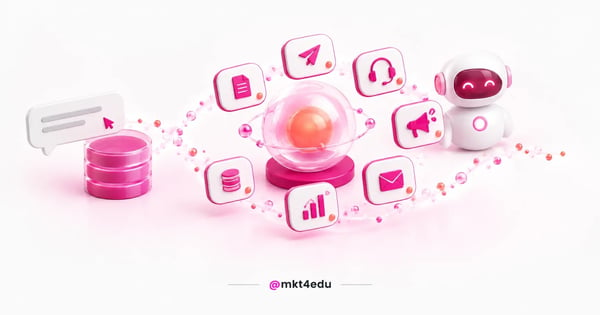 Caption: HubSpot AI moved from a standalone chat assistant to a line of specialized agents orbiting the CRM.
What changed is the shape of that delivery. Instead of isolated features spread across the hubs, HubSpot began organizing Artificial Intelligence around one assistant and a set of agents that take on entire tasks, gathered inside Agent Hub.
The platform allows the creation of chatbots to interact with website visitors, answer frequently asked questions and direct leads to human service when necessary. AI is used to improve the effectiveness of these chatbots.
In addition, AI helps personalize online experiences, delivering relevant content based on the customer's history of interactions and preferences. That improves the user experience at every point of the customer journey.
It also analyzes large volumes of marketing, sales and customer service data, which allows insights and recommendations to be generated to improve business strategy.
What happened to ChatSpot inside HubSpot AI?
ChatSpot was HubSpot's first public bet on talking to the CRM through prompts. Released in public beta, the chatbot filled in contact information and searched for data in HubSpot CRM through simple natural language commands, which made using the platform much more intuitive.
That job did not disappear, but the name did. HubSpot's official product pages now describe the line of AI tools around Agent Hub, Breeze Assistant and Agent Builder, with no mention of ChatSpot.
For anyone following the platform, the reading is straightforward: talking to the CRM stopped being a separate product and became the default interface. Here is how the agent line is organized today:
|
Feature |
What it does |
|
Content Agent |
Produces blog posts, social content and landing pages |
|
Prospecting Agent |
Monitors buying signals and launches personalized outreach |
|
Customer Agent |
Resolves customer service requests without a queue |
|
Campaign Agent |
Turns a goal into a planned multichannel campaign |
|
Nurture Agent |
Sends emails based on the lead's stage in the funnel |
|
Data Agent |
Answers questions about the database using CRM data |
|
Revenue Agent |
Speeds up collection by automating payment reminders |
Table: Agents described on HubSpot's official product pages.
The practical lesson goes beyond HubSpot. AI product names change fast, and it pays to document internally what your operation uses by function rather than by brand, so training does not have to be redone at every rename.
Can HubSpot CRM be integrated with AI tools?
Yes, HubSpot CRM can be integrated with AI tools to improve automation, data analysis and enhance the efficiency of marketing and sales operations. Integration is what turns a loose feature into a process gain.
HubSpot has invested heavily not only in implementing Artificial Intelligence in its tools, but also in creating new solutions that can be connected to its ecosystem.
The range of integration has also opened up beyond the platform. External assistants can be connected to the CRM, as the integration between Claude and HubSpot shows, which widens what AI can do over your database without switching tools.
Before switching on any AI layer, though, it is worth checking the housekeeping. A well-configured HubSpot implementation is what guarantees that AI reads reliable properties instead of half-filled fields.
Is it possible to create content with HubSpot AI?
Yes. Many companies are challenged to do more with less, especially when it comes to creating engaging content that is relevant and attractive to their target audience, and HubSpot answered that with a content generator built into the platform.
Through it you can create drafts and texts that can be used in your content marketing strategies, in blog posts, prospecting emails or landing pages. Today that job sits with the Content Agent, which produces pieces from the data and context that already live in the CRM.
The content generator is designed to kick-start and facilitate the continuity of the creative process, which can often be the most difficult part of content creation. Through a prompt, the assistant creates a draft that can be used to write texts that are better targeted to your audience.
However, it is important to always keep in mind the good practices of using AI-generated content:
- Always proofread all AI-generated content before publishing it.
- Always edit the content in order to employ the correct tone of voice that your brand wishes to convey.
- Don't rely exclusively on AI-generated content, and find a balance between it and human-generated content.
- Always do fact-checking when generating content through AI, since the output may contain outdated or even false information.
Anyone producing for organic search needs one extra layer of care. Knowing how to create content with AI without hurting SEO is what separates a gain in scale from a drop in traffic.
That care matters even more in an inbound marketing operation, where the blog carries lead generation. Creating content with AI without losing the brand voice is an editorial decision, not a setting in the tool.
What are the benefits of AI in customer service?
In the context of customer service and support, HubSpot AI offers a wide range of benefits with the potential to improve efficiency, service quality and overall customer satisfaction. These include:
- Fast responses: AI enables instant and consistent answers to frequently asked questions, reducing customer waiting times and improving the user experience.
- Multichannel service: it can be integrated into various communication platforms, such as websites, mobile apps, social networks and live chat, offering a continuous and consistent experience across multiple channels throughout the customer journey.
- Simple problem solving: chatbots can deal with simple questions and problems, freeing up human agents to solve more complex and challenging issues.
- Personalization: based on previous interactions, AI can customize responses and recommendations to meet the specific needs of each customer.
- Improved self-service: with AI, it is possible to direct customers to self-service resources such as knowledge base articles, video tutorials and FAQs, improving customers' ability to find solutions on their own.
- Sentiment analysis and feedback: AI can analyze the tone and sentiment of customer interactions to identify potential problems and assess customer satisfaction.
- Continuous learning: Artificial Intelligence can learn from previous interactions and improve its responses and behaviors over time, providing a more effective service.
- Cost reduction: automation through AI can help reduce operating costs, as fewer human interventions are required in routine tasks.
- Information retention: AI can keep a detailed record of previous interactions, allowing agents to quickly access customer history for more personalized service.
This layer stopped being an add-on and became a market expectation. Gartner projects that agentic AI will autonomously resolve 80% of common customer service issues by 2029, which reshapes the design of any support team.
Does HubSpot offer AI-powered chatbots?
Yes, HubSpot offers AI-powered chatbots as part of its marketing automation and customer service solutions, which can engage website visitors, answer frequently asked questions and collect lead information, providing real-time assistance.
They are an effective way of improving the customer experience and automating service tasks, allowing companies to offer quick, personalized responses to users.
HubSpot's AI-powered chatbots are generally configurable and customizable to meet the specific needs of each company. They can be integrated into your website, social media platforms and even popular messaging apps, contributing to a more comprehensive and convenient customer service experience.
In lead generation, the gain shows up in triage. Lead qualification with AI keeps the sales team from spending time on contacts that never fit the profile, and gives focus back to the ones who are ready to buy.
How does HubSpot ensure data privacy and security?
HubSpot takes the privacy and security of customer data very seriously. When using AI, a series of practices and measures are implemented to ensure that data is protected. Here are some of them:
- Data encryption: HubSpot uses encryption to protect data in transit and at rest. This means that data is encrypted during transmission and while it is stored on HubSpot's servers.
- Regulatory compliance: HubSpot adheres to data privacy regulations, such as the General Data Protection Regulation (GDPR) in the European Union and other relevant laws in different regions.
- Access controls: access to data is limited to authorized persons and systems only. HubSpot implements strict access control measures to prevent unauthorized access.
- Constant monitoring: HubSpot has monitoring systems in place to detect suspicious activity and respond quickly to any security threats.
- Data retention policies: HubSpot has clear data retention policies in place, ensuring that data is only kept for as long as necessary and is appropriately deleted when it is no longer needed.
- Training and awareness: the HubSpot team trains its employees and partners to understand security principles and best practices for protecting customer data.
One point stays with whoever operates the account. Legal basis, declared purpose and retention period remain the controller's responsibility under privacy law, not the platform's, even when the automation belongs to HubSpot.
Does HubSpot AI replace human intervention in marketing and sales?
Generally speaking, HubSpot AI does not completely replace the need for human intervention in marketing and sales. Although AI offers valuable automation and optimization, there are aspects that require the expertise, empathy and creativity that only humans can provide.
Genuine relationship building and understanding customer needs require empathy and human connections that AI cannot fully replicate.
In the same way, creating creative and innovative marketing and sales strategies depends on the human ability to think outside the box and adapt to complex situations. AI can analyze data, but interpreting that data within a broader context requires human understanding of the nuances and the business environment.
Furthermore, high-level strategic decisions, such as defining the direction of campaigns and adjusting marketing strategy, are made on the basis of broader human insights. Dealing with complex negotiations, problem-solving and handling objections requires sophisticated human communication skills.
Creating authentic, original and engaging content also requires creativity and writing skills that are distinctly human. That impacts the actual personalization of customer service and inbound sales strategies, as both require a deep understanding of each customer's individual needs.
HubSpot AI is therefore a powerful tool that can automate tasks, analyze data and provide valuable insights, but it still relies on human intervention to make strategic decisions and deal with complex situations. The ideal is to find a balance between AI capabilities and the skills of marketing professionals.
What are the HubSpot AI trends for marketing and sales?
The need to collect, analyze and interpret data is proving to be one of the most important practices for ensuring good performance in marketing and sales strategies. The role of AI in that work keeps growing, and companies tend to adopt the technology to optimize both results and customer experience.
HubSpot believes that the most important point when embracing the use of AI is the synergy between algorithms and human expertise. The available tools aim to promote the conscious use of the technology without overriding the role of marketing professionals.
The direction the platform took has a name: agent. Instead of assisting the user step by step, the software began executing tasks end to end, and Agent Builder lets you assemble your own agents by describing what they should do, with no code required.
For the sales team, that shows up in consolidating prospecting into a single space, with lead prioritization and predictive reading of what is likely to close. For marketing, it shows up in campaigns that start from a goal instead of a manual brief.
The trend that changes daily routine the most, though, is analysis. Asking your database questions in natural language changes who can extract information, and marketing data analysis in HubSpot stops being a task reserved for report specialists.
How can I use HubSpot AI in my business?
How can I use HubSpot AI in my business is the question that comes up most, and the answer starts with planning rather than activation. Each organization is different, but some steps repeat in every successful implementation:
- Explore available tools: start by identifying which HubSpot tools incorporate AI and are relevant to your needs as a business. This could include chatbots, marketing automation and data analysis.
- Determine the areas of impact: work out which areas of your business could benefit from the use of AI. This could be lead generation, customer service, content personalization or task automation.
- Access HubSpot's own learning resources: HubSpot generally offers training resources such as documentation and tutorials to help users understand how to use AI in their tools.
- Configure and customize: when using AI tools, configure and customize the settings according to your company's needs. This can include defining workflows, creating automation rules and configuring chatbots.
- Collect and analyze data: AI benefits from data. Start collecting relevant data about your customers and interactions so that AI can provide more accurate insights into behavior and performance.
- Test and optimize: after implementing AI, track your results and carry out tests to optimize performance over time, periodically evaluating the impact on your goals.
- Follow-up and support: keep an eye out for updates from HubSpot and the tools you are using. If necessary, contact support for assistance or to learn about new tools.
Implementation may vary depending on the specific features you are using, so it is always a good idea to check HubSpot's official documentation for detailed, up-to-date guidance.
Frequently asked questions about HubSpot AI
What should you prioritize first in HubSpot AI?
Prioritize customer service before content creation. That is where repetitive volume is highest, results appear within weeks and mistakes cost the least, because the answer passes through team review before it becomes a standard.
Next comes the data layer. A HubSpot CRM with clean properties and a well-defined inbound marketing and inbound sales process delivers far more with AI than any agent switched on over a confusing database.
Leave campaign automation for the third step. It depends on the two previous ones to work, and it is the one that most exposes inconsistent data when it is activated too early.
If your operation is at that decision point and you lack the people to run the implementation, the Mkt4edu team can help design the activation order alongside your team.
























 Portugal