


Buyers compare price, delivery and service in a handful of clicks, and generic communication lost ground in that scenario. Mass personalization answers this by treating groups of customers through shared traits, with the efficiency of a single send.
The CRM is what makes the move possible, because it concentrates purchase history, contact source, pages visited and replies to earlier sends in one record.
The full path runs through five points: the concept, how the platform is used, the tools available, what AI agents already solve and how to measure the outcome without getting lost in vanity metrics.
What is mass personalization and how does it differ from mass marketing?
Mass personalization is the strategy of delivering products, offers and messages adjusted to the profile of large groups of customers, without losing operational efficiency. It does not treat every person as a unique project, it recognizes behavior patterns and uses them to vary content inside a single campaign.
Mass marketing runs on the opposite logic, with one asset aimed at the widest possible audience. The difference between the two models is not the volume sent, it is the number of variations the database can sustain.
An online store that recommends products from a customer's previous purchases shows the mechanism at work. The system spots the pattern and suggests items that reach thousands of people, yet feel picked for each one of them.
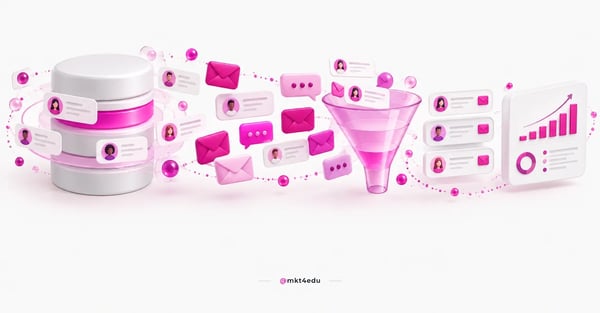 Caption: Mass personalization connects history, behavior and channel in a single customer record.
The gain shows up on three fronts. Engagement rises because the message relates to what the contact already signalled, the conversion rate follows that movement, and the base stays healthier, since people who receive something useful keep opening.
This repositions marketing strategies. Instead of one large send per month, the operation keeps several variations running at the same time, each addressed to a specific slice of the base.
Relevance and scale stopped being opposites in this setup. The same send can carry four or five versions of the offer, and each contact only ever sees the version that matches the group they belong to.
The type of platform weighs on that choice. An operational, analytical or strategic CRM surfaces different cuts of the same data, and the customer experience changes with the cut the team can reach day to day.
None of this depends on the size of the budget. It depends on an organized database, filled-in fields and a clear rule about who receives what.
How do you use a CRM to turn mass marketing into a relevant conversation?
A CRM becomes the engine of mass personalization when it performs three jobs in sequence: gathering reliable data, splitting the base into groups with similar intent, and sending the right communication to each group without manual work. Order matters, because segmenting a dirty base produces the wrong message at scale.
Data segmentation: the step that shapes the rest
Data segmentation starts with the fields the team actually fills in. Job title, program of interest, contact source and funnel stage usually produce more useful cuts than dozens of abandoned properties in the record.
Behavior outside the CRM counts as well. Segmenting your audience with Google Analytics reveals pages and flows a form never captures, and that cut feeds sharper lists inside the platform.
A simple rule keeps the excess away: every segment has to justify a different message. If two lists receive the same email, they are one single list.
Marketing automation and email marketing campaigns
With the segments in place, marketing automation takes over the repetitive work. Email marketing campaigns start to use personalization tokens, smart content and behavior triggers instead of one single text for the whole base.
The inventory of marketing automation tools that impact results is wide, and the choice usually comes down to integration rather than a feature list.
Templates help, as long as the variation goes beyond the first name. Recommendations from history, enrollment anniversaries and an offer tied to the last asset downloaded move the reply rate more than the greeting does.
Behavior analysis and continuous adjustment
Personalization does not end at the send. Opens, clicks, the page visited after the click and the reply to the commercial team form the picture of which variations worked.
Connecting that picture to the customer journey recorded in the CRM avoids reading each campaign in isolation and shows at which stage the contact stalls.
This cycle of measuring and correcting is what separates mass personalization from automated blasting. Without adjustment, automation only repeats the same mistake faster.
Which marketing tools support mass personalization?
The stack of marketing tools for personalizing at scale has three layers: the CRM that holds the data, the marketing automation engine that sends, and the integrations that bring extra channels. When all three live on one platform, the risk of marketing and sales drifting apart drops sharply.
HubSpot CRM covers the first two layers natively. Lists, workflows, emails, forms and contact records share the same base, and CRM training for the team often returns more than buying one more tool.
Integrations cover what the platform does not. Mailchimp is one possible integration for teams that already have sending history there, though the main email flow gains from staying inside HubSpot CRM, where the behavior is already recorded.
Three tactics pay off quickly with this set: an offer tied to the last interest shown, a follow-up message triggered by a specific action, and variable content per segment inside the same email.
Operations that spread communication across four or five systems pay for it in duplicated data. A contact who unsubscribes in one tool keeps receiving from another, and the complaint reaches the commercial team with no trace of where the send came from.
Video: a walkthrough of the HubSpot CRM structure, the base that makes mass personalization possible. Narrated in Brazilian Portuguese, with automatic captions available.
A walkthrough of the HubSpot CRM structure. The audio is in Brazilian Portuguese, so turn on the automatic subtitles in the player to follow along in English.
Small details still count. Using the name, the program of interest and the preferred channel shows the record was read, and that changes how the message lands.
What do HubSpot's AI agents change in mass personalization?
AI moved mass personalization from fixed rules to content generated per contact. HubSpot groups its agents under the Agent Hub, reached through the Breeze Assistant, and each agent takes on part of the work that used to require one operator per campaign.
Nurture Agent works at lead level, with personalized emails drawn from what the record shows. Campaign Agent moves one step up and handles the planning of multichannel marketing campaigns.
Data Agent answers questions about contacts and companies straight from the base, shortening a lookup that used to become a report. Agent Builder lets teams assemble their own agents for specific routines.
|
Agent |
What it handles |
Where it fits in personalization |
|
Nurture Agent |
Personalized emails per lead |
Message variation inside the same flow |
|
Campaign Agent |
Multichannel campaign planning |
Consistency across channels on one offer |
|
Data Agent |
Answers about contacts and companies |
Quick read of a segment before the send |
|
Agent Builder |
Creation of custom agents |
Specific marketing and sales routines |
Table: The agents gathered in Agent Hub and the role each one plays in mass personalization.
None of these agents replaces the segmentation rules. They speed up the production of variations, and the decision about who receives what stays with the team.
The most common questions about HubSpot AI and its agents concentrate on access, usage limits and what changed in the tools already under contract.
The cost of entry also changed in nature. The barrier stopped being technical and became organizational, because a well-instructed agent working on a messy base produces a convincing variation built on the wrong information.
The practical recommendation is to start small. One nurture flow with two agent-generated variations gives enough material to compare results before widening the use.
How do you align CRM strategy, inbound marketing and inbound sales?
A CRM strategy only becomes mass personalization when marketing and sales work on the same base. Inbound marketing feeds the record through content and forms, inbound sales reads that record before reaching out, and the CRM keeps the whole conversation so neither side starts from zero.
The starting point is the objective, not the tool. Planning a CRM strategy in stages avoids the mistake of configuring properties before knowing which question the team needs answered.
On the commercial side the gain is direct. When a rep opens the record and sees which emails the contact read and which page they visited yesterday, the approach changes tone without a new script.
The inbound sales tactics that scale enrollments depend on exactly that, because contact volume only holds up with context ready at the moment of the call.
Three commitments keep marketing strategies aligned with the commercial team and stop personalization from depending on the goodwill of whoever fills in the record:
- Agreed mandatory fields: marketing and sales define together what cannot be left blank in the record.
- Periodic base review: a contact with no interaction for several months leaves the active sending cadence.
- A/B testing per segment: the variation is compared inside the group, never against the whole base.
Training belongs on that list for a practical reason. The best designed cadence falls apart when half the team records information in a free text field and the other half uses the correct property.
Outdated data sinks any personalization. A base with the wrong job title and a stale program of interest delivers an irrelevant message as efficiently as it would deliver the right one.
How do you measure mass personalization and protect the customer experience?
Measuring mass personalization combines delivery indicators with relationship indicators. Opens and clicks show whether the message caught attention, conversion shows whether it drove action, and unsubscribes show whether the volume went past the point for that segment.
Delivery KPIs (Key Performance Indicators) tell only half the story. A high click rate with low conversion usually points to a promise that does not match between the subject line and the landing page.
The customer experience also shows up in less obvious signals, such as a direct reply to an email, the time to first commercial contact and repeat visits to the same asset.
|
Indicator |
What it reveals |
When to raise the alert |
|
Open rate |
Relevance of the subject for the segment |
A sustained drop across three sends |
|
Click rate |
Fit between the offer and the group |
High clicks with low conversion |
|
Conversion |
Strength of the offer at the right moment |
Results concentrated in one single segment |
|
Unsubscribe |
Too much volume or the wrong cut |
Growth right after a change in cadence |
Table: Tracking indicators for personalized marketing campaigns.
Comparing segments against each other is worth more than comparing a campaign with last month's. The cut shows where personalization is paying off and where it is still cosmetic.
It is worth separating the indicator from the diagnosis. A drop in opens points to a symptom, and the cause may sit in the subject line, the frequency, the sending time or the composition of the segment itself.
The base review belongs on the same calendar. Without periodic cleanup, data segmentation ages and marketing campaigns start to feel generic again to whoever receives them.
Frequently asked questions about mass personalization
Where should you start with mass personalization in the next cycle?
The first move is smaller than it looks. Pick two segments that justify different messages, build one campaign with both variations and compare the result between the groups before widening the cadence to the whole base.
The second move is about the base. Define the mandatory fields with marketing and sales at the same table, clean out contacts with no recent interaction and record the source of every new entry.
The third is about tooling. Confirm what the current licence already covers in automation and in AI agents before buying anything new, because much of what seems missing is switched off rather than absent.
Teams that need to design this cadence inside the CRM can talk to the Mkt4edu team and start from a diagnosis of the current base.












 Portugal