






For years, measuring how much traffic Google Search sent to an Instagram or TikTok profile was a matter of guesswork. The platforms showed their own numbers, but the portion coming from Google remained invisible.
That has changed with Search Console for social media. With the platform’s new features, Google now shows, in official reports, which searches lead people to your posts on Instagram, TikTok, X, and YouTube—and how that audience interacts with each piece of content.
For anyone who creates social media content or manages a brand’s digital presence, this is an unprecedented layer of raw data. And best of all: it doesn’t require third-party tools or even a website.
In this article, you’ll learn what this feature is, why it matters, its benefits, a step-by-step guide to setting it up, and how to use the data in your strategy.
What is Search Console for Social Media?
Social Media Search Console is the common name for “platform properties,” a new type of property in Google Search Console that connects Instagram, TikTok, X, and YouTube accounts and shows how posts from these networks perform in Google Search and Discover.
The feature was officially announced by Google in July 2026 and rolled out globally to all users at the end of that same month.
According to Google’s announcement, the goal is to help website owners and creators “track which search terms lead people to their content on Instagram, TikTok, X, and YouTube, and see exactly how their audience interacts with their posts.”
In practice, it works like this: if a Reel, a TikTok video, or a Short appears as a result in a Google search, that performance is now tracked in a dedicated section within Search Console.
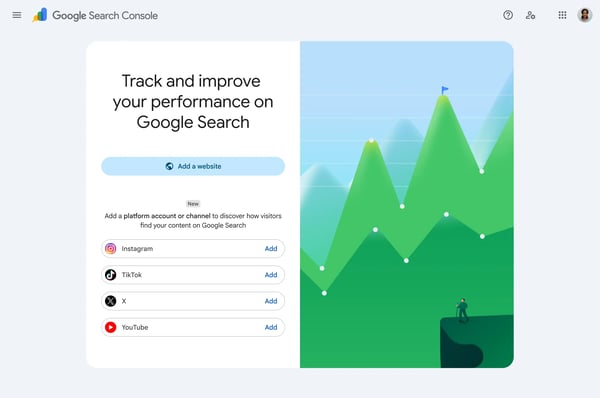 Image 01: Platform property selection screen in Search Console. Source: Google Search Central
There’s one detail that makes this new feature special. Until now, every Search Console property required verification of a domain or URL that belonged to you. From now on, verification is done through authorization in your social media account, without a website involved.
It’s worth clarifying the scope: the data refers to searches conducted on Google, not to internal searches on each social network. The official documentation on social and video content analytics details the areas covered, which include Search, Discover, and Google News.
This new feature didn’t come out of nowhere. Back in 2025, Google had already tested a view of social channels within Search Console Insights, albeit in a more limited format. Platform properties have refined this idea and transformed it into a full-fledged property type, complete with dedicated reports.
What is the difference between a website property and a platform property?
The key difference lies in what each property verifies and measures. A website property verifies ownership of a domain or URL and measures the pages at that address in search, while a platform property authorizes access to a social media account and measures that profile’s posts across Google’s surfaces.
In day-to-day analysis, this translates into a few practical distinctions. Here’s how the two compare:
|
Aspect |
Website Ownership |
Platform Ownership |
|---|---|---|
|
What it checks |
A domain or URL prefix that belongs to you |
An Instagram, TikTok, X, or YouTube account |
|
How it verifies |
DNS, HTML file, tag, or Google Analytics |
Direct authorization through your social media account |
|
What it measures |
Website page performance in search |
Performance of profile posts in Search, Discover, and Google News |
|
Who can use it |
Anyone who manages the website or domain |
Anyone who manages the network account, even without a website |
|
Reports |
Full suite, including indexing and user experience |
Performance, Insights, and Achievements, tailored to social content |
Table 01: Comparison based on the platform’s features as advertised and Search Console documentation.
An important detail of this comparison is that platform properties do not include the technical indexing and coverage reports available for websites. This makes sense, since social content is hosted and rendered by the platforms themselves, outside of your technical control.
For brands, the two types complement each other. The website remains the central digital asset, and platform properties add insight into social channels within the same search analytics tool.
Why is Search Console for social media important?
The importance of Search Console for social media lies in its ability to transform estimates into primary data.
For the first time, Google itself reports how much search traffic it sends to social media profiles, which search queries generate those visits, and which posts stand out—all in official, exportable reports.
This development aligns with a broader shift in behavior. An internal Google study released in 2022 had already indicated that about 40% of young Americans between the ages of 18 and 24 turned to TikTok or Instagram, rather than Google, to find a place to have lunch.
Since then, the discovery journey has become thoroughly fragmented. People search on Google, social media, and AI-powered responses—often all within the same purchasing journey. This is the scenario we detail in our content on SEO for social media, published before the feature was announced.
Google, for its part, is increasingly displaying social content in its search results. The official documentation mentions elements such as the short video carousel, the recent posts carousel, and the “what people are saying” block—all powered by social media content.
Profiles, Reels, videos, and threads appear in searches for recommendations, tutorials, and reviews. However, until now, this performance had been off the radar for SEO professionals: appearing in these spaces was visible on the SERP, but it wasn’t measurable by publishers.
Those who were already working to get Instagram to appear on Google, for example, had to rely on manual searches to check the results. Now, that same effort has an official metric.
This is even more significant in sectors that rely on social media for building relationships. This is the case with social media in education, where visibility, engagement, and student recruitment all play a role in a prospective student’s decision.
There is also the issue of traffic retention. With the growth of zero-click search, some user sessions end without a visit to the website.
Therefore, measuring brand visibility across all touchpoints, including social media profiles, is the key to understanding the true impact of organic presence.
In short: brand managers are now beginning to view Google as a source of measurable social traffic. And those who were already producing search-optimized content finally have an official benchmark to prove the return on that investment.
 Caption: Complete guide to integrating Google Search Console with social media profiles.
What are the benefits of the platform’s features?
The main benefit of the platform’s features is that they provide official visibility into traffic that was previously invisible: the path from a Google search to a social media post.
Once connected, each network becomes a property with its own reports on performance, trends, and milestones.
This is where it becomes clear how to measure your posts: the data appears in three reports that anyone familiar with Search Console will recognize immediately. Here’s how it’s all organized:
|
Report |
What it shows |
What it showsHow to make the most of it |
|---|---|---|
|
Performance |
Clicks, impressions, and additional metrics, with filters by post and by query, plus data export |
Find out which posts and which searches drive the most traffic, and prioritize the formats that work |
|
Insights |
Overview of recent traffic trends, top-performing posts, and how people discover your profile on Google |
Track the overall health of your social presence in search without diving into filters |
|
Achievements |
Growth milestones, such as reaching a new level of clicks from Search in the last 28 days |
Celebrate progress and communicate developments to the team and management |
Table 02: The three reports are the same as those described by Google in its announcement of the platform’s features, adapted for social and video content.
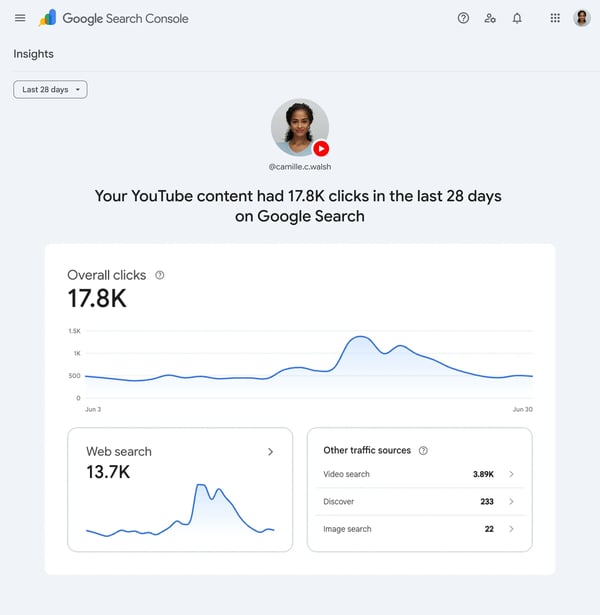 Image 02: Example of the Insights report for a platform property. Source: Google Search Central
In addition to the reports themselves, there are some benefits worth highlighting for those working in digital marketing:
- Primary data from Google: the numbers come directly from the source, not from estimates by third-party tools. When putting together the brand’s social media report, the share of search traffic is included using official data.
- Actual search queries: You discover the words people type into Google before landing on your profile—a valuable resource for content ideas, captions, and scripts.
- No website required: Creators and businesses that operate exclusively on social media can measure their performance on Google Search for the first time.
- Free export: Data can be exported for analysis in other tools, such as spreadsheets and BI dashboards.
- Cross-channel comparison: With your website and social media accounts linked to the same Search Console account, you can see the role each channel plays in driving brand searches.
One thing to note: this feature does not replace each platform’s native analytics. It shows the share of audience that comes via Google, which complements each social network’s internal reach and engagement data.
How do you set up Search Console for social media?
Setting up Search Console for social media takes just a few minutes: simply log in to your account, add a new property, select the desired platform (Instagram, TikTok, X, or YouTube), and authorize the connection to your social media account—where each platform is treated as a separate property.
The complete steps, according to the Search Console Help Center, is as follows:
- Sign in to Google Search Console with the Google account that manages the brand’s digital presence.
- Open the property selector in the upper corner and click "Add property." If you’re starting from scratch, you can go directly to the tool’s welcome page.
- Choose from the four available platforms: Instagram, TikTok, X, or YouTube. They appear in their own section, separate from the website and domain options.
- Follow the on-screen verification steps to securely authorize the connection. This process confirms that you control the social media account in question.
- Repeat the process for each network you want to monitor. Each connected platform creates a separate property with its own reports.
After verification, the Performance, Insights, and Achievements reports will begin to populate with data from that profile. As with any new Search Console property, it may take a few days for the data volume to stabilize.
If the option doesn’t appear in your account yet, it’s worth checking again in a few days. Google completed the global rollout at the end of July 2026, but interface updates are typically rolled out gradually across accounts.
Regarding access, it’s best to plan ahead. Authorization is handled through the social media account, so whoever performs the verification must be able to log in to the brand’s profile.
For companies that outsource their social media, this requires quick coordination between the agency and the in-house team.
A best practice for companies: link your social media accounts to the same Google account that already manages your website properties. This centralizes the brand’s search visibility, facilitating integrated analytics and reporting.
How can you use social media data in your SEO strategy?
Social media data from Search Console is of little value if it just sits in the dashboard. Strategic use begins when you integrate it into social media analysis that your team already conducts, by cross-referencing the search queries that drive people to your profiles with your content planning.
Here are some practical ways to get started:
- Discover the topics Google associates with your profile: the queries in the Performance report show the topics where your brand already has social visibility in search. These topics can indicate where it’s worth doubling down.
- Optimize the formats that search favors: if videos account for the majority of clicks, video video SEO —such as descriptive titles, chapters, and transcripts—tend to boost those results even further.
- Align captions and scripts with search intent: incorporating actual search queries into the text, audio, and on-screen text of your posts brings your content closer to what people are looking for, without forcing keyword repetition.
- Compare the roles of your website and social media in the user journey: with all properties under the same account, you can see when your audience arrives via the blog and when they arrive via social media profiles, and allocate efforts based on data.
- Monitor your brand across all search surfaces: by combining your social media properties with the the AI report in GSC, your team can now see organic performance in traditional search, AI-powered answers, and now on social media.
- Enrich your social media report: export click-through and impression data and add the missing dimension to your monthly report, showing how much of your social growth comes from Google Search.
- Identify evergreen content on social media: posts that continue to receive search clicks months after publication indicate topics with consistent demand, which deserve updates and new developments.
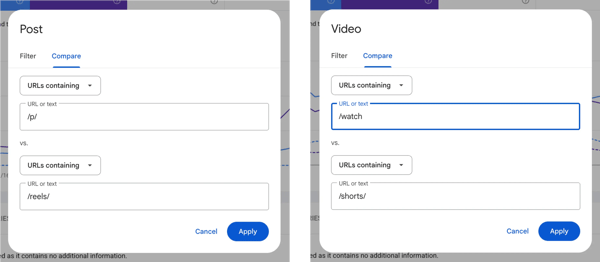 Image 03: Comparison of content formats in the Performance report, from the official social and video analytics guide. Source: Google Search Central
This cross-referencing of data tends to benefit those who treat search as an ecosystem rather than as isolated channels. Blogs, social media, and AI-powered responses feed into one another: authority built in one environment strengthens visibility in the others.
With this information, the team can act on two fronts at the same time. On social media, it produces more content about the courses that are already generating search traffic. On the website, it highlights the pages for those courses to capture the same demand in a different format.
For those who are recruiting students on social media, this data fills a long-standing gap: it makes it clear which portion of the traffic comes from Google searches, and not just from reach within the platforms themselves.
The same logic applies to any industry; after all, the search query that leads someone to a social media post is a sign of real demand, and signs of real demand are valuable throughout the entire acquisition funnel.
For teams that already implement structured SEO strategies, platform properties add a data source that simply didn’t exist before. It’s an opportunity to extend to social media the same rigor of analysis that the website has always had.
What are the limitations of Search Console for social media?
The main limitation of Search Console for social media is its scope, as the reports show only the performance of posts on Google surfaces, such as Search and Discover; in other words, everything that happens within the platforms—from reach in the feed to internal searches—remains outside the tool.
Other limitations should be factored into planning before the team sets expectations:
- Four platforms at launch: Instagram, TikTok, X, and YouTube. Profiles on Facebook, LinkedIn, Pinterest, and other platforms are excluded—at least for now.
- No internal search data: searches conducted within TikTok or Instagram are not included. For these, native tools—such as TikTok’s Creator Search Insights—should be used.
- More limited reporting than on websites: There are no reports on indexing, coverage, or page experience, since the technical aspects of social content are handled by the platforms.
- Reliance on Google visibility: The feature measures what appears on Google’s surfaces. Profiles with little public content or little indexed content tend to see low volumes initially.
None of these limitations invalidate the feature. They simply define its role in the analytics stack: platform-specific metrics account for the Google search portion, while native analytics and social listening continue to cover the rest, including the management of reputation crises on social media.
It’s also worth remembering that the platforms themselves continue to evolve on their own. Initiatives such as Meta One, which reorganized Meta’s paid subscriptions, show that the social media ecosystem is constantly changing, and the analytics layer needs to keep up.
The market expects this feature to evolve, as is often the case with Search Console reports. Google itself has published a guide to analyzing social and video content along with the global rollout, signaling continued investment in this area.
Frequently Asked Questions About Search Console for Social Media
So, is it worth connecting your social media accounts to Search Console?
If your brand posts content on Instagram, TikTok, X, or YouTube, linking those profiles to Search Console is a low-effort decision with clear benefits.
Setup takes just a few minutes, the feature is free, and the data answers a question that has gone unanswered for years: How much does Google Search contribute to a brand’s social audience?
More than just a new dashboard, these platform properties confirm a trend. Search is no longer the exclusive domain of websites, and Google now treats social content as a first-class result, complete with official metrics.
Those who connect their profiles now are also building a history. Each month of accumulated data becomes a basis for comparison for future content decisions, and this historical data cannot be recovered later by those who put it off until later.
To take advantage of this scenario, the next step is to ensure that your posts are optimized to be found—both in the platforms’ internal searches and on Google, as well as in AI-powered responses.
That’s exactly what we cover in our content on social media SEO: keep reading to learn how to optimize your profiles and posts to appear in search results.
Social data next to search data completes the picture behind organic search work.





























 Portugal