



.jpg)


At an educational institution, support is not one department. It is three, sharing the same channel. The student sends one message about enrollment, the invoice and a make-up exam grade. The registrar answers one part, finance answers another, and the third has no owner until someone calls to chase it.
Building a HubSpot service structure solves this less through technology and more through design: where the ticket comes in, who answers each type, how the student follows along without calling and how the institution finds out whether it was resolved.
What makes up a HubSpot service structure?
A HubSpot service structure has five linked pieces: the intake channels, which turn a message into a ticket; the ticket pipeline, which organizes progress; the routing and deadline rules, which define who answers and how fast; the customer portal, where the requester follows along on their own; and the feedback surveys, which measure the result.
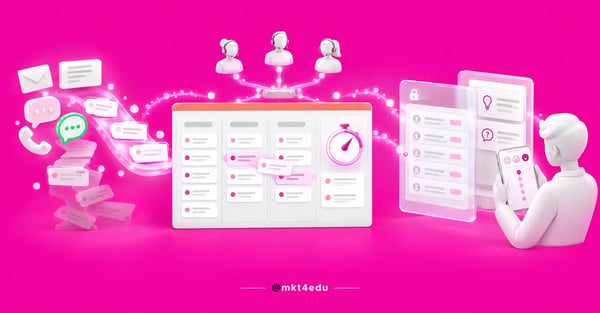 Caption: a HubSpot service structure only closes the loop when the five pieces talk to each other
None of these pieces works well alone. A carefully built pipeline with no intake channel configured becomes a manual spreadsheet. A portal with an incoherent pipeline shows the student a sequence of statuses that means nothing. And a survey fired with no closure criterion measures a conversation that may never have happened.
The pieces that change workload the most are routing and the portal. They attack the two biggest sources of rework in a registrar's office: the ticket that circles between departments and the call that only asks how things are going.
Anyone still at the previous layer, deciding whether a ticketing system is worth it, will find the concepts and benefits in how to implement a ticketing system. The strategic reading of why to centralize support on one platform is in customer experience with the Service Hub, which covers the journey, not the configuration.
How does a ticket come in: email, form, chat or manual?
A HubSpot ticket is born in four ways: manual creation, on the tickets index page or in a record's associated object card; a connected channel, automatically; a workflow, with the create record action; and the API (Application Programming Interface). Manual creation is available across all products and plans, while workflow creation requires Service Hub Professional or Enterprise.
In the help desk, the supported channels are chat, email, forms, calling, WhatsApp, Facebook Messenger and custom channels. Every message arriving through a connected channel creates a ticket, with no option to turn it off: the only way to stop ticket creation is to disconnect the channel.
Here is the change that tends to catch teams off guard. The documentation is literal: accounts created after April 1, 2024 cannot create tickets from channels connected to the conversations inbox. In those accounts, ticket management has to go through the help desk.
For an educational institution, the combination that usually works has three entry points: an institutional email connected as a channel, a form published on the site and in the portal, and chat on the enrollment pages.
The form is the most underrated of the three, and the only one that arrives already classified, because you choose the questions. Teams that build recruitment with HubSpot forms apply the same logic, swapping lead fields for program and subject. Chat pays off more with triage before a human steps in, which is solved with chatbots configured in HubSpot that separate financial from academic topics in the first question.
Video: the chatbot triage that feeds a HubSpot service structure before a human steps in, on the mkt4edu channel (in Portuguese)
Whatever the channel, three properties are required on any ticket: name, pipeline and status. With no criteria for the last two, the ticket is born somewhere nobody looks.
How do you design an institution's HubSpot ticket pipeline?
The ticket pipeline is the sequence of statuses a ticket travels through. The platform ships four default statuses: New, Waiting on contact, Waiting on us and Closed. For tickets, stages are called statuses by convention, but they work like stages on any object and each one is marked as open or closed.
Creating a custom pipeline requires a Starter, Professional or Enterprise subscription, and free tools cannot create one. The path is the settings icon, then Objects under data management, select the object, the Pipelines tab and Create pipeline. The permission needed is edit property settings, not Super Admin.
The first design decision is how many pipelines should exist, and the answer is almost never one per department. Mirroring the org chart is the most common mistake in an educational service project: one pipeline for the registrar, another for finance, and the ticket about a re-enrollment invoice has no home, because it belongs to both.
A separate pipeline is only justified when the workflow is genuinely different, with distinct stages and deadlines. The better criterion is the type of resolution, not the owner. A ticket resolved in one reply follows one flow. One that depends on a committee or the treasury follows another. One that depends on a student document follows a third.
On quantity, the documentation describes, within the simplified limits beta, a ceiling of custom pipelines per subscription: none on free tools, 15 on Starter, 100 on Professional and 350 on Enterprise. That total is shared across all objects and does not count default pipelines, so check the current number in your portal before planning around it.
Professional and Enterprise subscriptions also allow pipeline rules: restricting stage skipping, preventing a ticket from moving backwards and limiting who can edit records in certain statuses. Configuring them requires Super Admin, and with rules active, bulk editing is disabled.
That last consequence weighs on enrollment season, when someone needs to close two hundred tickets at once at the end of the period.
How do you route tickets and enforce deadlines with SLAs?
Routing is the rule that decides who receives a ticket. Tickets can be assigned manually or distributed by rules to specific users and teams, with skill-based routing available. The documentation is explicit: automatic routing of incoming messages requires an assigned Sales or Service seat for the user who will receive them, and users without a paid seat are left out of assignment rules.
That licensing detail blocks more projects than any configuration error.
By default, automatic distribution only considers agents marked as available, and the conversation stays unassigned when nobody is online. At institutions with shift-based support, keeping that default stops a morning ticket from landing with someone who only starts at night.
Team design has to come before the rules. Poorly defined teams produce queues nobody watches, and that choice depends on the map of users and permissions already established in the portal.
Deadlines are the other half. With Service Hub Professional or Enterprise, the help desk calculates three SLA metrics: time to first reply, time to next reply and time to close. Each generates automatic due date and status properties on the ticket.
Goals can apply to every ticket or vary by property, such as priority, team, source or pipeline, and combining properties requires Enterprise. SLAs can also apply at all times or only during business hours, with a defined time zone and schedule.
One documented limitation deserves attention at design time: the applicable SLA rule is determined when the SLA is applied and is not re-evaluated if the ticket's properties change later. A ticket that starts as low priority and becomes urgent the next day keeps the original rule's deadline. On an academic calendar, that matters: classify priority at intake, through the form or the chatbot, not in the middle of the conversation.
Does the HubSpot customer portal cut calls to the registrar?
The customer portal is a logged-in area where the contact checks their own tickets, follows the status and replies without opening email. It requires Service Hub Professional or Enterprise and a connected domain, because portals on HubSpot-provided system domains, the hs-sites kind, do not send membership emails to an access group.
It is the piece that cuts the most follow-up calls and the one fewest teams configure.
Access is always protected by login. There are two paths: the admin requires access group membership and the platform sends the registration emails, or self-registration is enabled in private content settings.
This is where the most common rollout trap sits. Registration emails go to the contact's member email property, not to the email field the institution uses day to day. A base imported with the address in the wrong field produces a portal nobody accesses, with no visible error message.
The second trap is scope. Only tickets appear in the portal: conversations with no associated ticket are not shown, whether they came from chat, a team email, a form or Facebook Messenger. If the institution handles half its volume through loose conversations, half the student's history simply does not exist for them.
Customization covers logo and favicon through the Brand Kit, a theme aligned with the site, the portal name in the browser tab and an editable URL slug. The default columns run from subject and requester to owner and status, with up to ten configurable properties, and the “ticket” label can become “requests” or “cases”.
Ticket visibility has three levels: only their own tickets, every ticket of the associated primary company, or selected customers by property filter. At an institution, the company level usually applies to corporate agreements and sponsors, never to an individual student.
You can also include a support form inside the portal, which creates the ticket already associated with the logged-in user. In that form the email field is unnecessary, because the association already came from the login.
One structural limitation closes the subject: the documentation records that multi-language portals are not supported, and each portal uses the domain's primary language. That matters for institutions with international offerings.
How does a knowledge base reduce ticket volume?
The knowledge base is the repository of articles that answers a question before it becomes a ticket. On Service Hub Professional, the account gets one knowledge base with up to 2,000 articles; on Enterprise, up to 100 knowledge bases and 10,000 articles in total. Creating and editing articles requires an assigned Service seat.
In educational support, a good share of tickets is calendar repetition: re-enrollment deadlines, a second copy of an invoice, transcript requests, dropping a course. These are questions with stable answers that change once a semester.
Each article accepts a title, subtitle, body, slug, language, category, subcategory, tags and meta description. Scheduling publishes, updates and unpublishes at a defined date and time, which solves content with term-limited validity.
Visibility has three levels: public, restricted to members of an access group, or restricted to single sign-on. You can keep academic regulations open to applicants and the internship handbook closed to enrolled students, in the same base.
One editorial caution. A public article gets indexed by search engines and competes with the institutional blog for the same query. Separating recruitment content from support content avoids cannibalization between the two.
The bigger gain appears when the base is cited inside the conversation. The agent answers and attaches the article; the next student finds the article before opening a ticket. It is the only point where today's work reduces tomorrow's.
Which HubSpot satisfaction survey should you use: NPS, CES or CSAT?
HubSpot splits satisfaction surveys into three types with different goals: loyalty, which measures NPS; support, which measures effort; and satisfaction, which measures CSAT. All three require Service Hub Professional or Enterprise and a Service seat, and sending by email depends on marketing permissions with publish access to the email tool.
NPS lives in the loyalty survey, on a 0 to 10 scale: 0 to 6 are detractors, 7 and 8 are passives, 9 and 10 are promoters. Delivery is by email or a web page with the tracking code installed, as a one-time or recurring send, and if the contact dismisses the web version without answering, it does not reappear for 14 days.
The support survey measures something else: the customer's effort in the support experience, on a seven-point scale from strongly agree to strongly disagree. It is email only and fires based on the ticket's pipeline and status, at closure or after a delay in minutes, hours or days.
One important detail for the cadence: the documentation records that it is sent only once per ticket, and a ticket reopened and closed again does not trigger another send.
The satisfaction survey measures how satisfied the customer was with a product, service or experience, and accepts three delivery methods: email, web page and chat, inside selected chatflows, when the conversation ends. Its default recipient criterion is a contact who became a customer more than 30 days ago, and the delivery method cannot be changed after it is chosen.
Here is how the three divide up in an academic operation:
|
Survey |
Metric and scale |
Delivery |
When it makes sense |
|
Loyalty |
NPS, 0 to 10 |
Email or web page |
Periodic reading of the student base, once a semester |
|
Support |
CES, seven points |
Email only |
At ticket closure, once per ticket |
|
Satisfaction |
CSAT, sentiment |
Email, web page or chat |
At the end of a chat conversation or a one-off service |
Table: the three feedback surveys that close the loop of a HubSpot service structure
The cadence that usually holds at an educational institution uses two of the three: the support survey at each ticket closure, to measure service, and the loyalty survey once or twice a year, to measure the relationship. The satisfaction survey comes in when there is a one-off service that deserves its own reading, such as an in-person enrollment desk. Firing all three at once tires the base and drops the response rate of all three.
Video: the communication that holds up the score measured at the end of a HubSpot service structure, on the mkt4edu channel (in Portuguese)
How much subscription does each piece of the structure require?
The complete structure requires Service Hub Professional or Enterprise, because the help desk, the customer portal, the knowledge base, SLA goals and feedback surveys live in those plans. Tickets and custom pipelines, on their own, work from Starter. That difference decides whether the institution starts small or has to buy the whole package.
You can start with tickets and a pipeline on Starter, solving internal organization. What does not exist at that level is self-service: with no portal and no knowledge base, every status check still goes through a person.
|
Piece |
Minimum subscription |
Additional requirement |
|
Create a ticket manually |
All products and plans |
None |
|
Custom pipeline |
Starter |
Edit property settings permission |
|
Pipeline rules |
Professional |
Super Admin to configure |
|
Help desk and channels |
Service Hub Professional |
Assigned Service seat |
|
SLA goals |
Service Hub Professional |
Property combinations only on Enterprise |
|
Customer portal |
Service Hub Professional |
Connected custom domain |
|
Knowledge base |
Service Hub Professional |
2,000 articles on Professional, 10,000 on Enterprise |
|
Feedback surveys |
Service Hub Professional |
Service seat and publish access to the email tool |
Table: documented requirements per piece of a HubSpot service structure
Two rows in that table are usually discovered late: the custom domain for the portal and the Service seat for routing. Both are silent blockers that only appear when someone tries to use the feature. Check those dependencies at the same moment the account is configured, because a HubSpot implementation project that has already sorted out domains and licenses delivers the structure in weeks, not months.
Which mistakes break a service structure the most?
The mistakes that bring a service structure down are not technical, they are design mistakes: a pipeline mirroring the org chart, statuses with no exit criteria, a portal published without the contact base prepared, surveys firing to people who were never served and no rule about who closes a ticket. All of them show up between the second and third month.
- Changing the pipeline structure with thousands of tickets already created means remapping statuses, rebuilding reports and retraining the team. That is weeks of work to fix an afternoon's decision.
- Statuses with no written definition: what does “under review” mean, and who takes the ticket out of there? With no documented answer, the status becomes a dump and average resolution time stops meaning anything.
- Treating the customer portal as a page rather than a database: publishing without checking the member email property produces a wave of students who get the link and cannot get in, which consumes more support than it saves.
- Measuring too early: firing the support survey in the first month, with the pipeline still changing, produces a number incomparable with the next month's.
- Isolating support from the rest of the operation: an invoice ticket from a student who is also a graduate program lead needs to show up on the record the sales team sees.
That last mistake costs the most revenue, and it requires a single CRM for an educational institution. Integrating post-sale and revenue is exactly what a RevOps reading organizes: same data, same funnel, same report, from first contact to enrollment renewal.
Frequently asked questions about a HubSpot service structure
So, is this service structure worth building?
It is worth it when the volume already hurts. If the registrar works from a shared inbox and a spreadsheet, the structure gives time back in the first semester, because it takes the two most repetitive tasks away from people: distributing tickets and reporting progress.
The return does not come from the pipeline. It comes from the portal and the knowledge base, which move work to self-service without making the experience worse.
What cannot be copied from any article is the design. How many pipelines should exist, which statuses describe the real flow, who answers which type of ticket, what deadline is realistic on your calendar and which survey cadence your base can take.
Those decisions depend on the support flow the institution already has, the volume per period and who answers what today. A pipeline designed on paper, without looking at two weeks of real tickets, almost always has to be rebuilt.
The mkt4edu team works on Service Hub implementation in recruitment and student relationship operations, and you can talk to us to review your support flow before configuring the first piece.

























 Portugal