





The fear is always the same. You built a new workflow, it looks right on screen, and the only way to know whether it is actually right is to switch it on. Except switching it on means sending email to real contacts.
That is the moment someone asks about the HubSpot sandbox. And that is the moment most teams find out two things at once: that the test environment exists, and that their account probably is not entitled to it.
That second detail rarely comes up front.
The sandbox is a real feature, well documented and useful, but with a subscription requirement that completely changes planning for anyone on Professional.
In Implementation projects, discovering that in week three costs replanning; discovering it in week one costs a ten-minute conversation.
What is the HubSpot sandbox and what is it for?
The HubSpot sandbox is a separate account that reproduces your production account's functionality to allow testing without affecting the account that is live. It exists so you can validate automations, custom objects, properties, and integrations before committing real data, and then move what worked to the main account.
The decisive word there is functionality.
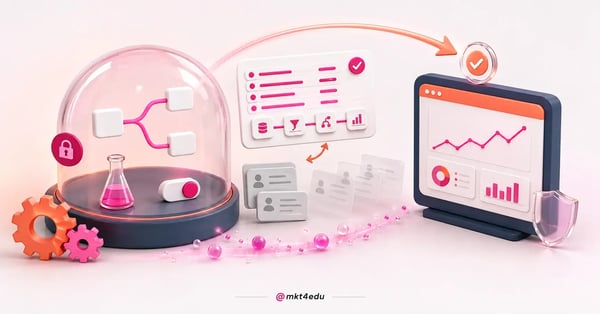 Caption: What passes through the dome is the validated configuration, not the database: the sandbox replicates functionality, not content.
The sandbox replicates what the platform can do and how it is configured, not the content of your database. That is different from what many people picture when they hear “test environment”: it is not a clone of your portal with all the contacts, emails, lists, and reports ready to play with.
In practice, the most frequent use is testing structural change. Creating a new property and seeing what it breaks in reports. Reorganizing a pipeline. Testing an integration before pointing it at the live database. Validating a complex workflow, with branches, before enrolling a real contact.
None of those cases is exotic. They all show up in any account past its first month of use, and that is why the subscription requirement weighs so heavily on planning.
Which subscriptions are entitled to the HubSpot sandbox?
The standard sandbox is exclusive to Enterprise subscriptions, and each account is entitled to a single standard sandbox. Starter and Professional accounts have no access to the feature, regardless of which Hub is contracted. It is not a hidden setting, nor something enabled by asking support.
That is the piece of information that reorders everything else.
Anyone who opens account settings and does not find the menu usually spends half an hour thinking they took the wrong path or that they lack admin permission. They do not, since the menu simply does not appear on a subscription that is not entitled to it.
The limit of one sandbox per account also has a practical consequence. Two teams testing different things share the same environment, with one team's changes showing up in the other's work. That requires agreeing on usage windows, and without that agreement the shared environment becomes a source of confusion instead of safety.
If the plan decision is still open in your case, the sandbox is one of the items worth putting on the table before signing, alongside the other features that change level between tiers.
The differences that matter most day to day are laid out in the comparison of HubSpot plans, and it helps separate what is essential from what is desirable.
What is the difference between a standard sandbox and a development sandbox?
They are two types of test account with distinct purposes. The standard sandbox is created through the HubSpot interface, requires Enterprise, and serves to test configuration and process. The development sandbox is created only through the HubSpot CLI and exists for temporary development proof of concept, not to validate operations.
Confusing the two creates wrong expectations in both directions.
From the development sandbox people expect a complete operating environment, which it is not. From the standard sandbox people expect version control, which it also lacks: it is an ordinary HubSpot account with test data, not a deployment pipeline.
Here is how the two options separate in practice:
|
Aspect |
Standard sandbox |
Development sandbox |
|
How it is created |
HubSpot interface, in account settings |
Only through the HubSpot CLI |
|
Audience |
People who configure and operate the platform |
People who develop on the platform |
|
Typical use |
Testing automation, objects, properties, and integrations |
Temporary development proof of concept |
|
Subscription requirement |
Enterprise |
Developer account with CLI access |
|
Expected permanence |
Ongoing environment, one per account |
Temporary, disposable |
Table: Account type classification according to HubSpot's developer documentation.
One operational detail still catches many people off guard: the hs sandbox sync command has been deprecated. Anyone with a routine built on it needs to reorganize the process, because syncing remains available through the interface, but no longer through that command.
What gets copied from production to the sandbox and what does not?
The sandbox is born with the functionality and configurations of the production account, and offers an optional data sync that runs only once.
It brings up to 5,000 most recently updated contacts, with up to 100 associated deals, companies, and tickets per type. Active integrations and surveys do not come along.
That list of exclusions is what separates a reliable test from a false positive.
Active integrations have to be reconnected manually in the sandbox, meaning the connector that works in production does not exist on the other side until someone authenticates it again. If your test depends on data arriving from an external system, that is the first step, not an optional one.
Record identifiers also differ between the two environments. That matters for anything working with IDs: API calls, custom integrations, workflows referencing a specific record. What passed in the sandbox with one ID will not find that same ID in production.
And email sending is limited to the sandbox's own users, which is deliberate protection rather than a defect. You can verify rendering, links, and send logic, but you cannot simulate delivery to a broad database.
Organizing what crosses over and what does not:
|
Item |
Does it go to the sandbox? |
|
Account functionality and configurations |
Yes, at creation |
|
Contacts |
Only in the optional sync, up to 5,000 |
|
Associated deals, companies, and tickets |
Only in the optional sync, up to 100 per type |
|
Active integrations |
No, they require manual reconnection |
|
Surveys |
No |
|
Record identifiers |
No, the IDs are different |
|
Email sending to the real database |
No, restricted to sandbox users |
Table: Documented behavior of the standard sandbox; the data sync happens only once, not continuously.
The sandbox tests logic and configuration very well, and tests poorly anything that depends on record identity, an external connector, or send volume.
What are the HubSpot sandbox limits?
There are two limits that matter to anyone planning automation testing. The sandbox allows up to 100,000 workflow enrollments per day, and each publication to production carries at most 300 changes at a time. The first limits testing volume; the second limits the size of the delivery package.
Neither is tight for normal use. Both become a topic on large projects.
The daily enrollment ceiling rarely shows up in manual testing. It shows up when someone validates a workflow by mass-enrolling the synced list and repeats the exercise several times a day, adjusting criteria between rounds.
The 300-changes-per-publication limit is easier to hit than it looks, because a structural reorganization generates many small alterations.
A property review plus adjustments to a pipeline and to several workflows passes 300 without anyone feeling they changed much.
The implication of this method is to publish in small, thematic batches rather than accumulating weeks of work for a single delivery. A small batch is easier to review, to roll back, and to explain to whoever approves it.
|
Limit |
Value |
What it affects |
|
Workflow enrollments |
100,000 per day |
Automation testing volume in the environment |
|
Changes per publication |
300 at a time |
Size of the package taken to production |
|
Standard sandboxes per account |
1 |
Teams testing in parallel |
|
Contact sync |
5,000, one time only |
Realism of the test data |
Table: Limits stated in HubSpot's official documentation for the standard sandbox.
How do you deploy from the sandbox to production?
HubSpot offers a process for publishing sandbox changes to the production account, in which you select the validated items and send them in a batch, respecting the ceiling of 300 changes per operation.
It is the path that avoids manually rebuilding, item by item, what has already been tested on the other side.
What the deploy does not do is decide for you.
Publishing is a review step, not a convenience button. Each selected change alters behavior in an account with real data, and the approval record has to exist before that.
Treating publication as a project milestone, with an owner and a date, is what keeps a change from appearing with nobody responsible for it.
It is also worth separating the things that make no sense to try to carry over. Synced data is test material, not content to promote. An integration reconnected in the sandbox has to be configured in production with production credentials. And anything that depends on a record identifier has to be checked again at the destination.
On a timeline with several fronts, it is worth treating each test-and-publish cycle as a task with defined inputs and outputs. The logic is the same as organizing projects inside HubSpot: what has no owner and no date is not a step, it is an intention.
No Enterprise: how do you test workflows without affecting production?
Without a sandbox, protection stops being an environment and becomes a protocol. It works with four elements: a test list of controlled internal contacts, manual enrollment instead of an automatic trigger, enrollment criteria restricted by a test property, and review by a second person before activating. It takes discipline, but it covers most of the risk.
This is not a consolation prize. It is how most accounts operate.
The first element is the test base. Internal contacts, with email addresses the team controls, marked by a dedicated property that exists only for this.
Do not use a real contact “we happen to know,” because activity logged on a real contact pollutes history and reporting.
The second is the form of enrollment. A workflow in manual enrollment mode catches nobody by surprise: you choose who enters, one by one, and observe the behavior step by step.
Only after the logic is confirmed does the automatic trigger come in, and even then it is worth starting with narrow criteria.
The third is the entry criterion. While the workflow is being validated, the filter should explicitly require the test property. That creates a double barrier: even if someone activates the workflow by mistake, the eligible population is only the test data.
The fourth is the second pair of eyes. In implementation projects, the most common error in a published workflow is not wrong logic, it is a forgotten condition: a dead-end path, a branch with no action, a delay that contradicts the trigger.
Whoever wrote it rarely sees that; someone else sees it in two minutes.
Add to that the habit of running the test outside campaign hours and checking the suppression list before any send, and you have a process that handles marketing automation without a dedicated environment.
More laborious than having a sandbox, and more transparent, because every decision is recorded where the team can audit it.
Much of the perceived risk, incidentally, comes from not knowing what each trigger fires. A lead nurturing sequence is where that becomes most visible, because a poorly written criterion there reaches a lot of people at once.
Frequently asked questions about the HubSpot sandbox
So, when is the HubSpot sandbox worth using?
The sandbox pays off when the cost of an error in production is greater than the cost of keeping a second environment up to date. That happens on accounts with an active database, with more than one person touching automation, and with an integration connected to an external system.
In a small, recently configured operation, the manual testing protocol resolves it with less friction.
What never pays off is counting on the feature without having confirmed the subscription. The requirement changes a timeline stage, not an execution detail, and it is worth checking that in the same conversation where you define the order of account configurations.
If your account is entitled to the environment, the next question follows: test what? The answer almost always starts with workflows, because that is where a poorly written condition reaches a real contact fastest, and where marketing strategies depend most on the configuration being right.
Start by understanding how to automate workflows in HubSpot CRM and use the test environment for what it does best: making mistakes without an audience.




























 Portugal