



.jpg)


A group with four schools. A university with campuses in three states. An on-campus brand and an online brand competing for the same student.
All of those structures arrive at the same point: they need separate identity, domain, sender and consent, without paying for independent portals.
The platform's answer to that used to be called HubSpot Business Units. Today it is called HubSpot Brands. And that is where research starts working against you, because half the available material uses one name, the interface uses another, and some screens in the product itself still use the old one.
This article first resolves the naming confusion and then gets to what matters: what the feature separates, what it does not, what it costs and at what point it stops being enough.
What are HubSpot Business Units and why did they become Brands?
HubSpot Business Units is the feature that lets you administer several brands inside a single account, each with its own domain, tracking code, forms, campaigns and email subscription types. HubSpot started calling it Brands, keeping the same function and the same add-on purchase model.
The name change was not merely cosmetic.
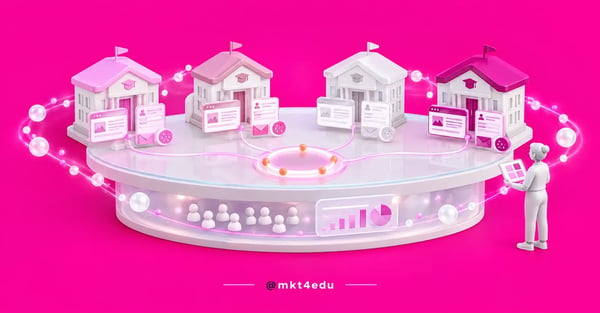 Caption: HubSpot Business Units give each brand its own domain, sender and consent without moving it out of the shared portal
“Business Unit” described an organizational division, close to a department or a branch. “Brand” describes what the feature actually separates: the identity the public perceives, from the domain to the email sender.
For an education group, the second name is more honest. What needs to stay separate is not the internal org chart, it is what the applicant sees when they open the landing page and when they receive the message.
Confirmation of the change sits in the technical documentation. HubSpot records that the API “references business units, which is the former name for brands” and keeps the endpoint path unchanged, because altering it would break existing integrations.
Video: the portal structure HubSpot Business Units fit into, on the mkt4edu channel (in Portuguese)
Business Units or Brands: which name appears on each screen?
The name you see depends on where you are in the portal. The settings screens and the navigation menu use Brands. The contact property created automatically is called Brands. But the official bulk-edit walkthrough tells you to select Business Units in the property picker, and the API preserves the old path.
That inconsistency is the main source of rework for anyone configuring this for the first time.
Someone searches for “Business Units”, finds tutorials with screenshots of an interface that no longer exists, opens the portal, cannot find the menu and concludes the feature was discontinued.
Here is how it breaks down day to day:
|
Where you are |
Name displayed |
What to do |
|
Account settings |
Brands > Multi-Brand |
This is where a brand is created, renamed or deleted |
|
Contact property |
Brands |
Created on its own as soon as the first brand exists |
|
Bulk contact editing |
Business Units |
Look for the old name in the property picker |
|
API and integrations |
business-units |
Keep the old path in existing calls |
|
Third-party material predating the change |
Business Units |
Read it as equivalent, checking the step against the official source |
Table: How the old and current names map across the main touchpoints in the portal.
The practical rule is simple: when the text says Business Units and the screen says Brands, they are the same thing. When the screen says Business Units, that is leftover naming HubSpot has not updated yet, not a different feature.
Recording that equivalence in your internal documentation, alongside the rest of the account configuration decisions, keeps the question from resurfacing every time an analyst changes.
What does the HubSpot brand add-on cost and who can buy it?
The feature is a paid add-on, purchased separately from the subscription. The official documentation indicates availability for accounts with Marketing Hub Enterprise, and each instance of the add-on unlocks exactly one brand. By buying several instances, an account reaches up to 100 brands. Prices are negotiated with HubSpot, not published in a table.
This is the information that usually arrives too late.
In implementation projects, the most predictable frustration is a team building the recruitment plan per brand, splitting owners, designing the nurture sequence, and only then discovering that the feature holding all of it up is not part of the plan they bought.
Two consequences of the add-on model deserve attention before signing.
The first is counting: since each add-on equals one brand, the number of instances comes from the real structure, not the desired one. A school that has not opened yet does not need an add-on today.
The second is permissions. Only Super Admins can create and edit brands, which makes configuring users and permissions in the portal a prerequisite rather than a parallel task.
What can you separate in a multi-brand HubSpot portal?
A multi-brand HubSpot portal separates a long list of assets by brand: ad accounts, brand domains, campaigns, click-tracking domains, cookie policies, custom properties, data privacy pages, documents, forms, marketing emails, pages, payment links, social accounts, email subscription types and workflows.
It is a longer list than most people expect, and it covers nearly everything the outside public sees.
For an education group, four items on that list make the biggest difference.
The tracking code is the first. Each brand gets its own, which changes a premise that holds for ordinary accounts, where the tracking code is unique per account. With Brands active, the code is selected per brand inside the tracking settings.
The second is the email subscription type. HubSpot describes the benefit directly: associating subscription types with different brands lets a contact “unsubscribe from one Brand while remaining subscribed to others”.
That solves a real problem for a multi-school group. A parent who asks to stop receiving communication from the elementary school should not, because of that, stop receiving communication about the technical course they looked up themselves.
The third is the cookie policy. The documentation allows a separate policy for each brand domain, with banner colors customized per brand, which keeps consent consistent with the site the visitor is actually looking at.
The fourth is the social account. Each connected account is associated with a brand, and the documentation records that a connected account can only be associated with one brand at a time. Anyone managing social profiles inside the platform needs to map that before connecting.
The combined effect is that the brand stops being an internal convention and becomes an attribute of the asset. Reporting, segmentation and consent all start to see the division.
Video: what is at stake when HubSpot Business Units separate each brand's identity, on the mkt4edu channel (in Portuguese)
How do HubSpot brand domains work in an education group?
A brand domain is the part of the address between the subdomain and the top-level domain. In www.school.edu, the brand domain is school. The brand add-on includes one additional brand domain per brand, and that is what lets each school in the group have its own address instead of a subdomain of the parent brand.
Page association follows the domain: when you create a page, the brand is assigned based on the domain it is published on. Changing a page's brand means, in practice, changing its URL.
The domain limits per subscription determine whether the add-on is necessary. Content Hub Enterprise includes ten brand domains by default. Marketing Hub Enterprise includes one, expandable through the domain-limit increase add-on or the brand add-on.
Before buying, it is worth checking what the current subscription already allows. A group with three brands and Content Hub Enterprise may already have the domains without buying anything, and the brand add-on then earns its place through what it organizes, not through the domain it unlocks.
Connecting the domain itself does not change: it is still the same DNS process, with an A record for the root domain and a CNAME for the subdomain, described in the guide to connecting a domain in the platform. What changes is the next step, associating that connected domain with the right brand.
One warning that saves time: a new brand domain is automatically associated with the account's default brand. Switching it to the correct brand is a separate action, and it is easy to forget.
The email sending domain deserves a read of its own. It is a subdomain separate from the one hosting pages, with its own records, and every brand that needs a recognizable sender will need one, with DKIM, SPF and DMARC configured on the matching domain.
How do you associate forms, emails and campaigns with each brand?
Forms, marketing emails and campaigns only accept a brand association at the moment of creation. The documentation is explicit: to change a form's brand you have to recreate the form; to change an email's you have to clone it; and a campaign that already exists cannot have its brand changed afterward. All other assets can be reassigned freely.
Those three are the trap in this feature. The other assets accept a correction later; forms, emails and campaigns do not. A mistake there becomes production rework, and in a recruitment operation that means rebuilding material in the middle of an enrollment cycle.
Hence the sequencing recommendation for any multi-brand rollout in the same HubSpot portal: create every brand before producing any new asset. Creating a brand takes minutes; recreating a library of forms does not.
It is also worth noting the default behavior of workflows. They are not born assigned to any brand, and the assignment is optional. It serves to organize, not to restrict what the workflow can do.
For contacts, the association happens through the property created alongside the first brand. It accepts more than one value, which helps when the same parent deals with two schools in the group, and it becomes the basis for lists, segmentation and reporting.
In bulk editing, the official step asks you to open the property picker and choose Business Units, with the option to add to or replace the existing value. Replacing by mistake erases the previous association, which matters for contacts belonging to more than one brand.
What does the Brands feature not solve?
Brands organizes and displays, it does not isolate. It does not replace permission control by team, which remains the job of teams, and it does not deliver full data isolation between brands, because the contact database, the users and the billing stay shared in the same portal. Anyone buying it expecting either of those two things ends up disappointed.
The first confusion is with teams.
Teams control access, record visibility and inclusion in reporting, with access levels that range from all records to only the user's own. That is where you define who sees what. A brand does not do that work, and a user with broad access still sees contacts from every brand.
The two layers complement each other. The brand answers “who does this asset belong to”. The team answers “who can see and edit it”. Structures with several units usually need both.
The second confusion is with a separate portal, and it is resolved in the next section, because the answer depends on how much isolation the operation actually requires.
There is also an expectation to calibrate around reporting. The brand property works as a data source and as an advanced filter in dashboards, which handles reading results per brand. But it remains a filter inside the same portal, not an isolated dashboard per company.
When is one portal enough and when do you need separate accounts?
A single portal with separated brands usually works when the brands share a team, a budget and governance, and what has to be distinct is what the public sees. Separate accounts make more sense when there is a data isolation requirement, non-overlapping teams, independent billing or access rules that are incompatible between the operations.
The question that separates the two scenarios is about the contact database.
If the same contact can and should move between brands, a single portal is the right arrangement. A parent who researched high school and then the technical course is the same person, and it makes sense for the operation to see that.
If a contact from one brand cannot appear to whoever runs the other, by contract, by internal competition or by legal requirement, no organizational feature solves it. That is account separation.
Here is how the criteria distribute:
|
Criterion |
Brand in the same portal |
Separate portal |
|
Contact database |
Shared, with brand as an attribute |
Fully isolated |
|
Domain and sender |
Own per brand |
Own per account |
|
Users |
Shared, with teams controlling access |
Independent setup in each account |
|
Email consent |
Per subscription type linked to the brand |
Per account, with no communication between them |
|
Consolidated group reporting |
Native, by brand filter |
Requires external consolidation |
Table: The two arrangements compared on the points that weigh most in a structural decision.
Consolidated reporting is the strongest argument for the single portal, and it is usually underestimated. A group comparing cost per lead across schools has that number ready there, and faces recurring manual work in a separate-account structure.
Consent is the strongest argument in the opposite direction when there is a legal requirement to segregate. Outside that scenario, granularity by subscription type tends to serve well, as long as the record of legal basis is organized according to the rules of privacy and consent in the portal.
Common questions about HubSpot Business Units
So, is it worth activating HubSpot Business Units?
It is worth it when the brands share a team and governance but need their own identity, domain, sender and consent in front of the public. In that scenario, the add-on costs less than parallel portals and still delivers consolidated group reporting, which is exactly what a multi-school group loses by separating accounts.
It is not worth it when the expectation is isolation. If the requirement is that one operation cannot see the other's database, the answer is a separate account, and insisting on the add-on only postpones that conversation.
Before deciding, three checks resolve most of the doubt. How many brands actually exist today, how many brand domains the current subscription already allows, and whether the problem is perceived identity or access to data.
The third is the most important. An identity problem is solved with a brand. An access problem is solved with a team. An isolation problem is solved with a separate portal, and no configuration inside a single portal is going to cover that.
In educational marketing projects with several units, the most expensive mistake is not choosing wrong, it is discovering the limitation after material production has started. The three checks take an afternoon and prevent months of correction.
All of this structure begins with the address each brand lives at. The step before any purchase is understanding how domains and subdomains connect in HubSpot.
That decision defines how many domains you need, what the subscription already covers and where the add-on becomes necessary. If you want that read done against your own structure, the mkt4edu team maps it out before you buy.


























 Portugal