





Changing a site's address is rarely a marketing decision. It usually arrives fully formed, out of a merger, a rebrand approved by the board or a legal requirement, and the digital team discovers it has inherited a technical project it never asked for.
A domain migration is the SEO operation with the greatest potential for damage and the least room for improvisation. It touches everything that sustains organic traffic at once: indexed URLs, internal links, accumulated backlinks and the signals Google spent years associating with that address.
The risk is not theoretical. In September 2026, Search Engine Journal reported the case of a British publisher that swapped its .co.uk domain for a .com overnight and lost 98% of its visibility in news search, with no recovery four months later.
The good news is that almost everything that goes wrong in an address change is documented, and most of it is avoidable with planning. What you cannot eliminate is uncertainty, and that is exactly why preparation matters so much.
When does a domain migration become unavoidable?
A domain migration is a change to the address a site is served from, with every URL switching hostname. Google classifies it as a site move with URL changes, the same family that includes moving from HTTP to HTTPS and restructuring paths. It is the most sensitive type, because no old address remains valid.
Four scenarios account for most cases, in any industry.
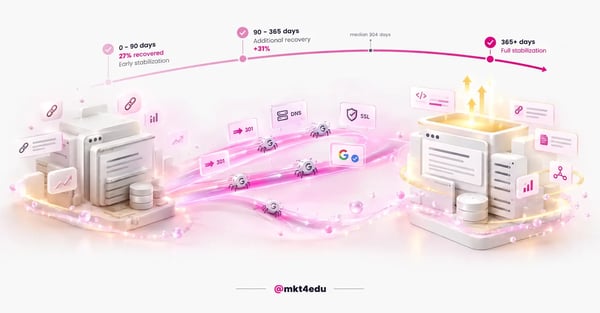 Caption: a domain migration only stabilizes once Google reprocesses redirects, DNS and the certificate on the new address
The first is rebranding. The company changes its name, and the address stops making sense to anyone typing the brand into search.
The second is a merger or acquisition, when two sites have to become one. This is the trickiest case, because it is not just an address change: there is competing content, equivalent pages on both sides and a consolidation decision to make page by page.
The third is a change of extension or geographic scope, such as moving from a country domain to a global one. That is exactly what triggered the 2026 British case.
The fourth is a regulatory or contractual requirement, where an external rule dictates the address the organization is allowed to use.
One distinction prevents unnecessary panic: changing the corporate brand is not the same as changing the address that generates revenue. In Brazil, Kroton and Estácio became Cogna and Yduqs in 2019, and their commercial brands stayed on the same addresses. The holding company changed its name; the enrollment sites did not.
When you can separate the two decisions, the SEO cost drops close to zero. That is the first question to ask in any rebranding project.
Why does a domain migration sink organic traffic?
Traffic drops because Google has to recognize, reprocess and reassociate with the new address every signal that was tied to the old one. While that happens, the site exists in two states at once for search systems, and relevance assessment becomes temporarily unstable.
It is not a penalty, it is a consequence of architecture. The crawler has to visit the old URLs, follow the redirects, find the new ones and redo canonicalization for each of them.
John Mueller, from Google's Search Relations team, summed it up when commenting on the 2026 British case: a site move is always a serious matter, even when you take the time to do it right, and the outcome is impossible to know entirely in advance.
The British case deserves a careful read, because it works better as a warning than as proof. Search Engine Journal itself notes that the publisher was not named, that the data cannot be independently verified and that the site had already been losing visibility in earlier algorithm updates, on top of internal technical problems.
Rather than proving that migration destroys sites, the episode shows that it lands in an account where other problems already existed and makes it impossible to separate the causes.
One detail deserves attention: the site migrated in full, overnight. John Shehata, of NewzDash, attributed the drop to a complete reassessment triggered by a drastic change, and recommended that large sites migrate in sections.
Migrating also does not fix a quality problem. Mueller has commented on a site with quality issues that changed domains, saw a temporary lift and dropped again, explaining that the improvement happened while Google still could not understand the site well. Once it understood it again, it reapplied the assessment.
How long does recovery from a domain migration take?
There is no official timeline. Google states that, for medium-sized sites, it can take a few weeks or more for the new URLs to replace the old ones, and longer for larger sites. Any fixed number circulating out there comes from industry research, not from documentation.
The two broadest public studies are by Dan Taylor. The first, published in Search Engine Journal in January 2025, analyzed 892 migrations. The second, from SALT.agency in June 2026, reached 1,052 cases and offers the most useful breakdown for planning.
Here is how the timelines are distributed across that set:
|
Time after the migration |
Sites recovered |
What that means for planning |
|
Up to 90 days |
27% |
Optimistic scenario, not the default expectation |
|
Up to 12 months |
58% |
Slightly more than half close a year in the black |
|
More than 12 months |
42% |
Spans at least one full commercial cycle |
|
After 3 years |
13.9% with no recovery |
Some migrations never return to the previous level |
Table: Distribution of recovery time across 1,052 domain migrations analyzed by SALT.agency, with a median of 304 days.
The 304-day median is the number that matters for budgeting. The study's mean of 489 days is pulled up by extreme cases and describes the typical case poorly.
Two honest caveats about this data: these are partly crowdsourced studies, in which those who suffered tend to report more, and recovery was measured by tool estimates rather than Search Console data. They are the best public numbers available, and they still are not a controlled study.
As for the size of the drop, the industry works with a reference range that has no official documentation behind it. The most cited reading is that a 10% to 30% swing stabilizing within a few weeks tends to be normal, and that a drop above 50% persisting for more than a month usually indicates an execution error.
What does a domain migration do to on-page SEO?
On-page SEO is the layer that suffers the most silent damage in a domain migration, because the content looks intact while the signals that describe it get lost along the way. Title, description, headings, canonical, structured data and internal links live in database fields, and a botched transfer erases any of them without breaking the page.
The most common error is losing metadata during the export. Titles and descriptions disappear, the new CMS generates automatic titles from the page name, and the whole site starts competing with standardized variations of its own name.
The canonical is the second critical point. Every new URL needs a self-referencing canonical, because a canonical pointing to the old address keeps Google tied to the version you have just retired.
Structured data also travels badly. Markup with absolute URLs, common in breadcrumb, organization and article types, keeps pointing to the old domain after the change, so it is worth validating the JSON-LD on the new site before releasing the switch.
On internal links, the guidance is direct: they all have to point to the new URLs, including those in the menu and the footer.
Mueller has pointed out that the classic error is redirecting the URLs and forgetting the canonical, the navigation or some link in the footer, which makes Google hold on to the old URLs far longer than necessary.
Closing out the layer is page experience. A new server, a different CDN and an unconfigured cache usually drag load time down right after the switch, and the performance drop adds to the migration's natural instability.
How do you preserve off-page SEO in a domain change?
Off-page SEO is the asset you do not control, and that is why it needs extra care in a domain migration. Backlinks, brand mentions and directory profiles point to addresses that are about to stop existing, and the only instrument that preserves that value is the permanent redirect, kept live for long enough.
The first piece of good news comes from Google's own documentation, which states that 301 and other permanent redirects do not cause a loss of PageRank, and explicitly advises not to worry about link credit.
The second is operational. Since the URL inventory is almost never complete, the Search Console links report becomes a mapping source: the pages that receive the most external links are the ones that cannot be missing from the redirect map.
A priority order helps when the volume is large. Pages with the most traffic and revenue come first, then those with the strongest backlink profile, then the homepage and the critical conversion pages.
Two points slip through often. The first is the old server's configuration file, which usually holds historical redirects accumulated over years and needs to be copied, not recreated from scratch.
The second is the old domain registration. Google recommends continuing to pay for it for at least a year, to prevent third parties from buying it and capturing the link history you spent years building.
Liabilities deserve a review before migrating too. If a disavow file exists on the old property, it does not transfer on its own and has to be resubmitted on the new one.
Does a domain migration affect AI SEO, AEO and GEO?
It does, through the simplest path possible: eligibility. Google states in its AI features documentation that, to appear as a supporting link in AI Overviews or AI Mode, a page has to be indexed and eligible to appear in Search. If the migration takes the page out of the index, it leaves both surfaces at once.
That fact defuses much of what is sold as a separate AI SEO strategy for migrations. The same documentation states that there are no additional requirements or special optimizations to appear in these features, and that there is no need to create machine-readable files, AI text files or new markup.
What Google lists as the foundation is still the same as ever: allow crawling in robots.txt, make content easy to find through internal links and offer a good page experience. In a migration, those three items are exactly the ones that break most often.
AEO and GEO practice takes an additional hit, and this one is about measurement. An AI-generated answer cites the URL, so while the citation circulates with the old address, the click depends on the redirect working. That is one more argument for keeping the 301s live for a long time.
There is a point where it is worth being honest about what is not known. Third-party AI systems have their own update cycles, and there is no public documentation stating how long each one takes to reflect the new address.
So the prudent recommendation is to treat visibility in SEO for LLM as a slower tracking metric than traditional search, without drawing conclusions in the first few weeks.
How do you prepare a domain migration before the switch?
Preparation is where a domain migration is won or lost. Google organizes the upfront work into three fronts: build the new site, compile the complete URL inventory and adjust the technical signals before any redirect goes live.
The inventory is the centerpiece. The site move documentation advises gathering URLs from sitemaps, server logs, analytics tools and the Search Console links report, and storing the mapping in a database or in pattern-based rewrite rules.
One detail that often slips: the map has to include images, videos, JavaScript and CSS files. Rich material in PDF, catalogs and photo galleries disappear from the index if they are left out of the map.
On the infrastructure side, the minimum list before the switch is short and non-negotiable:
- TLS certificate issued and configured on the new address.
- Staging environment blocked from indexing, with a temporary hostname and noindex.
- All variants verified in Search Console, with and without www, on HTTP and HTTPS, across both domains.
- Manual actions and pending removals checked, if the new domain was bought from a third party.
- DNS TTL lowered at least a week before the change.
- Server capacity reinforced, because Google increases crawl volume during a migration.
The manual actions check deserves its own paragraph. A domain previously used by someone else carries history, and buying an address with a spam past means inheriting a problem along with the brand.
There are also two calendar decisions. Google recommends migrating during a low-season period and not combining the address change with a redesign or CMS change.
Before any change at all, run a full crawl of the current site. Without that snapshot, there is no way to compare canonicals, titles and structured data afterwards, nor to know whether a problem already existed or was born during the switch.
What do you do on the day of the domain change?
The switch follows an order that cannot be reversed: first the redirects go live, then the change of address tool is submitted. Google requires the 301s to be implemented before submission, and the tool runs checks that block the process if anything critical is out of place.
Redirects have to be permanent and server-side, using 301 or 308. A temporary redirect, 302 or 307, does not work as a canonicalization signal, and the old address keeps being the one that shows up in search.
Google recommends pointing each URL directly at its final destination. The crawler follows up to ten hops in a chain, but the guidance is to keep at most three, and always below five.
The Search Console change of address tool plays a specific and limited role. It prioritizes crawling of the new site and forwards signals from the old one for a period of 180 days. Two prerequisites tend to catch teams by surprise: both properties must be in the same Google account and must be domain properties, not path properties.
Just as important is knowing what the tool does not do. It does not move subdomains automatically, does not remove the old site from the index and does not serve the move from HTTP to HTTPS or path changes within the same domain.
On the same day, four adjustments close out the technical package:
- Self-referencing canonical configured on every new URL.
- Hreflang updated to the new addresses, if the site has versions in other languages.
- Internal links pointed straight at the new URLs, including those in the menu and the footer.
- Staging robots.txt blocks and noindex removed.
Which errors cost the most traffic in a domain migration?
The errors that destroy the most traffic in a domain migration are about execution, not strategy. They repeat so regularly that Search Engine Journal catalogued eleven frequent causes of post-migration drops, and most of them are verifiable in minutes with a crawl.
Sending many old URLs to a single irrelevant page, usually the homepage, is the most expensive of them. Google states that this practice can be treated as a soft 404 error, which means the destination page simply inherits nothing.
A forgotten block is the second classic. The staging robots.txt ships along with the site and prevents crawling of the entire new address.
The rest of the list is predictable, and no less frequent for it:
- Canonicals pointing to irrelevant pages or to URLs that no longer exist.
- Metadata lost in the database transfer, with titles and descriptions disappearing.
- Broken redirects, in loops or in long chains.
- Images without redirects, which zeroes out traffic from image search.
- External links pointing to URLs with no matching destination on the new address.
- Historical redirects from the old server not copied to the new one.
- The old domain registration left to expire.
That last one deserves emphasis, because it is the only irreversible one. Google recommends keeping redirects for at least a year in the site move documentation, and continuing to pay for the old domain registration for at least a year.
A useful curiosity: Google's own documentation carries two different timelines. The site move page mentions at least a year of redirects, and the change of address tool mentions at least 180 days. The conservative timeline wins, not least because after 180 days Google stops recognizing any relationship between the two sites.
There is also a diagnostic error, rather than an execution one: attributing to the migration a drop that came from something else. If the switch happens near an algorithm update, separating the causes becomes nearly impossible, which is one more argument for choosing the date carefully.
How do you measure a domain migration without fooling yourself?
Measuring a domain migration misleads when the dashboard tracks the wrong type of search. The 2026 British case is the clearest demonstration: traditional tools, which follow a fixed set of mostly evergreen keywords, estimated a 60% to 70% drop, while the methodology based on trending searches showed 98%.
Thirty percentage points of difference is not a methodological detail, it is the difference between a scare and a disaster.
The translation for any business with seasonal demand is direct. Monitoring only evergreen terms, such as the name of a product or service category, shows a site that wobbled and came back. What that dashboard does not show is performance on the searches that spike on specific dates, tied to deadlines, applications, promotions or launches, which is where conversion happens.
So the tracking framework needs two separate bands in place before the switch: evergreen terms and cycle terms. Without a baseline for both, there is no way to know what was lost.
In Search Console, the daily routine focuses on three places: the sitemaps report, to watch the old index falling while the new one rises; coverage, to catch crawl errors; and performance, segmented by page.
One heads-up to save an internal fire drill: messages about URLs redirecting in the old sitemap are normal during a migration and do not indicate a problem.
Server logs complete the picture: they show real Googlebot activity on both addresses and reveal errors the dashboard is slow to report. When the old address hits zero, the migration is genuinely over.
Since reading ranking position on Google has become less reliable with the arrival of AI-generated answers, it makes even more sense to track impressions and clicks alongside position, instead of looking at rank in isolation.
What changes in a domain migration for an educational institution?
The education sector concentrates two aggravating factors that work as an example for any regulated market: a naming rule that can force the change and a calendar that leaves a very narrow safe window to execute it.
The rule comes from the registry. In Brazil, the .edu.br domain is restricted to higher education institutions recognized by the Ministry of Education, and the NIC.br rules require the chosen name to be non-generic and tied to the institution's legal name, trade name or acronym.
The practical consequence shows up when the institution changes its name. If the domain has to reflect the real denomination and the denomination changes, the address enters the conversation alongside the accreditation process, without anyone having planned an SEO project.
The NIC.br rules do not address what happens to the old address in that scenario. The registry's clarification note on the migration of direct .br domains mentions reasonable timelines and parallel coexistence between the new and the old name during the transition.
That coexistence sits well with Google's recommendation to keep redirects for at least a year.
The second aggravating factor is the calendar. Since Google recommends migrating in the low season, educational marketing strategies have to identify the window between the end of one enrollment cycle and the start of the next campaign, which is short and usually the only one in the year.
For institutions that depend on regional search, the impact extends to local SEO: the business profile, directory citations and mentions carrying the old address all join the update list.
The effect cuts across every organic channel. Good educational marketing strategies depend on indexed content, so the same technical failure that sinks the blog in search also removes the institution from generated answers, which is the territory of SEO for LLM.
The point that generalizes: in any sector with a naming rule and concentrated demand peaks, marketing needs to be told when the process starts, not when the new domain has already been registered.
Frequently asked questions about domain migration
Is a domain migration worth the risk?
It is worth it when the domain migration is the consequence of a bigger decision, about brand, regulation or acquisition, and not when it is an aesthetic preference. SALT.agency's data shows a median of 304 days to recover the previous traffic level, and roughly 14% of cases with no full recovery after three years. This is not a project for testing a hypothesis.
If the change is unavoidable, what remains is reducing the surface area for error. That means a complete URL inventory, redirects pointing straight at the final destination, canonicals and internal links updated on the same day, the change of address tool submitted after the 301s, and a baseline measured in two bands, evergreen terms and cycle terms.
And above all, it means separating the decisions. If you can change the corporate brand without touching the address that generates revenue, that is the cheapest saving in the entire project.
One last budgeting note. A badly run migration can consume a full year of organic results, which helps explain why SEO returns are measured in years and not in months: the asset takes a long time to build and disappears fast when the technical foundation fails.
If your organization is facing a name change, a post-acquisition integration or a repositioning with an address change, it pays to involve whoever handles organic traffic before the schedule is locked in.
The Mkt4edu team can assess the scenario and design the migration plan alongside your technical team: talk to us.



























 Portugal