





An SEO report in GA4 (Google Analytics 4) only does its job when it gathers, in one place, what organic search brought in sessions, engagement and conversion. That means going beyond the acquisition report and connecting Google Search Console, which adds clicks, impressions and average position to the numbers GA4 already shows on its own.
Without that combination, the report is incomplete. Digital marketing teams in any sector, from e-commerce to B2B services and educational marketing strategies, need to show not only how many sessions arrived through search, but also which pages ranked in the search engines.
The complete report also shows which queries generated clicks and how much of that traffic became a lead or a sale, whatever marketing strategies were used to attract that audience.
This article shows where to find each metric in GA4, how to link Google Search Console, how to read what the numbers say about site performance and how to turn that data into a recurring report someone actually reads and uses.
It also shows what changes with the new AI search trends and how CRO and user experience connect to SEO.
What is an SEO report in GA4?
An SEO report in GA4 is the organized set of metrics that shows how organic search performs on a site: how many sessions came from Google, how they engaged, how much they converted and, with Google Search Console linked, which queries and pages generated that organic search traffic.
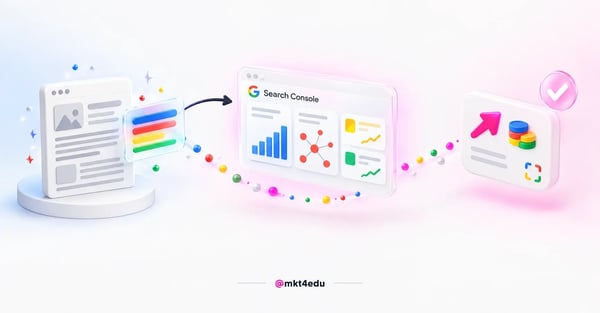 Caption: the SEO report in GA4 links the content you published to what Google recorded about it in search
GA4 has no single report called “SEO”. The data lives in two places: the acquisition report, native to the property since Google changed GA4's measurement logic compared with Universal Analytics, and the Google organic search traffic report, which only exists after the Search Console integration.
Building the SEO report means bringing those two sources into the same analysis routine. Each one alone tells part of the story: the first covers user behavior after the click, the second covers performance in the search engines, before the visitor even reaches the site.
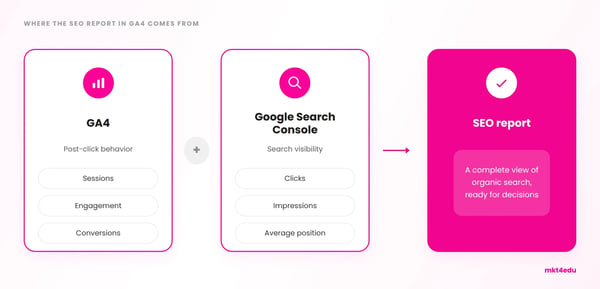 Caption: the SEO report in GA4 is born from crossing GA4 behavior data with Google Search Console search data
That separation exists because GA4 measures what happens after the click, sessions, engagement and conversion, while Search Console measures what happens before it, on the search results page itself. A complete SEO report needs both ends, whatever the market sector of the business.
How do you connect Google Search Console to GA4?
Connecting Google Search Console to GA4 is the prerequisite for the complete SEO report. Without that link, GA4 shows no search queries, no search landing pages, no impressions, clicks or average position, only sessions and post-click behavior.
The link is created in Admin, on the GA4 property, under “Search Console links”. Whoever creates it needs to be an editor on the GA4 property and a verified site owner in Google Search Console, with the same email in both tools.
The process has six steps: start the link, choose the Search Console account, select the verified property, choose the matching web data stream, review the details and submit the confirmation.
Once confirmed, the data appears in Reports, under Acquisition, in the acquisition overview, in two new widgets with search queries, landing pages, country and device category. A dedicated Google organic search traffic report also becomes available in the report library.
According to Google, the first numbers take up to 48 hours to appear after the connection, and the history prior to the link also becomes accessible once it is complete. It is worth reviewing that window before demanding data on the same day as the setup.
Which SEO metrics appear in the acquisition report?
The acquisition report shows where site visitors come from, including those arriving through organic search. It sits in Reports, under Acquisition, in Traffic acquisition, and organizes the data by channel, source and medium.
To isolate SEO traffic, the dimension that matters is “Default channel group”, which classifies sessions as Organic search, Direct, Paid social, Organic social and other categories. Searching for “google / organic” in the table filters straight to traffic coming from Google search.
The default metrics in that acquisition report are sessions, engaged sessions, engagement rate, average engagement time per session, conversions and total revenue. For SEO, what matters most month over month is the volume of organic sessions and the engagement rate of that group, two direct indicators of site performance.
After the link with Google Search Console, metrics GA4 does not calculate on its own come in: clicks and impressions from Google organic search, the organic search click-through rate and the average position of pages in the results. Those four complete the picture missing from the native acquisition report.
The table below organizes what comes from each source, to make building the report easier:
|
Metric |
Source |
What it shows |
|
Organic sessions |
GA4 |
Volume of visits coming from search |
|
Engagement rate |
GA4 |
Quality of the visit after the click |
|
Conversions |
GA4 |
Business result generated by search |
|
Clicks and impressions |
Search Console |
Volume of display and clicks in the SERP |
|
CTR and average position |
Search Console |
Snippet appeal and ranking |
Table: Split of SEO metrics between native GA4 and the Google Search Console integration.
Crossing those two columns is what lets you answer complete questions and generate real SEO insights. Pages with many impressions and few clicks signal a weak title or meta description. Pages with many clicks and little engagement signal content that does not deliver what it promised in search.
That kind of reading gets sharper when the report also segments the audience arriving through each channel, instead of treating all organic traffic as a single block. That crossover is the core of the data analysis in an SEO report, more than the isolated number of any metric.
Search Console on its own still offers more depth than the widget inside GA4, with filters by search type and side-by-side period comparison. For a quick audit, GA4 is enough. To investigate a specific drop in any SEO strategy, it is worth opening Search Console directly.
How do you build and read an SEO report in GA4 step by step?
Building and reading the SEO report in GA4 follows a sequence of six steps, from initial setup to the cross-reading of the data. The order matters because each step depends on the previous one being right, and reading the correct number in the wrong place leads to mistaken conclusions about site performance.
The first step is confirming the link with Google Search Console, described in the previous section. Without it, half the SEO metrics simply do not exist in GA4, and the report stays limited to what happens after the click.
In the second step, open the acquisition report, in Reports, under Acquisition, and set the analysis period. Comparing the same interval of the previous month or quarter avoids conclusions distorted by seasonality, common in businesses with search peaks on specific dates in the commercial calendar.
The third step filters the table by “google / organic” in the source and medium dimension, isolating organic search sessions from the rest of paid, direct and social traffic.
In the fourth step, open the Google organic search traffic report, inside the Search Console collection in the report library, and record clicks, impressions, CTR and average position for the same period.
The fifth step crosses the landing pages of both reports, identifying which URLs appear in both lists and what each metric reveals about them. That crossover is what turns two loose reports into an actual SEO report, with a clear reading of user behavior on each page.
Finally, record the numbers in a spreadsheet or external dashboard, with history from previous periods. GA4's native history has a retention limit, and long-term comparisons require a measurement plan organized outside the tool, because the default interface was not built for extended time series.
A custom exploration, inside GA4's Explore menu, also helps save that manual work. Saving an exploration template with the SEO dimensions and metrics already configured lets you reopen the same view each period without redoing the filters from scratch.
Reading the report is different from merely collecting the numbers. The chart below illustrates the kind of reading that matters: not the isolated value of one month, but the trend over time and the point where a change, such as linking Search Console, starts explaining part of the jump.
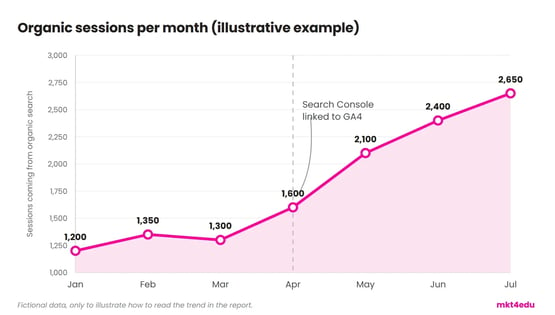 Caption: in the SEO report in GA4, reading the trend rather than the isolated number is what turns data into a decision
A one-off drop in a single month rarely justifies changing SEO strategies. A sustained drop across three consecutive months, compared with the same period of the previous year, is already a sign that something changed and deserves investigation.
Which trends are changing the SEO report?
The main trend changing the SEO report is the growth of AI search. An increasing share of user queries is answered directly by artificial intelligence systems, inside or outside Google, without generating a click that GA4 or Search Console can capture.
That does not make the traditional report useless, but it does make it incomplete if it stops there. Google confirms that AI features in search run on the same ranking systems as traditional search, so the SEO strategies that already worked still hold, but the way of measuring has to broaden.
The practice being called AI SEO, or Generative Engine Optimization, focuses on getting content cited in answers generated by artificial intelligence, not just ranked in a list of links. The tactics with the most proven effect are citing named sources, using verifiable statistics and bringing in expert quotes.
That brings SEO and E-E-A-T closer than before: real experience, clear authorship and trustworthy sources count as much for ranking in traditional search engines as for being cited in an AI answer.
The SEO report in GA4 remains the foundation, but it now coexists with the AI report in Google Search Console, officially launched by Google in 2026.
That report shows impressions generated inside generative AI answers, by page, country, device and day, but reveals neither clicks nor CTR. That is why it works as a complement, not a replacement, for the traditional report.
For businesses that already have relevant volume of brand searches or customer questions, it is worth following this topic closely: that is what the AI SEO service deals with specifically, how to appear in that kind of answer.
How do CRO and user experience complete the SEO report?
CRO, or conversion rate optimization, completes the SEO report by answering a question GA4 alone does not answer well: why the traffic arriving does not convert at the expected rate. SEO brings volume, CRO turns part of that volume into results.
Bounce rate and engagement rate are the starting point of that joint reading. A page that attracts many organic sessions but has a high bounce rate usually has a mismatch between what search promised and what the page delivers, not an SEO problem as such.
User behavior inside the page, such as scrolling, clicks on internal elements and time to conversion, completes that diagnosis. CRO, SEO and user experience go together because the same page that needs to rank well also needs to convert well, and an SEO report that ignores that end is only half done.
Reducing the site's bounce rate usually requires adjustments that have nothing to do with keywords: load time, clarity above the fold, shorter forms. Even so, the effect shows up in the SEO report, because Google also weighs user experience signals when deciding what to keep well positioned.
Businesses that already optimized acquisition and feel the funnel stalls after the click tend to gain more by going deeper into CRO than by producing more content marketing.
The SEO report in GA4 points to where the volume is. The CRO reading points to what to do with it, and the SEO insights left over from comparing pages usually point to the right next test.
How do you turn the SEO report into a recurring routine?
Turning the SEO report into a recurring routine means fixing frequency, format and recipient before repeating the process. Without those three decisions, the report becomes a one-off exercise nobody revisits, however good the marketing strategies behind it.
The recommended frequency varies with the volume of content published. Teams doing content marketing on a weekly rhythm usually review the report every month, to give Google time to index and rank the new content. Teams publishing less often can review every six or eight weeks.
The format has to fit the reader's time. A summary with three to five key indicators, organic sessions, engagement rate, conversions, clicks and average position, communicates more than a long spreadsheet that requires interpretation.
The recipient determines the level of detail. A report for digital marketing leadership can focus on conversions and trends; a report for whoever produces the content needs detail page by page, query by query.
It is also worth recording what changed since the last period: new publications, refreshes of old content, technical changes on the site. That is the context that keeps a drop or rise in organic sessions from being hard to explain when someone asks why, even with the right numbers on screen.
That data analysis discipline is what separates a report that gets used from a report that gets filed.
Which mistakes compromise the SEO reading in GA4?
Five recurring mistakes compromise the SEO report in GA4 before the analysis even begins: comparing periods without adjusting for seasonality, treating all organic traffic as a single block, ignoring the Search Console data lag, comparing numbers with the old Universal Analytics and measuring only clicks and sessions.
Comparing periods that differ in length or context distorts the reading. A 31-day month against a 28-day one, or a high-demand period against a low-demand one, produces variations unrelated to real SEO performance.
Treating all organic search as one group hides important differences between institutional pages, blog posts and product or service pages. Each page type has a different pattern of sessions, engagement and conversion, and mixing them masks where SEO is actually working.
A local SEO business, for example, needs to look at branch or region pages separately from general content pages.
Ignoring the up-to-48-hour window for Search Console data to appear in GA4 produces reports with incomplete numbers on the most recent days. The ideal is to always close the report with a safety margin of two or three days from the analysis date.
Comparing GA4 numbers with the old Universal Analytics also distorts the report. The two tools count sessions and conversions differently, so an apparent drop when switching systems is usually a change of methodology, not of real performance.
A fifth point, less technical and more strategic, is measuring only clicks and sessions at a time when part of search visibility also happens inside answers generated by artificial intelligence, which does not always produce a click measurable in GA4 or Search Console.
Frequently asked questions about the SEO report in GA4
Is SEO worth it? The SEO report in GA4 answers
Yes, SEO is worth it, and the report itself is the proof: it turns a marketing bet into session, engagement and conversion numbers any area of the company can verify, in any market sector.
The first step is technical, not analytical: confirming that Google Search Console is linked to the right GA4 property, with the correct email in both tools. A report built without that link is only half done.
After that, the priority is choosing only three to five fixed metrics to track every period, instead of trying to record everything the two tools offer. A lean, recurring report is worth more than a complete report done once.
The most complete SEO report today looks beyond the click. AI search trends and CRO and user experience metrics show that sessions and average position no longer suffice on their own.
Building that process, whether for educational marketing strategies, for local SEO across a network of physical branches or for any other sector, usually requires help from people who already deal with data volume and tight deadlines.
Mkt4edu works with SEO by structuring exactly this kind of report, from first access to GA4 to the recurring routine marketing leadership can follow.
The next step after mastering this report is to look at what GA4 and Search Console still do not capture on their own: the brand's presence inside AI-generated answers.
The article AI report in Google Search Console: how to read it? shows where to find that data and how to interpret the impressions by page, country and device that Google's official AI report provides.



























 Portugal