





Launching a remarketing campaign takes a few minutes in the Google Ads editor. What decides the result happens before that: the size of the list, the network chosen and the asset the applicant sees when they are reached again. That is where most operations stall.
The problem starts with a detail that is rarely discussed: remarketing in Google Ads has a minimum list size, and that minimum varies by network and by data source. Without reaching the number, the campaign stays active and delivers no impressions.
Anyone running student recruitment feels this quickly. A program page with modest traffic takes weeks to build a segment eligible to serve on Search.
How does Google Ads organize remarketing audiences today?
Google Ads groups everything you collect on your own property under the label of your data segments, created in Audience Manager. The platform itself records that the term “remarketing” is now called “your data” and that “audience types” became “audience segments”. The concept itself is detailed in the guide on remarketing.
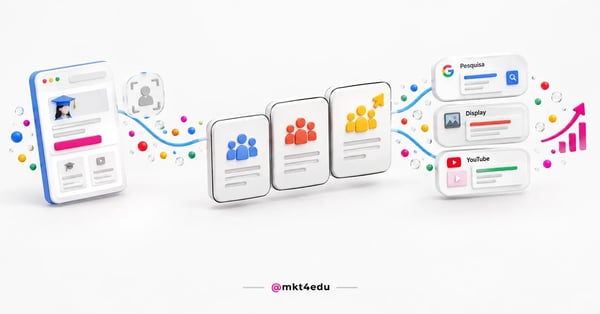 Caption: remarketing in Google Ads starts from a single audience list and feeds Search, Display and YouTube, each network with its own minimum
The name changed, the logic did not. You work with five first-party data sources: website visitors, app users, YouTube channel viewers, uploaded customer lists and custom combinations.
Each source has a different technical requirement. Website visitors and app users depend on the Google tag firing across the whole site. YouTube viewers depend on the channel being linked to the ads account. The customer list is the only one that needs no tag.
Before creating any segment, it pays to map the pages that signal real intent. At an educational institution, the hierarchy is usually predictable: the application page weighs more than the program page, which weighs more than a blog article, and that reading is what organizes the account's remarketing audiences.
That hierarchy separates useful remarketing from indiscriminate chasing. A blog visitor and an applicant who abandoned the form do not deserve the same budget or the same asset.
How many people does a remarketing list need on each network?
Google Ads requires a minimum list size to serve, and that number changes by network and by data source. The general rule published by the platform is 100 active visitors or users in the last 30 days for Search, Display and YouTube. Customer lists follow a different criterion.
Here comes the point almost no content records: Google's official documentation carries two different numbers for the Search Network.
The page on how your data segments work states that the Search Network needs at least 100 active visitors or users in the last 30 days. The page on data segments applied to search ads, meanwhile, says the segment needs at least 1,000 cookies to personalize ads there.
Both pages are official and published at the same time. The safe reading is to build for the larger number when the destination is Search.
Here is how the requirements break down by surface:
|
Network or segment source |
Official minimum to serve |
Counting window |
|
Search Network, website visitor segment |
100 active visitors or users |
Last 30 days |
|
Search Network, segment applied to text ads |
1,000 cookies |
Membership up to 540 days |
|
Display Network |
100 active visitors or users |
Last 30 days |
|
YouTube |
100 active visitors or users |
Last 30 days |
|
Gmail |
No published figure of its own |
Only signed-in users enter the segment |
|
Customer list uploaded or updated after 02/01/2024 |
100 matched users |
540 days of membership |
|
Customer list from before 02/01/2024 |
1,000 matched users |
540 days of membership |
Table: Requirements stated in the Google Ads Help Center for a segment of your data to be eligible to serve.
Two details in that table change media decisions. The first is the concept of an active user: Google counts whoever interacted with the property and met the eligibility criteria, not the total sessions your analytics tool shows. A page with 400 visits in a month can produce a small segment.
The second detail is Gmail. The documentation publishes no figure of its own for that surface, and records only that solely signed-in users enter Gmail data segments.
Since these rules change often, check the Help Center before committing to a number in a media plan.
Remarketing on the Search Network (RLSA): when is it worth it?
RLSA is the use of your data segments inside Search campaigns, to adjust bids or restrict serving to people who already visited your site. It is worth it when there is active search for your brand or your program and competitors are bidding on the same term.
The difference from display is large. In RLSA, the person is searching right now, so the ad responds to declared intent, not to a memory.
There are two modes. In observation, the segment only informs and you apply a bid adjustment. In targeting, the campaign appears only to people on the list.
For student recruitment, observation is usually the safer starting point. It does not cut reach and reveals how much it is worth paying more for a returning visitor.
Targeting mode pays off in two scenarios. The first is expensive generic terms, the “business administration degree” kind, where the click only pays if the person already knows the institution.
The second scenario is keyword expansion. Broad terms you would never buy in an open campaign become testable when the audience is restricted to past visitors.
RLSA coexists with the rest of the search investment. How the auction, budget and bidding work is detailed in the paid traffic guide, and paid traffic strategies at an institution start by defining each campaign's role before layering on audiences.
Display remarketing: what converts and what only burns impressions?
Display remarketing serves banners on Google partner sites to people who already visited your property. It converts when the list is short, recent and tied to a high-intent page. It only burns impressions when the list lumps together everyone who passed through the site in the last 540 days with no separation.
The practical rule is one: the closer the person got to applying, the more budget and frequency they deserve, the principle that guides remarketing in student recruitment.
A segmentation that tends to work at educational institutions uses three bands: people who abandoned the application form in the last 7 days, people who viewed a program page in the last 30 days and people who read blog content in the last 30 days. Each band gets a different asset: deadline, differentiator and supporting material.
What wastes the most budget in display is the absence of exclusions. Anyone who has applied needs to leave the list the moment they convert, which requires the conversion to be recorded in the tag.
Uncontrolled frequency is the second villain. Without a frequency cap, a small list receives the same banner dozens of times a week, which wears down the brand.
The third problem is placement quality. Display generates a high volume of cheap impressions, and cheap volume tends to produce weak leads when there is no filter at the entry point, a topic covered in the material on how to generate qualified leads.
Remarketing on YouTube: which video should past visitors see?
Remarketing on YouTube reaches people who already visited your site or interacted with your channel, using the same data segments from the Google Ads account. The asset criterion is direct: for someone who already saw the program page, serve proof and deadlines, not an institutional presentation.
The most common mistake is reusing the top-of-funnel video. A brand awareness asset, shown to someone who already researched the program, pushes the person back to the beginning.
Three formats work well at this stage: a short testimonial from a student in the same modality, an explanation of one step in the admissions process and a direct answer to a financial question.
Duration matters more here than in prospecting. For someone who already knows the institution, assets of 15 to 30 seconds with a single message tend to hold attention better.
YouTube also offers channel interaction segments, which work without a tag on the site: people who watched a video, who subscribed, who liked. They are useful for institutions with constant video production.
Customer Match: how do you use the institution's database in Google Ads remarketing?
Customer Match is uploading your contact database to Google Ads, which matches it against Google accounts and creates a servable segment. It is the route to reaching a past applicant, someone who applied but did not enroll, and alumni, without depending on a tag or a browser cookie.
Google's policy is restrictive about data origin. It allows only information collected in a first-party context, such as your own site, app, physical location or another situation where the customer shared data directly with you.
That restriction rules out purchased lists and partner databases. It also requires consent for the sharing when applicable law demands it, plus disclosure in the privacy policy.
In Brazil, this point speaks directly to the LGPD. Legal basis, consent records and the ability to delete need to be resolved before upload, a subject detailed in the guide on GDPR, LGPD and CCPA compliance.
Google Ads documentation records that a customer list needs at least 100 members added or updated in the last 540 days to keep serving. Lists uploaded before 02/01/2024 remain bound to the old minimum of 1,000 matches.
The operational consequence is the update routine. A static list ages, loses matches and one day stops delivering, with no obvious alert in the interface.
The most reliable way to sustain that is syncing the list from the CRM, rather than uploading manually. A CRM built for educational marketing sends an updated segment frequently and returns to media whoever already enrolled, keeping budget from chasing an applicant who is already a student.
Manual remarketing or Performance Max: does separating still make sense?
Yes, it still makes sense in most educational institution accounts. Performance Max uses your data as a signal, not as a filter, so it does not guarantee that budget goes to the people you want to reach. A manual remarketing campaign does.
That is not market opinion, it is what the platform states. The Help Center records that, with audience signals, you add suggestions that help Google AI optimize toward the goals, and that Performance Max campaigns can show ads to relevant audiences beyond your signals.
A suggestion and a restriction are different things. For anyone who has to prove the return of a specific audience, delegating gets in the way of the reading.
A separate manual campaign wins clearly in three situations: a small audience that needs guaranteed delivery, a single message such as an application deadline, and measuring remarketing's isolated effect.
Performance Max wins when there is enough conversion volume for the model to learn and the goal is scale rather than precision. The balance of pros, cons and scenarios is in the article on Performance Max.
The arrangement that tends to work is not picking a side. It is running Performance Max for discovery, keeping manual remarketing on the high-intent lists and excluding converters from those lists, so the two do not compete for the same click.
It pays to watch changes to similar segments. Google Ads documentation indicates that, through 2026, those segments move to a suggestion mode in Demand Gen campaigns, with the option for advertisers to decline.
How do you measure remarketing in Google Ads without fooling yourself?
Remarketing in Google Ads is the easiest campaign to overestimate, because it reaches people who already showed interest. The number that matters is not the isolated campaign's cost per lead, but how much of the progress toward enrollment would have happened without it.
Three readings help separate merit from overlap. The first is comparing the remarketing audience's conversion rate with the cold audience's over the same period.
The second is the time between first visit and conversion. If remarketing is working, that interval shortens.
The third is the holdout test. Turning remarketing off for part of the list for a few weeks is the most honest way to estimate real contribution.
Cost also needs a reference. The impact on average acquisition cost only becomes visible when there is a baseline of what the account spends on each front, a topic covered in the material on how much it costs to invest in paid traffic.
The tracking discipline does not change because of the network. The same rigor described in educational marketing metrics applies: look through to enrollment, do not stop at the click. Good educational marketing strategies treat remarketing as a stage with its own target.
Frequently asked questions about remarketing in Google Ads
How do you turn remarketing in Google Ads into enrollments?
Remarketing in Google Ads turns into enrollments when three decisions are made before the campaign goes live: which page defines intent, which list reaches the serving minimum on each network, and which message answers the real objection of whoever came back. Without those three, the rest is bid tuning on top of an undefined audience.
The rollout order that usually pays off starts small. Activate the application abandonment list first, which is short and hot, and only then open display and YouTube for wider windows.
While the Search list has not reached the required volume, effort pays off more on Display and YouTube. That way the operation does not sit idle waiting for the segment to fill.
What sustains that arrangement is less glamorous: a correct tag, recorded conversions, exclusion of anyone already enrolled and a list synced with the CRM.
If your institution needs that structure built and audited, mkt4edu's Paid Media practice handles audience architecture, separation by network and measurement through to enrollment. With mature lists, the next decision is when to hand that scale to Performance Max without losing control of the audience.



.jpg)

























 Portugal