






Anyone who has only run Google and Meta arrives at LinkedIn expecting the same pieces under different names. The logic of lists, windows and frequency is similar, but LinkedIn Ads remarketing has one feature neither of the other two offers: an audience built from an organization rather than an individual.
That difference is not an interface detail. A person audience talks to someone who raised their hand; a company audience talks to a committee that may never have heard of you.
The second thing that catches a first-time analyst is cost. It is worth understanding requirements and audience floors before launching the campaign, not after burning the first third of the budget.
What types of LinkedIn Ads remarketing exist?
LinkedIn groups all remarketing under Matched Audiences, and the official documentation describes four families: website retargeting, contact lists, company lists and predictive audiences. In the first three the data is yours; in the fourth, LinkedIn projects a new audience from your base.
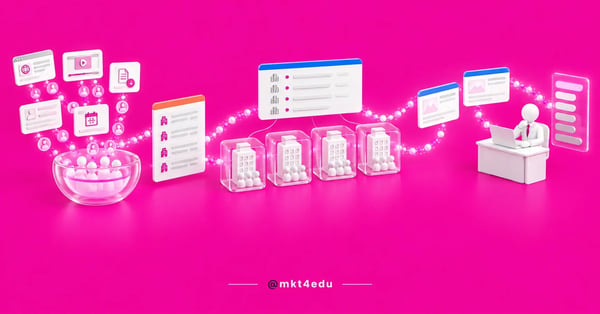 Caption: LinkedIn Ads remarketing is the only one that builds an audience from the company, not just from the person
Within retargeting, the platform goes well beyond a site visit. The engagement retargeting documentation lists eight engagement sources, each with its own triggers.
- Website retargeting: people who visited pages on your domain, with a live, working Insight Tag.
- Single image, document and conversation ads: chargeable clicks and any interaction; on documents, the download as well; on conversation ads, opening it and clicking any call to action.
- Video ads: people who watched 25%, 50%, 75% or 97% of the piece.
- Lead gen forms: people who opened the form and people who submitted it.
- Company page: visits and clicks on the call-to-action button.
- Event page: RSVPs, interactions, chargeable clicks and video views, including by quartile.
The retention windows are documented too. Engagement sources accept 30, 60, 90, 180 or 365 days; website retargeting stops at 180 days, with no one-year option. On a long cycle, that difference decides the audience source.
There is one timing constraint that hurts rushed planning: processing the audience takes up to 48 hours, and it can take another 24 hours before delivery starts.
Person audience or company audience: what is the difference?
The difference is the identification key. A person audience is built from the individual: their site visit, their ad click, their email in your database. A company audience starts from the organization, and LinkedIn decides afterwards who inside it will see the ad.
In practice, an account list starts from the company's name, domain, website or page URL. LinkedIn matches those fields with organization pages and reaches members who state they work there, filtered by job title, seniority or function.
Hence the consequence that confuses reports: a company audience reaches people who never interacted with your brand. There is no visit and no previous form, only a link to an account that matters to sales.
The creative has to respect that. A win-back piece along the lines of “you left something unfinished” makes no sense to someone who was never on your page. A company audience calls for category and problem messaging.
The metric changes with it. On a person audience you look at frequency per individual; on a company audience, how many accounts were reached and how deeply, a reading closer to a sales funnel by account.
Applying guardrails to the targeting is essential. A list of 500 companies with no job-title cut makes an enterprise solution ad land on interns, so the seniority filter stops being refinement and becomes waste control.
How do you sync a HubSpot account list with LinkedIn Ads?
HubSpot creates ad audiences in four types, and how they are distributed reveals LinkedIn's differentiator. According to HubSpot's ad audience documentation, there are Website Visitors, Contact Segment, Company Segment and Lookalike. Company Segment is exclusive to LinkedIn; Lookalike, to Meta.
In other words: an account list synced from the CRM has only one possible destination, LinkedIn. No other platform connected to HubSpot receives an audience built on the company object.
The sync flow has four steps, each with its own failure point:
- Connect the LinkedIn ad account to HubSpot, with admin permission in Campaign Manager. Without that access, creation fails silently.
- Confirm the tracking is installed, both the HubSpot code and the Insight Tag, if you will use a website visitor audience.
- Create the audience from a company segment that already exists in the CRM, not from an exported CSV.
- Let the audience update itself as records enter and leave the segment through stage changes.
The fourth step is what justifies the work. A segmented list inside HubSpot changes composition on its own when an account moves stage, and the ad audience follows without anyone re-exporting a spreadsheet.
Anyone uploading the file directly in Campaign Manager faces another set of rules: the list upload documentation requires a UTF-8 CSV and emails hashed with SHA256, lowercase and without spaces.
The cost is maintenance. A manually uploaded list ages the next day and stops reflecting the state of accounts in the HubSpot CRM within a few weeks.
Video: the automation that keeps the segment current behind LinkedIn Ads remarketing, on the mkt4edu channel (in Portuguese)
What are the requirements and the minimum size of each audience?
Each audience type has a different technical requirement, but they all converge on the same delivery floor cited by the sources: 300 matched members. Below that, the audience exists in the dashboard and does not deliver, which usually gets read as a creative or bidding problem. It is worth organizing the requirements before choosing the source:
|
Audience type |
What feeds it |
Technical requirement |
Delivery floor |
|
Website retargeting |
Visits to pages on your domain |
Live, working Insight Tag; 30 to 180-day window |
300 members |
|
Ad engagement |
Clicks, interactions, video quartiles and downloads |
Nothing to install; 30 to 365-day window |
300 members |
|
Company and event pages |
Visits, CTA clicks and RSVPs |
Page or event linked to the ad account |
300 members |
|
Lead gen form |
Opens and submissions of the native form |
Active campaign with a LinkedIn form |
300 members |
|
Contact list (person) |
CSV or a segment synced from the CRM |
SHA256 emails; the documentation recommends 10,000 rows and caps at 300,000 records |
300 members |
|
Account list (company) |
CSV or HubSpot Company Segment |
Name, domain, website or page URL; 1,000 companies recommended, 300,000 cap |
300 members |
Table: requirements per audience type in LinkedIn Ads remarketing, according to the platform's documentation
Two rows deserve attention. The recommendation of 10,000 rows for a contact list and 1,000 companies for an account list is match-quality guidance, not a hard limit: LinkedIn matches only part of the file, so a short list tends not to reach 300 members.
The floor is not uniform across the documentation either. The engagement retargeting API page publishes no minimum of its own, while the list upload page states the 300 members for contact lists, and that is the number HubSpot repeats. Plan for the higher figure and confirm it in your account.
Do remarketing and ABM use the same account list?
The list can be the same; the operation cannot. Remarketing uses the account list to sustain presence with accounts already on the sales radar. ABM (Account-Based Marketing) uses the same list to open a conversation in accounts that do not yet know the brand.
The point of contact between them is the CRM. If the list comes from a company segment, the same base feeds both media and the sales cadence, with no spreadsheet reconciliation afterwards.
The practical separation is by deal stage. Accounts with no open opportunity get category content and proof; accounts with an opportunity in progress get decision material. It is the same logic as ABM applied in HubSpot, with a paid layer on top.
The most common mistake is running both in the same ad set. The result is high frequency on a small audience, with the same creative for someone in negotiation and someone who never heard the company's name.
When does LinkedIn Ads get too expensive for remarketing?
LinkedIn charges a premium for qualified reach: its cost per thousand impressions tends to be the highest among the big platforms. In remarketing, list size makes the problem worse, because a small audience with a high CPM turns into frequency, not incremental reach.
There are scenarios where the channel does not add up. They are worth recognizing before reserving budget:
- An audience right at the 300-member line: the campaign delivers little, learns slowly and pays a premium per impression.
- A low average ticket: when the contract cannot support a high cost per lead, the money works harder elsewhere.
- A B2C audience: professional targeting stops being an advantage and you pay the premium without using what the channel does best.
- An owned base with good reach: if email and sales already talk to the same accounts, paid ads tend to buy conversion that would come for free.
- Low site volume: with few visits per month, website retargeting never clears the floor.
None of these scenarios is final. Several are solved with scope: a narrow campaign on the highest-value accounts, with a small budget and a long window, pulls the discussion of how much to invest in paid traffic up to the account level, and keeps the rest of the budget in other paid traffic channels.
The honest reading is that LinkedIn is rarely the volume channel for remarketing. It is the precision channel, and it pays off most when it complements an operation with cheap reach somewhere else.
Video: the cost comparison between channels that decides whether LinkedIn Ads remarketing makes the plan, on the mkt4edu channel (in Portuguese)
Frequently asked questions about LinkedIn Ads remarketing
When does LinkedIn Ads remarketing pay off?
LinkedIn Ads remarketing pays off when the decision happens inside a company, with more than one person involved, and the ticket supports a high cost per impression. In that scenario, the company audience delivers what no other platform does: the brand in front of a committee that never filled in a form.
Outside that scenario, it tends to be the wrong channel. A small audience, a low ticket or a consumer audience turn the targeting premium into waste, and what separates the two situations is the quality of the list coming out of the CRM.
If that base already exists and what is missing is translating it into a campaign, the mkt4edu paid media team designs the audience structure and the split between remarketing and ABM.
That split sustains the investment over the medium term. Defining which accounts go into an ABM operation and which stay in remarketing avoids audience overlap, which is where LinkedIn's cost per impression charges the most.
























 Portugal