





An e-commerce blog post can receive 30,000 sessions in three days and return to normal levels the following week, without anyone having made any changes to the website or purchased media. When this happens, Google’s recommendation feed is usually the driving force behind it.
This behavior is neither a bug nor a fluke. Google Discover operates on a different logic than Google Search, and that difference explains both the spike and the subsequent drop.
In Search, there’s a person with a question. In the feed, there’s a person with a presumed interest. Remove the search query, and you lose the predictable demand, the ranking history, and most of the analytics the marketing team is used to.
The result is a channel that delivers high, low-cost traffic at times and disappears at others, without warning. Understanding the official guidelines and the measurement criteria is what prevents panic-driven decisions.
What is Google Discover, and why doesn’t it have search queries?
Google Discover is the recommendation feed that Google displays in the Google app, in the new tabs section of Chrome on mobile, and in the Android feed, based on the user’s inferred interests. There’s no search box, no typed-in words, and no stated intent: content is served before the request is even made.
This absence of a search query changes three things at once.
The first is the trigger. In Search, content appears because someone searched for it. In the feed, it appears because Google has determined that that topic interests that person at that moment, based on previous activity, location, and context.
The second is predictability. Search volume is a metric that can be estimated month by month; however, inferred interest cannot. It changes with the news cycle, local seasonality, and the feed’s own rotation.
The third is the format that endures. Content that answers a specific question performs well in Search. Content that makes people want to read it without having been searched for performs well in the feed—which requires a different editorial skill set than page optimization.
That’s why Discover is volatile by nature, not due to a flaw in its implementation. The documentation for the Discover performance report itself notes that Discover traffic is served proactively by Google and tends to be less predictable than Search traffic.
This volatility has a side effect for management: it is easily mistaken for a penalty. A 60% drop in the feed over the course of a week may simply be a normal fluctuation in interest, rather than a sign that the site has lost quality.
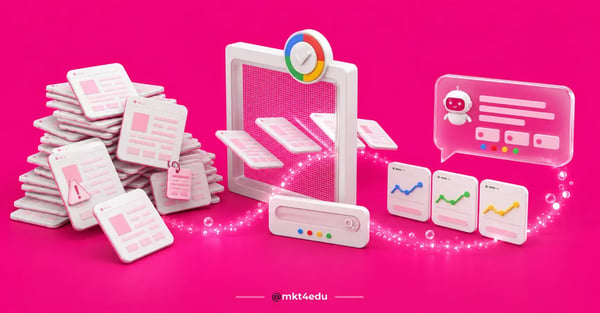 Caption: The Google Discover filter analyzes and delivers content directly to the user’s feed based on inferred interests.
What requirements does Google have for appearing on Discover?
Eligibility for Google Discover is automatic. The official documentation states that content becomes eligible if it is indexed by Google and complies with Discover’s content policies, without requiring any specific tags or structured data.
There are, however, recommendations that increase your chances, particularly for images.
The most important statement in the documentation is also the most overlooked: being eligible does not guarantee that your content will appear. There is no technical requirement that guarantees a spot in the feed.
It’s worth distinguishing between what is an indexing requirement, what is a technical recommendation, and what simply doesn’t make a difference:
|
Item |
What Google Documents |
Where websites often fall short |
|
Indexing |
Content indexed by Google |
New page without an internal link, stuck in slow discovery |
|
Content policies |
Comply with Discover’s content policies |
Exaggerated title inherited from a social media post |
|
Featured image |
At least 1,200 px wide, more than 300,000 total pixels, 16:9 aspect ratio |
800-px cover image repurposed from the website banner |
|
Image preview |
Generated by `max-image-preview:large` or AMP |
Meta tag missing from the blog template |
|
Discover tag or schema |
None required |
Hours spent on markup that does not affect eligibility |
Table: Google’s documented requirements for Discover eligibility and the most common pitfalls in corporate blogs.
Enabling the large preview is the fix with the highest return and lowest effort on the list. The robots meta tag documentation defines `max-image-preview:large` as permission to display a larger preview, up to the width of the viewport, and this rule also applies to Discover.
In practice, it’s a single line in the template’s`<head>` section:
<meta name="robots" content="max-image-preview:large">
Without this setting, Google may display the preview at the default size. In the feed, a small card loses out to a card with a large image in the same screen space, even if it has better content.
The rest of the guideline is about editorial quality, not configuration. Google points to its own guidance on useful content and a people-first as the basis for what performs well in the feed, along with a good page experience.
What changed in the February 2026 Discover core update?
The February 2026 Discover core update was the longest update of the year so far: the Google Search Status Dashboard recorded the Discover update running from February 5 to February 27, 2026, lasting 21 days and 17 hours.
The stated focus was on local relevance, reducing clickbait, and prioritizing content that demonstrates expertise.
A long duration is important for diagnosis. An adjustment that runs for three weeks produces daily fluctuations within that period, so observing a drop or recovery on the 10th says little about the outcome on the 27th.
To accurately date any variation, the year’s history needs to be at hand. Here’s how the official calendar is organized, from most recent to oldest:
|
Date |
Update |
Duration |
|
August 18–21, 2026 |
August 2026 spam update |
3 days |
|
June 24–26, 2026 |
June 2026 spam update |
2 days and 1 hour |
|
May 21–June 2, 2026 |
May 2026 core update |
11 days and 21 hours |
|
March 27–April 8, 2026 |
March 2026 core update |
12 days and 4 hours |
|
March 24–25, 2026 |
March 2026 spam update |
19 hours and 30 minutes |
|
February 5–27, 2026 |
February 2026 Discover update |
21 days and 17 hours |
Table: Ranking updates confirmed by Google in 2026, with dates and durations from the Google Search Status Dashboard.
Only the February entry directly affects Discover. The other five affect Search, which is exactly why the separation of reports in the next block matters so much.
Each of the three stated pillars of the February update has direct implications for content creation.
Local relevance favors location-based content. For example, a story about new traffic regulations in the downtown area of a specific city has a feed appeal that a generic article on urban mobility lacks, and the same logic applies to neighborhood clinics, regional real estate agencies, and brick-and-mortar stores with a defined delivery area.
Reducing clickbait addresses the gap between what the card promises and what the page actually delivers. The objective criteria for this are detailed below, because this is the area where most people slip up in good faith.
Highlighting expertise boosts authorship and credibility. Content with a real author, visible credentials, and a named source is more defensible, which aligns the feed with the same E-E-A-T standards E-E-A-T that underpins authority in SEO.
The complete history of changes announced by Google throughout the year can be found in our Google Updates Tracker, which is useful for pinpointing changes that aren’t related to Discover.
How does conversational personalization change the Discover feed?
Google announced on August 20, 2026 that Discover now accepts instructions in plain language: from the three dot menu in the feed, users say in their own words which topics and links they want to see more or less of. The feed adjusts on the fly and remembers the request.
The change adds a declared layer to a channel that used to be inferred only. Google still estimates interest from history and context, but it now also receives an explicit request from the reader.
For content teams, the practical effect is concentration. A reader who asks for more of a specific topic creates a stable pocket of demand inside a feed that has always been rotational.
The instruction works in the opposite direction too. Asking for less of a topic or a link becomes a button rather than an ignored card, which tends to penalize repetitive coverage and inflated headlines faster than before.
The Discover announcement arrived alongside the improved preferred source button, and the two mechanisms reinforce each other. A reader who declares interest in a topic is often the same reader willing to mark a brand as a preferred source in Google.
In the same post, Google reported that more than 600,000 unique sources have already been selected as preferred by readers, according to the official announcement on personalization across Search, Discover and News.
None of this changes eligibility requirements. Indexing, Discover policies and a prominent image remain the entry point, and personalization only acts on content that was already able to appear.
Google described the launch as arriving in the coming days through the Google app, without detailing countries or languages covered. Until availability is confirmed in your market, treat the feature as strategic direction rather than a lever already in hand.
Is the drop in Discover traffic since July 2026 confirmed?
No. There have been industry reports of a decline in Discover traffic since mid-July 2026, but this has not been confirmed by Google nor recorded on the Status Dashboard. Treating this as fact is the quickest path to making the wrong content decisions.
What can be stated with certainty boils down to one sentence: some publishers report a loss of feed volume in the second half of the year, with no official cause attributed. There has been no confirmed update during this period, no published policy change, and no data from Google quantifying the alleged decline.
This caution isn’t editorial nitpicking—it’s budget protection. Reacting to rumors of an update often leads to the mass rewriting of content that was performing well, at a real cost and with no proven benefit.
The defensible approach is to compare your own data with your own historical trends. If your site’s Discover report shows a decline that begins on a specific date, that date is the fact; a third-party explanation remains a hypothesis until proven otherwise.
It’s worth remembering that a drop in organic traffic rarely has a single cause in 2026. Changes in click behavior on search results with AI-generated answers also reduce sessions—a topic covered in more detail in the discussion on no-click search.
How do you separate Discover from Search in the Search Console report?
In Search Console, Discover and Search are separate reports, not a filter within the same performance report. The Discover report is a separate item in the side menu, appearing only when the property reaches a minimum number of impressions in the feed, and it stores data for up to 16 months.
Mixing the two is the mistake that leads managers to attribute a decline to the wrong update. When the number being looked at is the sum, a loss in Search caused by the May core update results in a loss in Discover, and the team spends three weeks fixing the channel that didn’t actually decline.
The difference in available dimensions makes the distinction clear. The Discover report allows grouping by page, country, date, and ad type, but does not provide query data, since there are no queries to report on.
The absence of queries also means there is no useful average position. Any analysis routine that relies on keywords and position simply does not apply to the feed, and insisting on it produces an empty report.
The reading guide that resolves most of the discussions has four steps.
- Open the Discover report on its own and record impressions, clicks, and CTR for the period, without combining them with Search.
- Mark the exact date the variation began, with daily granularity, before looking for an explanation.
- Compare that date with the official update calendar and check whether the coinciding event is from Discover or Search.
- Repeat the same process in the Search results report to determine which of the two channels drove the site’s total traffic.
These four steps help distinguish between cause and coincidence at no cost to the tool. When the variation in the site’s total traffic appears in Search and not in the feed, the entire investigation takes a different direction.
Further reading helps complete the picture. The Generative AI performance report, released in June 2026, shows the behavior of generative response surfaces and is broken down in our article on the AI report in Search Console.
What kind of content has a real chance of appearing on Google Discover?
Content that performs well on Google Discover is the kind someone would read out of personal interest, without being in the process of making a purchase at that moment. Five key factors drive visibility in the feed: news with a date, rule changes, market trends with statistics, consumer interest, and niche curiosity.
The screening criterion is a question asked before every story: Would someone who isn’t looking for your product stop to read this?
Here’s how each hook performs in the feed, with an example from the industry:
|
Content Type |
Chance of appearing in the feed |
Why |
|
News with a date (SaaS: a feature that changes a team’s routine) |
Post |
Clear window of novelty, which is the feed’s central trigger |
|
Change in a rule or regulation (accounting: new tax requirement) |
High |
Affects many people at once and has a deadline |
|
Market trend with a number (real estate: price per square meter by neighborhood) |
Medium to high |
The data itself provides a reason for non-customers to read the article |
|
Consumer interest (retail and tourism: changes in ticket prices) |
Medium to high |
Relevant to everyday decisions and spreads through sharing |
|
Niche curiosity (health and industry: why a protocol changed) |
Medium |
Smaller audience, with high engagement and a strong card image |
|
Product, service, or category page |
Low |
Depends on stated intent, which the feed lacks |
|
Corporate and bottom-of-the-funnel content |
Low |
No new information and no trigger for spontaneous interest |
Table: mkt4edu’s editorial analysis of how each content hook performs in the recommendation feed, with an example from the industry.
The “low chance” category doesn’t mean the content is bad. The product page is where the sale happens; it’s just not feed material, and expecting it to perform well in Discover is like measuring the wrong tool.
The opposite mistake is just as common. Turning the entire blog into news coverage to drive feed volume undermines the content that supports commercial search—which is what actually fuels conversions.
There is a practical balance: broad-interest topics anchored in the company’s actual expertise.
A practical example: a financial management software company discussing changes to invoice regulations is on solid ground; the same company discussing celebrities is not, and the cost to its credibility is high.
Eye-catching headline or clickbait: where’s the line on Discover?
Google Discover rewards headlines that spark interest and penalizes those that mislead, and the documentation pinpoints the target precisely: clickbait and similar tactics that artificially inflate engagement with misleading or exaggerated details in the preview content—whether it’s the title, excerpt, or image. It’s a fine line, but it’s testable.
The test that works isn’t about tone—it’s about consistency. The key question is whether the page delivers, on the first screen, exactly what the card promised.
Five criteria determine the screening of any headline before publication.
- Verifiability: Every claim in the headline appears in the body of the article with a number, date, or named source. A headline containing information that doesn’t exist in the text is clickbait—no question about it.
- Withheld information: Does the headline hide key information to force a click? “What’s changing in the new shipping rule will surprise you” withholds information; “New shipping rule changes delivery times in rural areas” delivers it.
- Proportionality of adjectives: The weight of the word matches the weight of the fact. Calling an administrative rule adjustment a “revolution in the sector” is an exaggeration, even when the text is well-written.
- Image relevance: Does the cover show what the content is about? A photo of a team celebrating in a story about budget cuts is a misleading preview, and the policy explicitly mentions the image.
- Emotional tone: Does the headline appeal to morbid curiosity, outrage, or sexual provocation? The guidelines list sensationalism of this kind as a tactic to avoid.
A headline that meets the “five criteria” can be as compelling as you like. Legitimate curiosity stems from specificity, not mystery: a concrete number, a defined deadline, a clear consequence for a real person.
There’s also an easy-to-spot internal warning sign. When a card’s CTR is high and time on page is consistently low, the headline is promising more than the page delivers, and that combination is the operational definition of clickbait.
The opposite pattern is also revealing. A modest CTR with a long read time indicates an honest but underutilized headline—which is a packaging issue, not a content issue—and can be resolved by rewriting the title without exaggerating the promise.
Does Google Discover replace demand generation?
Google Discover does not replace demand generation: it is a top-of-the-funnel channel, with an audience that has not expressed purchase intent.
Visitors arriving from the feed have read a piece of general interest, and treating this volume as qualified demand results in a low conversion rate and a misguided conclusion about the channel.
The confusion stems from the sheer volume of traffic. A spike in feed traffic can double the site’s monthly sessions and create the impression that the site has discovered a new source of customers.
What Discover actually delivers is reach and repeat engagement. It introduces the brand to people who weren’t looking for it, feeds the remarketing audience, increases newsletter sign-ups, and builds familiarity that reduces friction months later, when users are searching with intent.
What it doesn’t deliver is volume predictability. No acquisition plan can survive if it relies on a channel whose own documentation warns that delivery is proactive and less predictable.
The implication for the media and content plan is clear: Discover serves as an additional layer, never as a substitute for commercial intent search, paid media, or your own user base.
Measurement must reflect this distinction. Attributing direct sales to Discover distorts the results; the fair approach is to measure reach, new visitors, return visits, and influence on subsequent conversions.
How does this change strategies for educational marketing?
In strategies for the educational marketing, Discover functions as a calendar showcase: what drives the feed is the date that disrupts the routine of millions of people, not the course offering. It’s the most instructive example of an industry with a strict seasonal cycle and high-consideration decisions.
The college entrance exam calendar is the strongest hook in this market. The opening of registration, the announcement of cutoff scores, and date changes combine novelty, immediate usefulness, and local relevance—the three attributes that the feed rewards.
Changes to the rules for the ENEM and FIES follow next, for a very specific reason. A single administrative order alters the plans of millions of families, giving the post a reach that no institutional news story can match.
Campus life ranks third for another reason. Its appeal is narrative and visual, and the feed card is defined precisely by the combination of headline and image.
What doesn’t make it into the feed is still what drives conversions. The program page addresses the explicit intent to enroll, and it is there that the program’s own merits carry the most weight: curriculum, faculty, admission criteria, and graduate outcomes.
The regional institution gained a specific advantage after the February 2026 update. Local relevance favors those who write about their own city, so a story about a municipal announcement performs better in the feed than a generic national article.
There is a risk in this sector that is easy to overlook. Content produced by a partner or outsourced provider without clear authorship falls short on the “expertise” metric, which the same update reinforced.
The measurement criteria do not change based on the channel. Reach and new visitors come from Discover, while conversions continue to be driven by intent-based search and organic traffic, within the framework of educational marketing metrics.
This example is typical of the sector, not an exception. The same strategic reasoning for educational marketing applies to any niche with a seasonal cycle and high-consideration decision-making, such as health insurance, property insurance, real estate, and long-term software contracts.
Frequently Asked Questions About Google Discover
So, is it worth investing in Google Discover?
Yes, with realistic expectations. Google Discover is a rare opportunity for organic reach at scale without relying on search volume, and the barrier to entry is low: clean indexing, a 1200-px image in 16:9 aspect ratio, a large preview enabled, and content that appeals to people who aren’t actively searching for anything.
What isn’t worth it is reorganizing your content operation around it. A channel without search queries is a channel without predictable demand, and the February 2026 update showed that the rules can change for three weeks in a row without prior notice of the impact.
The approach that underpins this result is twofold: produce discovery content with honest headlines and high-quality images, and keep the search base with commercial intent intact by measuring each channel in the appropriate report.
This decision becomes easier when there is a return figure on the table, and the calculation of how much the SEO investment yields helps determine how much of the budget should go toward discovery content and how much should be allocated to intent-driven search.
If your website is experiencing significant fluctuations in organic traffic and you still can’t tell whether they came from the feed or Search, the starting point is to review the two reports separately and conduct a content audit—the kind of work that the mkt4edu’s SEO team conducts in collaboration with marketing teams.
To review your situation with experts who do this every day, contact our team and bring your data from the last 16 months.



























 Portugal