





Publishing content and not finding it in search the next day triggers an almost automatic reaction inside teams, which is to edit the text. The problem is that Google indexing rarely fails because of the text. It fails, it is delayed or it never starts for reasons that happen before anyone reads the article.
In October 2026, Google released for the first time observed time ranges for each stage of that path. The numbers change the conversation, because they turn a diffuse anxiety into a diagnosis with a timeline.
This article organises those ranges, explains what they mean and, above all, what they do not mean.
What are the three stages of Google indexing?
Google indexing is the second of three stages. First comes crawling, where automated programs download the content of pages. Then comes indexing, where the search engine analyses that content and stores it in the index. Last comes serving, where the system chooses what to show for each query.
 Caption: Google indexing is the middle gate: the page has to be crawled before and chosen after
Google does not guarantee that it will crawl, index or serve a page, even if it follows every quality guideline. That sentence opens the official explanation of how search works, and it is worth keeping in mind.
That caveat changes the nature of the question. There is no queue with a ticket number and no contracted deadline, there is probability.
What each stage decides is different, which is why the diagnosis has to be made stage by stage. Crawling decides whether the content was seen. Indexing decides whether it was understood and stored. Serving decides whether it competes for a query.
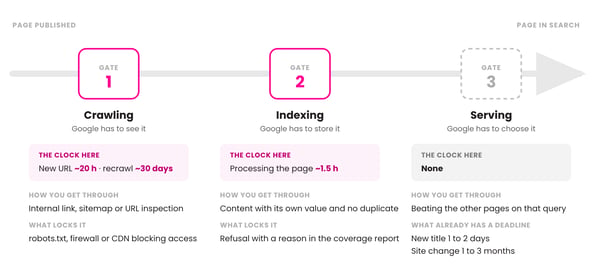 Caption: the three gates between publishing and showing up in Google indexing; because the processes are chained, delays add up, and the ranges are times observed and released by Google, with no commitment and no service level agreement
The separation between the second and the third stage is the one that confuses marketing teams the most. Being indexed means being eligible, it does not mean being chosen. A page can sit perfectly in the index and never appear, because it loses to others on the query you expect it to serve.
Anyone doing this diagnosis for the first time will find the verification walkthrough in the guide on what decides whether a blog post shows up on Google, which covers the editorial and eligibility layer. Here the focus is different: the clock.
Video: the optimisation layers acting at each stage of Google indexing, on the mkt4edu channel (video in Portuguese)
How long does it take Google to index a site?
In October 2026, Gary Illyes, a Google analyst, presented observed time ranges for each stage during the Search Central Live Deep Dive event in Europe. They are the first public numbers that allow comparing the typical case with the worst case of each process.
Before the numbers, the caveat that came with them, which matters as much as the table. Illyes stated that the processes are chained: a page cannot be indexed before it is crawled, so the delays of one stage add to those of the next.
More importantly, those ranges are observations, not a commitment. There is no service level agreement between Google and any site, and nothing in that sequence is guaranteed.
With that in mind, see how the ranges break down:
|
Process |
Typical case |
Worst case |
|
Discovery of a new URL |
about 20 hours |
weeks or never |
|
Recrawl of a known URL |
about 30 days |
weeks or never |
|
Indexing processing |
about 1.5 hours |
months or never |
|
Effect of a site change |
1 to 3 months |
6 months to 1 year |
|
Removal requested in Search Console |
about 2 hours |
24 hours |
|
Title update in search |
1 to 2 days |
weeks or months |
Table: time ranges by search process, presented by Gary Illyes at the Search Central Live Deep Dive of October 2026 and reported by Search Engine Roundtable and Search Engine Journal
The most useful reading of the table is not in any single row, it is in the distance between the columns. Processes whose typical case is measured in hours have a worst case measured in months, and that means the average misleads.
The same presentation brought ranges for Google Updates, and they sit in another order of magnitude. Recovering a site after a core update takes three to six months in the typical case and can reach a year, while the effect of a spam update appears within one to two weeks.
For an educational institution, the most expensive row is usually the fourth. A structural change to the site takes one to three months to show effect, which does not match a recruitment campaign cycle that runs in weeks.
Why is discovering a new URL the real bottleneck?
Discovery is the bottleneck because indexing processing takes about an hour and a half, while finding the URL takes about twenty hours in the typical case. The time is not in understanding the page, it is in realising that it exists. And in the worst case, the URL may simply never be found.
Google's crawler does not sweep the internet blindly looking for news. It reaches a URL (Uniform Resource Locator, the address of the page) through concrete paths: a link on another known page, an entry in a sitemap file, or a manual inspection request.
Hence the practical consequence: a page with no links pointing to it and outside the sitemap depends on luck. Publishing is not an event that notifies the search engine.
That is why new content on a site that publishes frequently shows up fast, and new content on a dormant site takes time. Crawl frequency is learned, and a URL that never changes receives fewer visits from the crawler.
There is also an earlier layer, which is access. If a server, firewall or content delivery network rule blocks the crawler, the count never starts, and the diagnosis of how to validate Googlebot crawling has to be settled before any discussion about timelines.
It is worth separating the two failures, because the symptom looks alike. Blocked access produces a page that never enters the index. Slow discovery produces a page that enters later, and the difference shows up in the coverage report.
How long does Google take to update a page title?
A title change takes one to two days to appear in the results in the typical case, and can take weeks or months in the worst case. The reason is direct: the new text is only displayed after the page is crawled again, and that recrawl happens around every thirty days.
That mismatch explains a common frustration inside teams. Someone rewrites the title of ten pages in an afternoon, checks search the next day and concludes the change was not saved. It was saved, it just has not been seen by the crawler yet.
There is a second layer, independent of timing, worth knowing. Google does not always use the title you wrote, because it generates the displayed text from the page content when it judges that another phrasing describes the document better.
In practice, that means waiting out the timeline is a necessary but not sufficient condition. If after weeks the old title is still showing, the problem has stopped being time and has become the fit between title and content.
For teams working with program pages, the operational recommendation is to group changes. Editing the title of a batch of pages in a single window and measuring the set forty-five days later produces a more reliable reading than checking page by page.
Google Search Console: what is it for in an indexing diagnosis?
Google Search Console exists to answer, with data from the search engine itself, at which stage the page stopped. It shows whether the URL was discovered, whether it was crawled, whether it was indexed and, when it was not, which reason the system recorded. It is the only source that does not depend on interpretation.
The URL inspection tool is the starting point of the diagnosis. It answers the binary question that matters, which is whether the page is in the index or not, and reports the date of the last crawl.
That date is the most underrated number in the panel. Compared with the date of your last edit, it tells you immediately whether the search engine has already seen the new version or whether you are looking at an old snapshot.
The coverage report, in turn, is for patterns, not isolated cases. One non-indexed URL is noise, while thirty non-indexed URLs with the same reason are a structural problem.
Anyone building the monitoring routine will find the full reading of the reports in the material on how Google Search Console works, which covers setup and interpretation panel by panel.
One note about the manual indexing request. It exists, it works for isolated cases and it does not scale, because it has a daily limit and does not replace link structure and a sitemap.
How do you create a sitemap for Google to speed up discovery?
Creating a sitemap for Google means publishing a file that lists the site's URLs and submitting it through Search Console. It acts exactly on the stage that gets stuck, which is discovery, by handing over the list of URLs instead of waiting for the crawler to find each one through a link.
Two points about the sitemap are usually ignored. The first is that the file helps with discovery, but does not guarantee that everything in it will be crawled and indexed.
The second is that not every site needs one. A small site, with around five hundred pages or fewer and good internal linking between them, tends to be discovered without the file.
Educational institution websites almost never fit that description. Between program pages, campuses, blog, application forms and resources, the volume passes five hundred pages quickly, and then the file stops being optional.
The most common format is XML (Extensible Markup Language, the markup language used in the file), and most content management platforms generate it automatically. The human work is not in creating the file, it is in checking what went into it.
Three errors appear frequently when nobody checks:
- URLs returning errors or redirects remain listed after a site redesign.
- Pages marked not to be indexed appear in the file, which sends contradictory instructions.
- The file is not updated when the program structure changes, and the map describes a site that no longer exists.
None of those errors brings a site down, and that is exactly why they last for years. The effect is accumulated friction in discovery, not a sudden drop.
What does Google indexing mean in AI search?
Google indexing has also become a prerequisite for AI (Artificial Intelligence) search, because the search engine's generative features work on the same index and the same ranking systems as traditional search. A page outside the index is not cited in an AI-generated summary, however good the text is.
That undoes an expectation that circulates widely in teams, which is that there is a parallel path to appearing in generated answers. There is no shortcut that skips the technical stage.
The consequence is comfortable for anyone already doing the basics. The same work of discovery, crawling and indexing that sustains organic traffic sustains eligibility for citation.
What changes is the unit that competes. Generative systems retrieve passages, not whole documents, so an indexed article with self-contained paragraphs has a better chance of being cited than an indexed article with long, context-dependent blocks.
Indexing settles eligibility, and what happens after the click is another discipline. That search experience layer is what SXO (Search Experience Optimization) organises, and it does not replace any of the technical stages.
The distinction between the optimisation layers, including what belongs to classic SEO (Search Engine Optimization) and what belongs to the generated answer, is detailed in the comparison between SEO, AEO and GEO.
For teams using generative AI in production, there is an extra review precaution that directly affects what goes into the index, described in the material on how to create content with AI without destroying your SEO.
Video: the logic of competing page by page once Google indexing is settled, on the mkt4edu channel (video in Portuguese)
How do you calibrate leadership expectations about organic timelines?
Calibrating expectations means separating, in the conversation with leadership, three timelines that are usually treated as one: the time for the page to exist in search, the time for a structural change to show effect and the time for the page to compete for a query. They are different and have different orders of magnitude.
The first timeline is short and technical. Between publishing and being in the index, the typical case adds up to less than a day, and it can be verified objectively in URL inspection.
The second is the most frustrating, because it runs from one to three months. Any architecture reorganisation, URL change or page cleanup falls in that range, and asking for results in four weeks is asking before the system's response time.
The third timeline has no reliable number, because it depends on the competition for the query and not on the search engine. This is where the expectation has to be built with data from your own site, not with a market benchmark.
It is worth opening a fourth timeline when the subject is Google updates. Recovery after a core update is measured in quarters, not in weeks, and treating it as an indexing problem leads the team to change what is not the cause.
An honest way to present this in a meeting is to invert the question. Instead of promising when the content will rank, show at which stage each page is today, with the date of the last crawl next to it.
That framing changes the tone of the conversation because it turns a promise into a status report. And it makes visible when the problem is timing, when it is access and when it is competition.
When the volume of pages makes that tracking unfeasible by hand, structuring the technical routine alongside the editorial one is what sustains the result, and that is the scope of continuous SEO work.
Frequently asked questions about Google indexing
Where do you start unblocking Google indexing?
Start with the diagnosis, not with the content. Before rewriting any text, open Search Console's URL inspection and find out whether the page is in the index and when it was last crawled, because those two pieces of information eliminate most of the wrong hypotheses.
If the page was not discovered, the work is internal links and the sitemap. If it was discovered and not indexed, the coverage report names the reason. If it is indexed and does not appear, the problem is competition and only then does the editorial discussion begin.
The change in posture these timelines allow is to stop treating absence from search as a single problem. They are three problems with three different clocks, and treating the wrong one consumes an entire campaign cycle.
On sites with many pages and a history of redesigns, that mapping usually reveals whole batches stuck at the same stage. It applies to a catalogue of programs, to an operation with dozens of product pages or to a services site that has changed platform more than once.
If that is your scenario, talk to our team to assess the indexing status of your domain and prioritise what unlocks the most traffic first.



.jpg)























 Portugal