


Running an event stopped being a spreadsheet problem and became a data problem. Event management today has to answer who was invited, who registered, who showed up and what happened afterwards, and it has to answer that inside the same database that holds contacts, deals and marketing campaigns.
An earlier version of this article taught a workaround: build a deal pipeline with stages such as "Guest Confirmed", "Payment Received" and "Attendance Confirmed". That workaround still works, but it is no longer the only route.
Since the update dated September 16, 2026, HubSpot documents native marketing event creation inside Marketing Studio, in beta. That changes the order of decisions: first you confirm whether your edition has the feature, and only then do you decide whether the workaround is still needed.
What is event management inside HubSpot CRM?
Event management inside HubSpot CRM is the practice of recording the event as part of the operation rather than as a side project. Invitation, registration, attendance, payment and commercial outcome stay attached to the same contact, which lets you measure the event using the same criteria applied to other marketing strategies.
The question "what is event management" usually gets a logistics answer: venue, vendors, run of show. That answer serves the producer and fails the person who has to justify the spend.
Inside a CRM the definition shifts. Event management becomes the ability to answer four questions with data instead of memory: who was invited, who confirmed, who attended and what happened over the following 90 days.
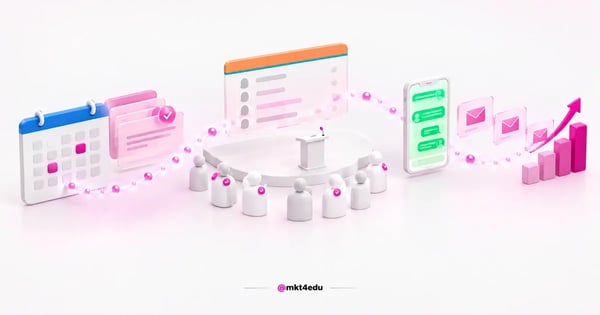 Caption: event management inside the CRM ties invitation, registration and attendance to the same contact, with no parallel spreadsheet
That shift is what links events to revenue. Without a record in the CRM an event becomes a cost with good photography; with a record it becomes a traceable stage of the sales funnel, comparable to a paid media push or an email sequence.
The foundation is the same as any inbound operation: clean contacts, standardized properties and continuous history. Teams still building that base will find the groundwork in the guide on what HubSpot CRM is and what it does.
How do you create a native marketing event in Marketing Studio?
HubSpot has native marketing event creation inside Marketing Studio, in beta, available in Marketing Hub Professional and Marketing Hub Enterprise. Access requires Super Admin or Campaigns permission, and the event is created inside a campaign rather than as a standalone record.
The interface path is short. Under Marketing, open Marketing Studio, go into the campaign you want, and click "Edit in canvas". On the canvas, use "+ Add asset", open the New tab, pick "Marketing event" and finish with "+ Add content".
The event does not stay locked inside that campaign. It also shows up on the Marketing Events index page, with Details and Performance tabs, which gives marketing teams one place to review every event in the account.
Third-party events continue to work alongside it. Platforms such as Zoom and Eventbrite still arrive through integration, and the record carries a link and a preview image from the source platform instead of being typed in by hand.
The same help page also mentions creating an event from Claude through the HubSpot connector. That is an interface path, not a roadmap promise, and it is worth treating it exactly that way.
On editions and pricing, it helps to separate what is documented from what is assumed. The HubSpot product and services catalog lists per-seat figures such as Sales Seat Professional at US$ 100 per month per seat and Core Seat Professional at US$ 50 per month per seat.
That same catalog carries no list price for Marketing Hub: there, Marketing Hub appears only as a product name linking out to the pricing page. Any Marketing Hub figure quoted outside that page is an estimate, not a published rate.
For a tour of the platform before you build the first event, the channel's audio manual walks through the core features of the account.
Video: Audiobook walkthrough of HubSpot's core platform features, on the mkt4edu / 4RevOps channel (in Portuguese)
What does the HubSpot help page not explain about registration and attendance?
The help page that documents the native marketing event describes creation, permissions, editions and navigation, and it does not explain how registration and attendance are captured. It also does not list which platforms sync that data into an event created inside Marketing Studio.
That gap belongs in the planning conversation. Anyone who intends to rely on the beta feature for attendance control has to validate the behavior in their own account before promising a report to leadership.
There are two reasons not to fill the gap with an assumption. The first is operational: inventing a capture mechanism leads to designing a process that may not exist. The second is contractual: beta features change, and what is not written down is not a commitment.
The practical route is a small-scale test. Create a low-risk event, run real registration, check what appears on the Performance tab, and only then decide whether the capture meets the level of control your operation needs.
In the meantime, attendance can still be recorded through a contact property fed by a form and by automation workflows, which is the mechanism you already control and can audit.
How do you run event management by pipeline without Marketing Hub Professional?
Accounts without Marketing Hub Professional or Enterprise still run event management through a dedicated deal pipeline whose stages mirror the guest journey. The classic design uses "Guest Confirmed", "Payment Received" and "Attendance Confirmed", plus custom properties for logistical detail.
The starting point is the contact base. Import the list into HubSpot CRM and build segmented lists around criteria that actually change the message, such as attendance at previous editions, job title, region or stated interest.
Next, move into the CRM the details that currently live in a spreadsheet: dietary preference, arrival time, accessibility needs, chosen track. Custom properties exist for that, and they are what lets you filter without opening a file.
With the pipeline in place, each guest becomes a record that moves across stages. Reading the board answers, at a glance, how many confirmed, how many paid and how many attended, which is precisely what the workaround has to deliver.
Workflows complete the design. Set one up to remind guests who have not confirmed, another to thank those who attended, and a third to notify the owner when a high-value invitation stalls in the same stage.
The known risk is contamination: an event pipeline mixed into the commercial pipeline distorts revenue forecasting. Keep the two separate and apply the pipeline management best practices for HubSpot.
The two routes solve different problems, and the choice depends less on preference than on the edition you pay for. Here is how that breaks down:
|
Criterion |
Native marketing event |
Deal pipeline |
|
Availability |
Beta, in Marketing Hub Professional and Enterprise |
Any account with the deals object |
|
Permission required |
Super Admin or Campaigns |
Edit access on deals |
|
Where the event lives |
Campaign plus the Marketing Events index |
Its own pipeline board |
|
Registration and attendance capture |
Not explained on the help page |
Forms and workflows under your control |
|
Third-party events |
Arrive via integration, with link and preview |
Manual entry or import |
Table: comparison between the native beta feature and the pipeline workaround, based on the HubSpot help page updated on September 16, 2026
The table reads simply: if your edition has the feature, the native route organizes the work better; if it does not, the pipeline delivers comparable control at the cost of more configuration.
How do you promote the event with marketing campaigns and automation?
Promoting an event in HubSpot combines landing page, form, email and segmentation inside a single campaign. The gain is measuring registration and attendance in the same dashboard you use for every other marketing campaign, without exporting data to compare one channel against another.
The landing page is the front door. It needs date, format, a concrete benefit and a short form, because every extra field takes a slice of the conversion rate.
The form is where a registration becomes a contact. Teams still tuning that step will find the detail in the walkthrough on how to create forms in HubSpot to capture leads.
After the form comes marketing automation. A sequence of confirmation, a reminder seven days out, a reminder one day out and a message on the day itself reduces no-shows without manual sending, and the companion piece on email marketing helps calibrate the cadence.
Segmentation is what separates a generic invitation from a relevant one. Lists built on previous behavior, job title and region let you change the argument of the email without rewriting the whole campaign, which is the backbone of digital marketing strategies applied to events.
Paid media and social extend reach rather than replace owned audience. Ads connected to the account let you see registrations by source, which makes competing marketing strategies comparable to each other.
In the full design, inbound marketing strategies and inbound sales strategies work as one motion: marketing fills the registration list, and sales works the people who showed qualified intent during registration.
Lean teams usually save time by standardizing the setup from the start, following the essential HubSpot implementation steps.

How do you measure conversion rate and the event sales funnel?
Measuring an event means tracking the drop between stages, not only the final headcount. The sequence of invitation, registration, attendance and opportunity forms a sales funnel of its own, and each handoff carries a conversion rate that shows where the process loses people.
The first rate runs from invitation to registration, and it speaks to offer and segmentation. A weak number here usually points to the wrong list or a vague promise, not to a broken landing page.
The second runs from registration to attendance, and it measures the reminder cadence. It is the indicator most sensitive to marketing automation, because it depends on frequency, channel and lead time.
The third runs from attendance to opportunity, and it is the one sales cares about. It shows whether the event drew decision-makers or only an audience interested in content.
That third rate is where inbound marketing strategies meet inbound sales strategies, because a lead generated by the event only becomes an opportunity if someone takes the next step inside the agreed window.
Return on investment comes after those three. With total event cost on one side and revenue sourced from the records on the other, ROI (return on investment) stops being an estimate and becomes arithmetic.
For that calculation to hold, the event has to be tied to the journey recorded in the CRM, a point developed in the analysis of CRM and the customer journey.
What should you do after the event to sustain the customer relationship?
Follow-up is the stage that turns attendance into a customer relationship. A satisfaction survey within the first 48 hours, nurturing segmented by in-event behavior and a structured handover to sales are the three actions that protect the result once the last attendee has left.
The survey has to be short and fast. Three questions sent within two days collect more responses than a long questionnaire sent the following week.
Nurturing changes with behavior. Whoever sat in the technical session gets technical material, whoever sat in the business session gets a case study, and whoever registered without attending gets the recording plus an invitation to the next edition.
The handover to sales closes the loop. A workflow that creates a task for the owner once an attendee meets the agreed criteria keeps interest from cooling while somebody assembles a report.
It is worth remembering that absence is data too. Someone who registered and did not attend is still an interested contact, and treating that list as a loss wastes half the event.
Reusing that audience is what places the event inside the organization's digital marketing strategies, rather than leaving it as a one-off that starts and ends on the same day.
Teams that structure this cycle consistently tend to see the effect described in the review of why CRM matters for companies, where the gain comes from continuity rather than from one isolated action.
Once event volume grows, configuration stops being one person's task and becomes an operation. That is the point where specialist support on HubSpot CRM and email marketing is worth evaluating, to standardize the cadence before scaling.
Frequently asked questions about event management
Where should you start with event management in HubSpot?
Start with the edition check, because it decides everything else. If the account runs Marketing Hub Professional or Enterprise with the right permission, open Marketing Studio and test the native marketing event on a small event, keeping in mind that the feature is in beta and that registration and attendance capture is not documented.
If the account is on another edition, the deal pipeline remains the route, and it delivers comparable control as long as it stays separate from the commercial pipeline.
In both scenarios, the part that moves the result is not the tool but the cadence: a short form, reminders with defined lead time, segmentation by behavior and a clear handover to the sales team.
Marketing teams that treat an event as a measured campaign rather than an isolated production can compare this cycle with the last one and decide with data what to repeat. Anyone who wants to discuss that design with people who run the platform daily can talk to the mkt4edu team.











 Portugal